

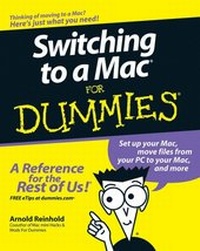
Switching to a Mac For Dummies
1st Edition
Published on 19. October 2007
Book
Paperback/Softback
384 pages
978-0-470-14076-5 (ISBN)
Description
Here's how to pick a Mac and get going with Mac OS X
Find the right Mac, set it up in a jiffy, and start enjoying the iLife
Whether prompted by those very amusing TV commercials or just your good sense, you're ready to turn down Mac lane. Here's your guidebook! Find out what to expect, how to move your stuff, what Windows apps you can run on a Mac, how to get online and stay safe (it's easy!) and translate Mac speak versus Windows speak.
* Decide what hardware you need
*
Set up a wireless network
*
Keep your Mac updated and secure
*
Create cool projects with Apple software
*
Run Windows on your Mac
Find the right Mac, set it up in a jiffy, and start enjoying the iLife
Whether prompted by those very amusing TV commercials or just your good sense, you're ready to turn down Mac lane. Here's your guidebook! Find out what to expect, how to move your stuff, what Windows apps you can run on a Mac, how to get online and stay safe (it's easy!) and translate Mac speak versus Windows speak.
* Decide what hardware you need
*
Set up a wireless network
*
Keep your Mac updated and secure
*
Create cool projects with Apple software
*
Run Windows on your Mac
More details
Edition
1., Auflage
Language
English
Place of publication
Chichester
United Kingdom
Publishing group
John Wiley and Sons Ltd
Target group
Professional and scholarly
Edition type
New edition
Dimensions
Height: 23.6 cm
Width: 18.8 cm
Weight
562 gr
ISBN-13
978-0-470-14076-5 (9780470140765)
Schweitzer Classification
Other editions
New editions
Arnold Reinhold
Switching to a Mac For Dummies
Book
09/2009
2nd Edition
Wiley
€23.90
Article exhausted; check for reprint
Additional editions
Person
Arnold Reinhold has over three decades experience in the software industry. His first Apple product was a Mac 512. He has coauthored numerous books, including The Internet For Dummies Quick Reference, 8th Edition.
Content
Introduction.
Part I: Informed Switching Starts Here.
Chapter 1: Why Switch? Demystifying the Mac Mantra.
Chapter 2: Meet the Mac Family.
Chapter 3: Deciding What to Buy.
Part II: Making the Switch.
Chapter 4: The Big Day: Setting Up Your Mac.
Chapter 5: Mac OS X for Windows Users.
Chapter 6: Moving Files from Your PC to the Mac.
Chapter 7: Switching Applications.
Part III: Connecting Hither and Yon.
Chapter 8: Getting Your Mac Online.
Chapter 9: Networking the Mac Way.
Chapter 10: Staying Secure in a Connected World.
Part IV: More Software, More Choices.
Chapter 11: The Sweet iLife Suite.
Chapter 12: Enjoying Other OS X Goodies.
Chapter 13: Oops, It's a PC: Running Windows on Your Mac.
Part V: Specialty Switching Scenarios.
Chapter 14: Switching with the Whole Family in Mind.
Chapter 15: Switching Your Business to Macs.
Chapter 16: Converting from OS 9 and Other Operating Systems.
Chapter 17: Desktop to Dashcode: OS X Advanced.
Part VI: The Part of Tens.
Chapter 18: Ten Terrific Troubleshooting Tips.
Chapter 19: Ten Cool Mac Tricks.
Chapter 20: Ten Creative Uses for Your Old PC.
Appendix: Mac Speak versus Windows Speak: A Translation Glossary.
Index.
Part I: Informed Switching Starts Here.
Chapter 1: Why Switch? Demystifying the Mac Mantra.
Chapter 2: Meet the Mac Family.
Chapter 3: Deciding What to Buy.
Part II: Making the Switch.
Chapter 4: The Big Day: Setting Up Your Mac.
Chapter 5: Mac OS X for Windows Users.
Chapter 6: Moving Files from Your PC to the Mac.
Chapter 7: Switching Applications.
Part III: Connecting Hither and Yon.
Chapter 8: Getting Your Mac Online.
Chapter 9: Networking the Mac Way.
Chapter 10: Staying Secure in a Connected World.
Part IV: More Software, More Choices.
Chapter 11: The Sweet iLife Suite.
Chapter 12: Enjoying Other OS X Goodies.
Chapter 13: Oops, It's a PC: Running Windows on Your Mac.
Part V: Specialty Switching Scenarios.
Chapter 14: Switching with the Whole Family in Mind.
Chapter 15: Switching Your Business to Macs.
Chapter 16: Converting from OS 9 and Other Operating Systems.
Chapter 17: Desktop to Dashcode: OS X Advanced.
Part VI: The Part of Tens.
Chapter 18: Ten Terrific Troubleshooting Tips.
Chapter 19: Ten Cool Mac Tricks.
Chapter 20: Ten Creative Uses for Your Old PC.
Appendix: Mac Speak versus Windows Speak: A Translation Glossary.
Index.