

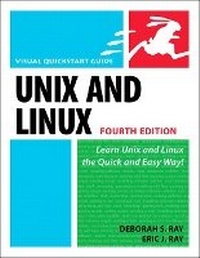
Unix and Linux
Visual QuickStart Guide
4th Edition
Published on 9. July 2009
Book
Paperback/Softback
408 pages
978-0-321-63678-2 (ISBN)
Description
With Unix, 4th Edition: Visual QuickStart Guide, readers can start from the beginning to get a tour of the Unix operating system, or look up specific tasks to learn just what they need to know. This task-based, visual reference guide uses step-by-step instructions and plenty of screenshots, and includes three years worth of new material based on the latest Unix developments. This reference guide details all Unix commands and options along with tips that put those commands in context. Leading Unix authorities Deborah S. Ray and Eric J. Ray leverage their expertise as technical writers and working in the industry (Sun Microsystems) as they take readers step-by-step through the most common Unix commands and options.
More details
Edition
4th edition
Language
English
Place of publication
Berkeley
United States
Publishing group
Pearson Education (US)
Target group
Professional and scholarly
Dimensions
Height: 181 mm
Width: 228 mm
Thickness: 20 mm
Weight
628 gr
ISBN-13
978-0-321-63678-2 (9780321636782)
Copyright in bibliographic data and cover images is held by Nielsen Book Services Limited or by the publishers or by their respective licensors: all rights reserved.
Schweitzer Classification
Other editions
New editions
Book
07/2014
5th Edition
Peachpit Press Publications
€36.50
Article is exhausted; no reprint
Previous edition
Book
08/2006
3rd Edition
Peachpit Press Publications
€23.51
Article exhausted; check for reprint
Persons
Deborah S. Ray and Eric J. Ray are syndicated columnists and consultants. In addition, Deborah publishes TECHWR-L, a Web site for technical writers, and Eric is a senior technical writer for Sun Microsystems. The authors of many books on computers and computing systems, the Rays have received several awards from the Society of Technical Communications, including an International Distinguished Technical Communication award and an International Excellence award.
Content
Introduction
Chapter 1: Getting Started with Unix
Chapter 2: Using Directories and Files
Chapter 3: Working with Your Shell
Chapter 4: Creating and Editing Files
Chapter 5: Controlling Ownership and Permissions
Chapter 6: Manipulating Files
Chapter 7: Getting Information
Chapter 8: Configuring Your Unix Environment
Chapter 9: Running Scripts and Programs
Chapter 10: Writing Basic Scripts
Chapter 11: Sending and Reading E-mail
Chapter 12: Accessing the Internet
Chapter 13: Working with Encoded and Compressed Files
Chapter 14: Using Handy Utilities
Chapter 15: Being Root
Chapter 16: Sensational Unix Tricks
Appendix A: Unix Reference
Appendix B: What's What and What's Where
Appendix C: Commands and Flags
Index
Chapter 1: Getting Started with Unix
Chapter 2: Using Directories and Files
Chapter 3: Working with Your Shell
Chapter 4: Creating and Editing Files
Chapter 5: Controlling Ownership and Permissions
Chapter 6: Manipulating Files
Chapter 7: Getting Information
Chapter 8: Configuring Your Unix Environment
Chapter 9: Running Scripts and Programs
Chapter 10: Writing Basic Scripts
Chapter 11: Sending and Reading E-mail
Chapter 12: Accessing the Internet
Chapter 13: Working with Encoded and Compressed Files
Chapter 14: Using Handy Utilities
Chapter 15: Being Root
Chapter 16: Sensational Unix Tricks
Appendix A: Unix Reference
Appendix B: What's What and What's Where
Appendix C: Commands and Flags
Index