

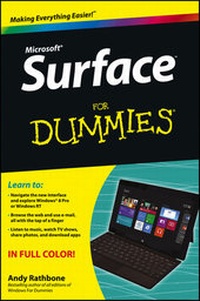
Surface For Dummies
1st Edition
Published on 4. February 2013
Book
Paperback/Softback
256 pages
978-1-118-49634-3 (ISBN)
Description
Clear the surface and make way for the new tablet from Microsoft!
As Microsoft's first foray into the tablet market, the Surface is packed with all the features you're looking for to stay entertained and get things done wherever you go. Written by bestselling veteran author Andy Rathbone, this full-color, easy-to-understand book is packed with information on how to use the new interface, figure out the operating system, navigate the new app environment, and take full advantage of this exciting new tablet device.
* Explains how Windows 8 Pro and Windows RT differ, and helps you decide which Surface model best meets your needs
* Walks you through using both the hardware and software, such as the touch cover/type cover, Windows RT and Windows 8 Pro operating system, and the version of Office Home & Student 2013 that's bundled with the Surface RT
* Explains how to make Surface work with other devices
* Details how Office applications work on Surface
* Shares tips on how to handle common challenges with tablet devices as well as suggestions for getting a better performance from yours
Surface For Dummies does more than just scratch the surface - it serves as a guide to navigating and enhancing your entire Surface experience!
As Microsoft's first foray into the tablet market, the Surface is packed with all the features you're looking for to stay entertained and get things done wherever you go. Written by bestselling veteran author Andy Rathbone, this full-color, easy-to-understand book is packed with information on how to use the new interface, figure out the operating system, navigate the new app environment, and take full advantage of this exciting new tablet device.
* Explains how Windows 8 Pro and Windows RT differ, and helps you decide which Surface model best meets your needs
* Walks you through using both the hardware and software, such as the touch cover/type cover, Windows RT and Windows 8 Pro operating system, and the version of Office Home & Student 2013 that's bundled with the Surface RT
* Explains how to make Surface work with other devices
* Details how Office applications work on Surface
* Shares tips on how to handle common challenges with tablet devices as well as suggestions for getting a better performance from yours
Surface For Dummies does more than just scratch the surface - it serves as a guide to navigating and enhancing your entire Surface experience!
More details
Other editions
New editions
Person
Andy Rathbone began his relationship with technology back in 1985. He has written all editions of Windows For Dummies, the all-time bestselling computer book, as well as many other technology books -- more than 50 in all.
Content
Introduction 1
Chapter 1: Which Microsoft Surface Do You Need? 5
Chapter 2: Getting Started with Your Surface15
Chapter 3: Setting Up Your Surface27
Chapter 4: The First Walkthrough of Surface39
Chapter 5: Typing, Touching, and Drawing on the Surface61
Chapter 6: Connecting to the Internet, Printers, Monitors, Storage, and More 77
Chapter 7: All About Apps 111
Chapter 8: Browsing the Web 127
Chapter 9: Reaching Out with Mail, People, Calendar, and Messaging Apps 145
Chapter 10: Photos and Movies 171
Chapter 11: Listening to Music 179
Chapter 12: Visiting the Windows Desktop 187
Chapter 13: Working in Microsoft Office 201
Chapter 14: Settings and Troubleshooting 213
Chapter 15: Ten Essential Tips 'n' Tricks 225
Index 229
Chapter 1: Which Microsoft Surface Do You Need? 5
Chapter 2: Getting Started with Your Surface15
Chapter 3: Setting Up Your Surface27
Chapter 4: The First Walkthrough of Surface39
Chapter 5: Typing, Touching, and Drawing on the Surface61
Chapter 6: Connecting to the Internet, Printers, Monitors, Storage, and More 77
Chapter 7: All About Apps 111
Chapter 8: Browsing the Web 127
Chapter 9: Reaching Out with Mail, People, Calendar, and Messaging Apps 145
Chapter 10: Photos and Movies 171
Chapter 11: Listening to Music 179
Chapter 12: Visiting the Windows Desktop 187
Chapter 13: Working in Microsoft Office 201
Chapter 14: Settings and Troubleshooting 213
Chapter 15: Ten Essential Tips 'n' Tricks 225
Index 229