

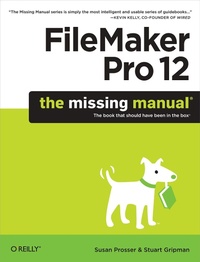
FileMaker Pro 12: The Missing Manual
1st Edition
Published on 28. August 2012
Book
954 pages
978-1-4493-1628-0 (ISBN)
Description
You don't have to be a techie to use FileMaker Pro 12, but you do need to know what you're doing. With this crystal-clear guide, you'll learn how to create a powerful database that lets you do almost anything with your data. Whether you're running a business, printing a catalog, or planning a wedding, you'll learn how to customize your database and put it to work.
The important stuff you need to know:
* Get started. Tour FileMaker Pro's features and create your first database in minutes.
* Catalog your data. View, sort, and shape information in dozens of ways.
* Create professional documents. Publish reports, invoices, and other documents with ease.
* Harness processing power. Use calculations and scripts to crunch numbers, search text, and automate tasks.
* Add visual power and clarity. Create colorful charts to illustrate and summarize your data.
* Think like a developer. Dive into the high-level features of FileMaker Pro Advanced.
More details
Other editions
Additional editions
Susan Prosser
FileMaker Pro 12: The Missing Manual
E-Book
07/2012
1st Edition
O'Reilly
€37.99
Available for download
Susan Prosser
FileMaker Pro 12: The Missing Manual
E-Book
07/2012
1st Edition
O'Reilly
€41.49
Available for download
Previous edition
Susan Prosser | Stuart Gripman
FileMaker Pro 11: The Missing Manual
The Book That Should Have Been in the Box
Book
06/2010
1st Edition
O'Reilly
€37.50
Shipment within 10-20 days
Persons
Susan Prosser is a reformed journalist who's stopped trying to bring information to the people and now helps them manage the data they already have. She is a FileMaker Certified Developer and has developed FileMaker databases for 12 years, and also trains and writes curricula for other developers. Stuart Gripman is the founder of Crooked Arm Corp, a full-service FileMaker Pro consulting and development firm based in Berkeley, California. A FileMaker Certified Developer, he has written for both Macworld and MacLife.
Content
The Missing Credits;
About the Authors;
About the Creative Team;
Acknowledgments;
The Missing Manual Series;
Introduction;
Why FileMaker Pro?;
About This Book;
Macintosh and Windows;
About the Outline;
What's New in FileMaker Pro 12;
The Very Basics;
About Online Resources;
Safari® Books Online;
Part 1: Getting Started with FileMaker;
Chapter 1: Working with a Database;
1.1 A Very Quick Database Tour;
1.2 Opening and Closing Database Files;
1.3 Adding Data to Your Database;
1.4 Navigating Your Database;
1.5 Finding Records;
1.6 Sorting Records;
1.7 Same Database, Different Views;
1.8 Saving Your Database;
1.9 Using FileMaker's Help Menu;
Chapter 2: Organizing and Editing Records;
2.1 Views;
2.2 Advanced Find Techniques;
2.3 Editing What's in Your Fields;
2.4 Changing Text Appearance;
2.5 Checking Spelling;
2.6 Preview Mode and Printing;
Part 2: Building Your First Database;
Chapter 3: Creating a Custom Database;
3.1 Creating a New Database;
3.2 Creating and Managing Fields in Table View;
3.3 Understanding Layouts;
3.4 Customizing a Layout;
3.5 Creating a New Layout;
3.6 Arrange and Align Tools;
Chapter 4: Adding Power to Your Database;
4.1 Creating a Simple Calculation;
4.2 Creating a Related Table;
4.3 Creating and Using Portals;
4.4 Using Tab Controls;
4.5 Adding Merge Fields;
4.6 Writing a Basic Script;
4.7 Creating a Dynamic Report with the Assistant;
4.8 Creating a Trailing Group Report;
4.9 Creating Charts in Table View;
4.10 Changing the Default Account;
4.11 Summing Up;
Part 3: Thinking Like a Developer;
Chapter 5: Creating and Managing a Relational Database;
5.1 Understanding Relational Databases;
5.2 Modeling Your Database;
5.3 Creating a Relational Database;
5.4 Using Relational Database Power;
5.5 Lookups;
5.6 Reviewing Relationship Concepts;
Chapter 6: Field Options;
6.1 Understanding Field Types;
6.2 Auto-Enter Field Options;
6.3 Validation Options;
6.4 Storage Options;
6.5 Beyond Text: Container Fields;
Chapter 7: Layout Mechanics;
7.1 Layout Types;
7.2 Layout Parts;
7.3 Formatting Fields;
7.4 Advanced Field Controls;
7.5 Tab Order;
7.6 Creating Layouts for Printing;
Chapter 8: Layout Design;
8.1 Layout Themes;
8.2 Touch Themes;
8.3 Grids, Guides, and Dynamic Guides;
8.4 Screen Stencils;
8.5 Data Formatting;
8.6 Merge Fields;
8.7 Merge Variables;
8.8 Tooltips;
8.9 Autosizing;
8.10 Buttons;
Chapter 9: Understanding Calculations;
9.1 Understanding Calculations;
9.2 Using a Related Field in a Calculation;
9.3 Understanding the Specify Calculation Dialog Box;
9.4 Auto-Enter Calculations;
9.5 Validate Data Entry with a Calculation;
9.6 Commenting in Calculations;
Chapter 10: More Calculations and Data Types;
10.1 Number Crunching Calculations;
10.2 Going Beyond Basic Calculations;
10.3 Text Calculations;
10.4 Date and Time Calculations;
10.5 Containers in Calculations;
Chapter 11: Understanding Scripts;
11.1 Understanding Scripts;
11.2 Your First Script;
11.3 Shortcuts to the Edit Script Window;
11.4 The Importance of the Layout;
11.5 Running Scripts;
11.6 Organizing Your Scripts;
11.7 Branching and Looping in Scripts;
11.8 Script Triggers;
Chapter 12: Exploring Script Steps;
12.1 Go to Layout;
12.2 Go to Object;
12.3 Scripting for Fields;
12.4 Working with Records;
12.5 Finding Records;
12.6 Sorting Records;
12.7 Working with Windows;
12.8 Working with Files;
12.9 Printing;
12.10 Other Script Steps;
Part 4: Becoming a Power Developer;
Chapter 13: Applying Developer Utilities;
13.1 Copying and Pasting Database Structure;
13.2 Script Debugger;
13.3 The Data Viewer;
13.4 Disable Script Steps;
13.5 The Database Design Report;
13.6 Custom Functions;
13.7 Custom Menus;
13.8 Developer Utilities;
13.9 File Maintenance;
Chapter 14: Advanced Relationship Techniques;
14.1 Advanced Relationships;
14.2 Portal Filtering;
14.3 Understanding Table Occurrences;
14.4 Table Occurrence Groups;
14.5 Understanding Graph Arrangements;
14.6 Connecting Database Files;
14.7 Using Multiple Relationship Techniques;
Chapter 15: Reporting and Analysis;
15.1 Summary Fields and Subsummary Parts;
15.2 Web Viewer Objects;
15.3 Conditional Formatting;
15.4 Basic Charting (Found Set Charts);
15.5 Chart Formatting;
15.6 Charting and Reports;
15.7 Advanced Charting;
Chapter 16: Advanced Calculations;
16.1 Understanding Boolean Functions;
16.2 Using Storage Options;
16.3 Logical Functions;
16.4 The Let() Function and Variables;
16.5 Recursion;
16.6 Plug-Ins;
Chapter 17: Advanced Scripting;
17.1 Commenting Scripts;
17.2 Importing Scripts;
17.3 Communicating with Database Users;
17.4 Creating Modular Scripts;
17.5 Script Parameters;
17.6 Script Variables;
17.7 Handling Errors;
17.8 Advanced Script Triggers;
17.9 Putting a Complex Script Together;
Part 5: Security and Integration;
Chapter 18: Sharing Your Database;
18.1 FileMaker Network Sharing;
18.2 Sharing Over the Internet;
18.3 FileMaker Server;
18.4 Server Hardware;
18.5 FileMaker Go;
Chapter 19: Adding Security;
19.1 How Security Works;
19.2 Privilege Sets;
19.3 Managing Accounts;
19.4 Extended Privileges;
19.5 Managing External File Access;
19.6 Scripts and Security;
Chapter 20: Sharing Data with Other Systems;
20.1 Sharing Your Data with Others;
20.2 Snapshot Link;
20.3 External SQL Sources;
20.4 Exporting Data;
20.5 Importing Data;
20.6 Import Data Sources;
20.7 Importing and Exporting in a Script;
Part 6: Appendixes;
Getting Help;
Getting Help from FileMaker Pro;
FileMaker's Installed Extras;
Getting Help from the Community;
File Conversion;
Compatibility;
Understanding Conversion;
Start with a Test Run;
Converting a Single File;
Converting Multiple Files;
Using the Insert Commands with Container Fields;
FileMaker Error Codes;
About the Authors;
About the Creative Team;
Acknowledgments;
The Missing Manual Series;
Introduction;
Why FileMaker Pro?;
About This Book;
Macintosh and Windows;
About the Outline;
What's New in FileMaker Pro 12;
The Very Basics;
About Online Resources;
Safari® Books Online;
Part 1: Getting Started with FileMaker;
Chapter 1: Working with a Database;
1.1 A Very Quick Database Tour;
1.2 Opening and Closing Database Files;
1.3 Adding Data to Your Database;
1.4 Navigating Your Database;
1.5 Finding Records;
1.6 Sorting Records;
1.7 Same Database, Different Views;
1.8 Saving Your Database;
1.9 Using FileMaker's Help Menu;
Chapter 2: Organizing and Editing Records;
2.1 Views;
2.2 Advanced Find Techniques;
2.3 Editing What's in Your Fields;
2.4 Changing Text Appearance;
2.5 Checking Spelling;
2.6 Preview Mode and Printing;
Part 2: Building Your First Database;
Chapter 3: Creating a Custom Database;
3.1 Creating a New Database;
3.2 Creating and Managing Fields in Table View;
3.3 Understanding Layouts;
3.4 Customizing a Layout;
3.5 Creating a New Layout;
3.6 Arrange and Align Tools;
Chapter 4: Adding Power to Your Database;
4.1 Creating a Simple Calculation;
4.2 Creating a Related Table;
4.3 Creating and Using Portals;
4.4 Using Tab Controls;
4.5 Adding Merge Fields;
4.6 Writing a Basic Script;
4.7 Creating a Dynamic Report with the Assistant;
4.8 Creating a Trailing Group Report;
4.9 Creating Charts in Table View;
4.10 Changing the Default Account;
4.11 Summing Up;
Part 3: Thinking Like a Developer;
Chapter 5: Creating and Managing a Relational Database;
5.1 Understanding Relational Databases;
5.2 Modeling Your Database;
5.3 Creating a Relational Database;
5.4 Using Relational Database Power;
5.5 Lookups;
5.6 Reviewing Relationship Concepts;
Chapter 6: Field Options;
6.1 Understanding Field Types;
6.2 Auto-Enter Field Options;
6.3 Validation Options;
6.4 Storage Options;
6.5 Beyond Text: Container Fields;
Chapter 7: Layout Mechanics;
7.1 Layout Types;
7.2 Layout Parts;
7.3 Formatting Fields;
7.4 Advanced Field Controls;
7.5 Tab Order;
7.6 Creating Layouts for Printing;
Chapter 8: Layout Design;
8.1 Layout Themes;
8.2 Touch Themes;
8.3 Grids, Guides, and Dynamic Guides;
8.4 Screen Stencils;
8.5 Data Formatting;
8.6 Merge Fields;
8.7 Merge Variables;
8.8 Tooltips;
8.9 Autosizing;
8.10 Buttons;
Chapter 9: Understanding Calculations;
9.1 Understanding Calculations;
9.2 Using a Related Field in a Calculation;
9.3 Understanding the Specify Calculation Dialog Box;
9.4 Auto-Enter Calculations;
9.5 Validate Data Entry with a Calculation;
9.6 Commenting in Calculations;
Chapter 10: More Calculations and Data Types;
10.1 Number Crunching Calculations;
10.2 Going Beyond Basic Calculations;
10.3 Text Calculations;
10.4 Date and Time Calculations;
10.5 Containers in Calculations;
Chapter 11: Understanding Scripts;
11.1 Understanding Scripts;
11.2 Your First Script;
11.3 Shortcuts to the Edit Script Window;
11.4 The Importance of the Layout;
11.5 Running Scripts;
11.6 Organizing Your Scripts;
11.7 Branching and Looping in Scripts;
11.8 Script Triggers;
Chapter 12: Exploring Script Steps;
12.1 Go to Layout;
12.2 Go to Object;
12.3 Scripting for Fields;
12.4 Working with Records;
12.5 Finding Records;
12.6 Sorting Records;
12.7 Working with Windows;
12.8 Working with Files;
12.9 Printing;
12.10 Other Script Steps;
Part 4: Becoming a Power Developer;
Chapter 13: Applying Developer Utilities;
13.1 Copying and Pasting Database Structure;
13.2 Script Debugger;
13.3 The Data Viewer;
13.4 Disable Script Steps;
13.5 The Database Design Report;
13.6 Custom Functions;
13.7 Custom Menus;
13.8 Developer Utilities;
13.9 File Maintenance;
Chapter 14: Advanced Relationship Techniques;
14.1 Advanced Relationships;
14.2 Portal Filtering;
14.3 Understanding Table Occurrences;
14.4 Table Occurrence Groups;
14.5 Understanding Graph Arrangements;
14.6 Connecting Database Files;
14.7 Using Multiple Relationship Techniques;
Chapter 15: Reporting and Analysis;
15.1 Summary Fields and Subsummary Parts;
15.2 Web Viewer Objects;
15.3 Conditional Formatting;
15.4 Basic Charting (Found Set Charts);
15.5 Chart Formatting;
15.6 Charting and Reports;
15.7 Advanced Charting;
Chapter 16: Advanced Calculations;
16.1 Understanding Boolean Functions;
16.2 Using Storage Options;
16.3 Logical Functions;
16.4 The Let() Function and Variables;
16.5 Recursion;
16.6 Plug-Ins;
Chapter 17: Advanced Scripting;
17.1 Commenting Scripts;
17.2 Importing Scripts;
17.3 Communicating with Database Users;
17.4 Creating Modular Scripts;
17.5 Script Parameters;
17.6 Script Variables;
17.7 Handling Errors;
17.8 Advanced Script Triggers;
17.9 Putting a Complex Script Together;
Part 5: Security and Integration;
Chapter 18: Sharing Your Database;
18.1 FileMaker Network Sharing;
18.2 Sharing Over the Internet;
18.3 FileMaker Server;
18.4 Server Hardware;
18.5 FileMaker Go;
Chapter 19: Adding Security;
19.1 How Security Works;
19.2 Privilege Sets;
19.3 Managing Accounts;
19.4 Extended Privileges;
19.5 Managing External File Access;
19.6 Scripts and Security;
Chapter 20: Sharing Data with Other Systems;
20.1 Sharing Your Data with Others;
20.2 Snapshot Link;
20.3 External SQL Sources;
20.4 Exporting Data;
20.5 Importing Data;
20.6 Import Data Sources;
20.7 Importing and Exporting in a Script;
Part 6: Appendixes;
Getting Help;
Getting Help from FileMaker Pro;
FileMaker's Installed Extras;
Getting Help from the Community;
File Conversion;
Compatibility;
Understanding Conversion;
Start with a Test Run;
Converting a Single File;
Converting Multiple Files;
Using the Insert Commands with Container Fields;
FileMaker Error Codes;