

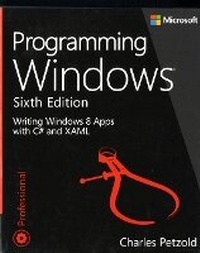
Programming Windows
6th Edition
Published on 15. January 2013
Book
Paperback/Softback
1136 pages
978-0-7356-7176-8 (ISBN)
Description
Reimagined for full-screen and touch-optimized apps, Windows 8 provides a platform for reaching new users in new ways. In response, programming legend Charles Petzold is rewriting his classic Programming Windows-one of the most popular programming books of all time-to show developers how to use existing skills and tools to build Windows 8 apps.
Programming Windows, Sixth Edition focuses on creating Windows 8 apps accessing the Windows Runtime with XAML and C#. The book also provides C++ code samples. The Sixth Edition is organized in two parts:
Part I, "Elementals," begins with the interrelationship between code and XAML, basic event handling, dynamic layout, controls, templates, asynchronous processing, the application bar, control customization, and collections. You should emerge from Part I ready to create sophisticated page-oriented collection-based user interfaces using the powerful ListView and GridView controls.
Part II, "Specialties," explores topics you might not need for every program but are essential to a well-rounded education in Windows 8. These include multitouch, bitmap graphics, interfacing with share and search facilities, printing, working with the sensors (GPS and orientation), text, obtaining input from the stylus (including handwriting recognition), accessing web services, calling Win32 and DirectX functions, and bringing your application to the Windows 8 app store.
Programming Windows, Sixth Edition focuses on creating Windows 8 apps accessing the Windows Runtime with XAML and C#. The book also provides C++ code samples. The Sixth Edition is organized in two parts:
Part I, "Elementals," begins with the interrelationship between code and XAML, basic event handling, dynamic layout, controls, templates, asynchronous processing, the application bar, control customization, and collections. You should emerge from Part I ready to create sophisticated page-oriented collection-based user interfaces using the powerful ListView and GridView controls.
Part II, "Specialties," explores topics you might not need for every program but are essential to a well-rounded education in Windows 8. These include multitouch, bitmap graphics, interfacing with share and search facilities, printing, working with the sensors (GPS and orientation), text, obtaining input from the stylus (including handwriting recognition), accessing web services, calling Win32 and DirectX functions, and bringing your application to the Windows 8 app store.
More details
Other editions
Additional editions
E-Book
01/2013
6th Edition
Microsoft Press
€32.49
Available for download
Previous edition

Charles Petzold
Programming Windows
Book
11/1998
5th Edition
Microsoft Press
€65.79
Article exhausted; check for reprint
Person
Charles Petzold has been writing about Windows programming for 25 years. A Windows Pioneer Award winner, Petzold is author of the classic Programming Windows, the widely acclaimed Code: The Hidden Language of Computer Hardware and Software, Programming Windows Phone 7, and more than a dozen other books.
Content
Introduction
Part I: Elementals
Chapter 1: Markup and Code
Chapter 2: XAML Syntax
Chapter 3: Basic Event Handling
Chapter 4: Presentation with Panels
Chapter 5: Control Interaction
Chapter 6: WinRT and MVVM
Chapter 7: Asynchronicity
Chapter 8: App Bars and Popups
Chapter 9: Animation
Chapter 10: Transforms
Chapter 11: The Three Templates
Chapter 12: Pages and Navigation
Part II: Specialties
Chapter 13: Touch, Etc.
Chapter 14: Bitmaps
Chapter 15: Going Native
Chapter 16: Rich Text
Chapter 17: Share and Print
Chapter 18: Sensors and GPS
Chapter 19: Pen (Also Known as Stylus)
Part I: Elementals
Chapter 1: Markup and Code
Chapter 2: XAML Syntax
Chapter 3: Basic Event Handling
Chapter 4: Presentation with Panels
Chapter 5: Control Interaction
Chapter 6: WinRT and MVVM
Chapter 7: Asynchronicity
Chapter 8: App Bars and Popups
Chapter 9: Animation
Chapter 10: Transforms
Chapter 11: The Three Templates
Chapter 12: Pages and Navigation
Part II: Specialties
Chapter 13: Touch, Etc.
Chapter 14: Bitmaps
Chapter 15: Going Native
Chapter 16: Rich Text
Chapter 17: Share and Print
Chapter 18: Sensors and GPS
Chapter 19: Pen (Also Known as Stylus)