

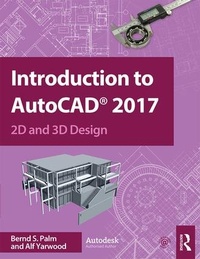
Introduction to AutoCAD 2017
2D and 3D Design
1st Edition
Published on 14. July 2016
Book
Paperback/Softback
436 pages
978-1-138-19198-3 (ISBN)
Description
Master the complexities of the world's bestselling 2D and 3D software with Introduction to AutoCAD 2017. Ideally suited to new users of AutoCAD, this book will be a useful resource for drawing modules in both vocational and introductory undergraduate courses in engineering and construction.
A comprehensive, step-by-step introduction to the latest release of AutoCAD. Covering all the basic principles and acting as an introduction to 2D drawing, it also contains extensive coverage of all 3D topics, including 3D solid modelling and rendering.
Written by a member of the Autodesk Developer Network.
Hundreds of colour pictures, screenshots and diagrams illustrate every stage of the design process.
Worked examples and exercises provide plenty of practice material to build proficiency with the software.
Further education students will find this an invaluable textbook for City & Guilds AutoCAD qualifications as well as the relevant Computer Aided Drawing units of BTEC National Engineering, Higher National Engineering and Construction courses from Edexcel. Students enrolled in Foundation Degree courses containing CAD modules will also find this a very useful reference and learning aid.
A comprehensive, step-by-step introduction to the latest release of AutoCAD. Covering all the basic principles and acting as an introduction to 2D drawing, it also contains extensive coverage of all 3D topics, including 3D solid modelling and rendering.
Written by a member of the Autodesk Developer Network.
Hundreds of colour pictures, screenshots and diagrams illustrate every stage of the design process.
Worked examples and exercises provide plenty of practice material to build proficiency with the software.
Further education students will find this an invaluable textbook for City & Guilds AutoCAD qualifications as well as the relevant Computer Aided Drawing units of BTEC National Engineering, Higher National Engineering and Construction courses from Edexcel. Students enrolled in Foundation Degree courses containing CAD modules will also find this a very useful reference and learning aid.
More details
Language
English
Place of publication
London
United Kingdom
Publishing group
Taylor & Francis Ltd
Target group
Professional and scholarly
Professional and Professional Reference
Illustrations
707 Farbfotos bzw. farbige Rasterbilder
707 Halftones, color
Dimensions
Height: 246 mm
Width: 189 mm
Weight
904 gr
ISBN-13
978-1-138-19198-3 (9781138191983)
Copyright in bibliographic data and cover images is held by Nielsen Book Services Limited or by the publishers or by their respective licensors: all rights reserved.
Schweitzer Classification
Other editions
Additional editions
Book
09/2018
1st Edition
Routledge
€230.65
Shipment within 10-20 days
E-Book
07/2016
Routledge
€78.99
Available for download
E-Book
07/2016
Routledge
€78.99
Available for download
Persons
Bernd S. Palm is an experienced Autodesk authorised author, lecturer and examiner. He works as a program manager, and develops course content, for online classes on different CAD software.
Alf Yarwood was a former Autodesk authorised author, lecturer and examiner who wrote numerous books covering the AutoCAD software package.
Alf Yarwood was a former Autodesk authorised author, lecturer and examiner who wrote numerous books covering the AutoCAD software package.
Content
1. Introducing AutoCAD 2017 2. Calling Tools 3. Introducing Drawing 4. Draw Tools and Object Snap 5. Zoom, Plan and Templates 6. The Modify Tools 7. Hatching 8. Orthographic and Isometric 9. Introducing 3D Modeling 10. 3D Models in Viewports 11. The Modification of 3D Models 12. Dimensions and Text 13. Blocks and Inserts 14. Other Types of File Format 15. Sheets Sets 16. Rendering 17. Building Drawing 18. Three-Dimensional Space 19. Editing 3D Solid Models 20. Internet Tools and Help 22. Design and AutoCAD 2017 Appendix A: List of Tools Appendix B: Some Set Variables Appendix C: 3D Views Appendix D: Keyboard Shortcuts