

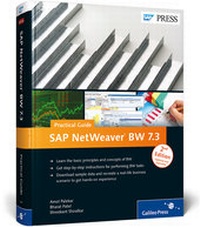
SAP NetWeaver BW 7.3-Practical Guide
2nd Edition
Published on 31. December 2012
Book
Hardback
789 pages
978-1-59229-444-2 (ISBN)
Description
They say that the best way to learn is by doing. With this practical guide to SAP NetWeaver BW, put that theory to the test. Start with conceptual explanations and then dive straight into real-world application-all with the help of a case study that teaches you how to meet common business intelligence requirements. Whether you want to create objects, extract and transform data, or master the BEx tools, this book is all the help you need.
1. From Beginner to Expert
Start with the basics and move to the advanced-from InfoObjects to Open Hub, you'll be guided every step of the way.
2. Hands-on Experience
Do more than learn what DSOs and InfoCubes are-use step-by-step instructions and hundreds of screenshots to actually create them yourself.
3. Practical Business Scenario
Get to know ABCD Corp., the fictional company that serves as the basis for your training. As you use SAP NetWeaver BW to meet its business requirements, you'll learn essential skills for working in the system.
4. Changes in Release 7.3
Update your skills for the latest release. With information on graphical modeling, new types of InfoProviders, BW Workspaces, and SAP HANA, even experienced SAP NetWeaver BW users will find something new.
5. Data Files for Download
Download the bonus data files for ABCD Corp., which will give you everything you need to
create the necessary objects and practice the tasks described in the book.
Highlights:
* InfoObjects
* DataStore objects
* InfoCubes
* InfoProviders
* MultiProviders
* Process chains
* Extraction, transformation, and loading
* BEx tools
* Planning applications
* SAP BusinessObjects BI
* Administration
* Open Hub
* SAP HANA
More details
Other editions
New editions
Amol Palekar | Bharat Patel | Shreekant Shiralkar
SAP BW 7.4-Practical Guide
Book
04/2015
3rd Edition
SAP PRESS
€69.95
Article not available at the moment
Previous edition
Bharat Patel | Amol Palekar | Shreekant Shiralkar
A Practical Guide to SAP NetWeaver Business Warehouse 7.0
Book
12/2009
1st Edition
SAP PRESS
€69.95
Article exhausted; check for reprint
Content
Acknowledgments. 17
Introduction. 19
1. The Business Scenario: ABCD Corp. 23
1.1. Marketing Network. 24
1.2. The Sales and Billing Process. 25
1.3. Business Intelligence Requirements. 28
1.4. The Business Planning Scenario. 29
1.5. Summary. 30
2. Overview of SAP NetWeaver BW. 31
2.1. Evolution of SAP NetWeaver BW. 31
2.2. Layers of SAP NetWeaver BW. 35
2.3. Basic Navigation in SAP NetWeaver BW. 41
2.4. The DWW Functions. 53
2.5. Activation of SAP Business Content. 55
2.6. Implementation and Architecture Options for SAP NetWeaver BW. 64
2.7. Additional Resources for SAP NetWeaver BW. 66
2.8. Summary. 67
3. InfoObjects and Master Data. 69
3.1. Types of InfoObjects. 70
3.2. Creating an InfoArea. 72
3.3. Creating an InfoObject Catalog. 74
3.4. Creating a Custom Characteristic InfoObject. 77
3.5. Configuring a Characteristic InfoObject. 79
3.6. Creating a Key Figure InfoObject. 101
3.7. Configuring a Key Figure InfoObject. 103
3.8. Creating a Unit InfoObject. 118
3.9. Summary. 120
4. DataStore Objects. 121
4.1. Introduction to DSOs. 121
4.2. Architecture of the Standard DSO. 126
4.3. Designing a DSO. 133
4.4. Configuration of the Standard DSO. 135
4.5. Configuration of Write-Optimized DSOs. 143
4.6. Configuration of Direct-Update DSOs. 145
4.7. Usage Scenarios for DSOs. 146
4.8. Summary. 148
5. InfoCubes. 149
5.1. Modeling InfoCubes. 149
5.2. Types of InfoCubes. 160
5.3. Creating an InfoCube. 161
5.4. Provider-Specific Properties. 180
5.5. Summary. 183
6. InfoProviders. 185
6.1. MultiProviders. 186
6.2. InfoSets. 202
6.3. VirtualProviders. 227
6.4. Semantically Partitioned Objects (SPOs). 228
6.5. Hybrid Provider. 244
6.6. Transient Providers. 252
6.7. Analytical Index. 254
6.8. Composite Provider. 254
6.9. Summary. 255
7. Extraction, Transformation, and Loading. 257
7.1. Introduction to ETL. 257
7.2. Loading Master Data from a Flat File to an InfoObject. 264
7.3. Loading Transaction Data from a Flat File to a DSO. 309
7.4. Loading Data from a DSO to an InfoCube. 329
7.5. Temporary Storage Areas and Error Stacks. 336
7.6. Graphical Modeling. 344
7.7. Summary. 355
8. Data Extraction from Source Systems. 357
8.1. Configuring an SAP Source System for Extraction. 357
8.2. Using SAP Business Content for Extraction: Logistics DataSources. 359
8.3. Using Generic DataSources for Extraction. 364
8.4. Data Extraction from Non-SAP Systems. 377
8.5. Summary. 379
9. Creating Queries Using BEx Query Designer. 381
9.1. BEx Tools Landscape. 382
9.2. Introduction to BEx Query Designer. 384
9.3. Creating a Simple BEx Query. 389
9.4. Introduction to OLAP Variables. 398
9.5. Creating OLAP Variables Using the Variable Editor. 404
9.6. Creating Filters. 416
9.7. Creating Structures. 421
9.8. Creating Selections and Formulas. 425
9.9. Creating Key Figures. 433
9.10. Properties of Query Elements. 437
9.11. Creating Conditions. 449
9.12. Creating Exceptions. 453
9.13. Configuring Report-to-Report Interfaces. 457
9.14. Summary. 462
10. Reporting and Analysis Tools. 463
10.1. Running Queries in BEx Analyzer. 464
10.2. Performing Information Analysis in BEx Analyzer. 471
10.3. Local Properties and Formulas in BEx Analyzer. 476
10.4. Saving and Reusing Workbooks in BEx Analyzer. 482
10.5. Building an Analysis Application in BEx Analyzer. 484
10.6. Running Queries in BEx Web Analyzer. 495
10.7. Performing Information Analysis in BEx Web Analyzer. 500
10.8. Analysis Filters and Settings in BEx Web Analyzer. 505
10.9. Information Broadcasting Using BEx Web Analyzer. 507
10.10. BW Workspaces. 515
10.11. Summary. 527
11. Creating Applications Using BEx Web Application Designer. 529
11.1. BEx Web Application Designer Overview. 529
11.2. Creating a Simple Web Application. 533
11.3. Web Items. 549
11.4. Working with Commands. 563
11.5. Web Template Properties. 571
11.6. Summary. 572
12. Creating Planning Applications. 573
12.1. Introduction to the Integrated Planning Component and Planning Applications. 574
12.2. Elements of a Planning Application. 577
12.3. Building Planning Applications. 629
12.4. Planning Locks. 649
12.5. Changes to Data in Real-Time InfoCubes. 651
12.6. Summary. 652
13. Reporting with the SAP BusinessObjects BI Suite. 653
13.1. Overview of SAP BusinessObjects BI Products. 654
13.2. The Unified Semantic Layer and the Information Design Tool. 656
13.3. SAP Crystal Reports. 660
13.4. SAP BusinessObjects Web Intelligence. 662
13.5. SAP BusinessObjects Dashboards. 665
13.6. SAP BusinessObjects Analysis. 667
13.7. SAP BusinessObjects Explorer. 670
13.8. BI Launch Pad. 672
13.9. Summary. 673
14. Administration and Monitoring. 675
14.1. DSO Administration and Maintenance. 676
14.2. InfoCube Administration and Maintenance. 684
14.3. Aggregates. 693
14.4. Compression. 700
14.5. Process Chains. 702
14.6. Analysis Authorizations. 711
14.7. Other Administration and Maintenance Tasks. 718
14.8. Summary. 721
15. Advanced Features. 723
15.1. Open Hub. 723
15.2. Analysis Process Designer. 726
15.3. Remodeling. 740
15.4. Summary. 742
Appendices. 743
A. An Introduction to SAP HANA and SAP NetWeaver BW. 745
B. ABCD Corp. Case Study Data. 753
C. Definitions of Additional InfoObjects for ABCD Corp. 765
D. Important Transaction Codes. 769
E. Important SAP Notes. 773
F. The Authors. 775
Index. 777