

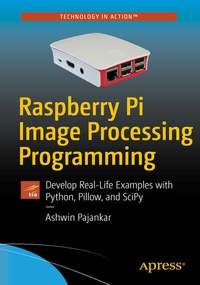
Raspberry Pi Image Processing Programming
Develop Real-Life Examples with Python, Pillow, and SciPy
Published on 24. March 2017
Book
Paperback/Softback
XIX, 126 pages
978-1-4842-2730-5 (ISBN)
Description
Write your own Digital Image Processing programs with the use of pillow, scipy.ndimage, and matplotlib in Python 3 with Raspberry Pi 3 as the hardware platform. This concise quick-start guide provides working code examples and exercises. Learn how to interface Raspberry Pi with various image sensors.
What You'll Learn
Who This Book Is For
Raspberry Pi and IoT enthusiasts, digital image processing enthusiasts, Python and Open Source enthusiasts and professionals
What You'll Learn
- Understand Raspberry Pi concepts and setup
- Understand digital image processing concepts
- Study pillow, the friendly PIL fork
- Explore scipy.ndimage and matplotlib
- Master use of the Pi camera and webcam
Who This Book Is For
Raspberry Pi and IoT enthusiasts, digital image processing enthusiasts, Python and Open Source enthusiasts and professionals
More details
Edition
1st ed.
Language
English
Place of publication
Berkeley
United States
Target group
Professional and scholarly
Illustrations
53 farbige Abbildungen, 17 s/w Abbildungen
XIX, 126 p. 70 illus., 53 illus. in color.
Dimensions
Height: 23.5 cm
Width: 15.5 cm
Weight
454 gr
ISBN-13
978-1-4842-2730-5 (9781484227305)
DOI
10.1007/978-1-4842-2731-2
Schweitzer Classification
Other editions
New editions
Book
08/2022
2nd Edition
APress
€58.84
Shipment within 15-20 days
Additional editions
Ashwin Pajankar
Raspberry Pi Image Processing Programming
Develop Real-Life Examples with Python, Pillow, and SciPy
E-Book
03/2017
APress
€34.99
Available for download
Person
Ashwin Pajankar is a Programmer, a Maker, an Author, a Youtuber, and an Educator with more than 10 years' experience in software design, development, testing, and automation. He graduated from the coveted IIIT Hyderabad, earning an M.Tech in computer science and engineering. He holds multiple professional certifications from Oracle, IBM, Teradata, and ISTQB in development, databases, and testing. He has won several awards in college through outreach initiatives, at work for technical achievements, and community service through corporate social responsibility programs.
Content
Raspberry Pi Digital Image Processing ProgrammingPart I: Raspberry Pi and pillowChapter 1: Getting Started Single Board Computers History of Single board computers Raspberry Pi 3 Setup Connecting Raspberry Pi to internet Introduction to RaspbianChapter 2: Python and Digital Image Processing
Introduction to Python Python 2 vs Python 3 Why Python 3 Various Python Editors Concept of Digital Signal and Image ProcessingChapter 3: PIL, pillow, matplotlib, images, and cameras
Introduction to PIL Why one should not use PIL Introduction to pillow Installation of pillow Installation of matplotlib Working with images and various camerasChapter 4: Basic Image processing operations
Concepts related to Images Cutting, copying, and pasting images Image Channels Calculating Histograms Arithmetic and logical operations on image
Chapter 5: Advanced Pillow Image enhancements Image filtering Colorspace conversion
Part II: Scientific Image Processing with Python 3Chapter 6: Introduction to numpy and scipy Installation of Numpy and Scipy Introduction to scipy.misc Images in NumpyChapter 7: Basic Image processing with scipy.ndimage Image transformations< MeasurementsChapter 8: Advance topics Morphology FiltersChapter 9: Advanced Matplotlib Detailed explanation of interpolation modes Basic image processing with matplotlib alone
Introduction to Python Python 2 vs Python 3 Why Python 3 Various Python Editors Concept of Digital Signal and Image ProcessingChapter 3: PIL, pillow, matplotlib, images, and cameras
Introduction to PIL Why one should not use PIL Introduction to pillow Installation of pillow Installation of matplotlib Working with images and various camerasChapter 4: Basic Image processing operations
Concepts related to Images Cutting, copying, and pasting images Image Channels Calculating Histograms Arithmetic and logical operations on image
Chapter 5: Advanced Pillow Image enhancements Image filtering Colorspace conversion
Part II: Scientific Image Processing with Python 3Chapter 6: Introduction to numpy and scipy Installation of Numpy and Scipy Introduction to scipy.misc Images in NumpyChapter 7: Basic Image processing with scipy.ndimage Image transformations< MeasurementsChapter 8: Advance topics Morphology FiltersChapter 9: Advanced Matplotlib Detailed explanation of interpolation modes Basic image processing with matplotlib alone