

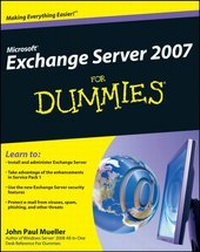
Microsoft Exchange Server 2007 For Dummies
1st Edition
Published on 24. October 2008
Book
Paperback/Softback
388 pages
978-0-470-39866-1 (ISBN)
Description
Exchange problems for solutions -- see how to have better e-mail and meeting management
E-mail is essential but not especially exciting. Exchange Server 2007, however, does a super job of serving up e-mail plus a whole lot more, and this book shows you just how exciting that can be! Get the lowdown on Service Pack 1 enhancements and how to take full advantage of the security, reliability, and speed that Exchange Server 2007 provides.
* Step by step -- lay the groundwork by exploring what Exchange Server does, and then install and configure it
* Pick and choose -- assess your organization's needs to determine which edition of Exchange Server best meets them
* You've got mail -- consider how your users work with their mail and customize your setup to facilitate their needs
* Lock 'em up -- configure Exchange Server for the greatest level of security
* Set it right -- create settings for the most efficient interaction with clients, use multiple mailboxes, and view digital certificates
* Customize -- use templates and develop custom forms
* Prepare for anything -- troubleshoot your configuration, perform regular maintenance, and be able to recover from mail-specific problems
Open the book and find:
* The new features of Service Pack 1
* Choosing the correct edition of Exchange Server
* How to use Exchange Management Console
* Steps for the initial configuration
* How to set up an offline address book
* What it takes to manage resource scheduling and interactive calendars
* How to monitor Exchange Server performance
* Tips for troubleshooting databases, mail flow, performance, and more
E-mail is essential but not especially exciting. Exchange Server 2007, however, does a super job of serving up e-mail plus a whole lot more, and this book shows you just how exciting that can be! Get the lowdown on Service Pack 1 enhancements and how to take full advantage of the security, reliability, and speed that Exchange Server 2007 provides.
* Step by step -- lay the groundwork by exploring what Exchange Server does, and then install and configure it
* Pick and choose -- assess your organization's needs to determine which edition of Exchange Server best meets them
* You've got mail -- consider how your users work with their mail and customize your setup to facilitate their needs
* Lock 'em up -- configure Exchange Server for the greatest level of security
* Set it right -- create settings for the most efficient interaction with clients, use multiple mailboxes, and view digital certificates
* Customize -- use templates and develop custom forms
* Prepare for anything -- troubleshoot your configuration, perform regular maintenance, and be able to recover from mail-specific problems
Open the book and find:
* The new features of Service Pack 1
* Choosing the correct edition of Exchange Server
* How to use Exchange Management Console
* Steps for the initial configuration
* How to set up an offline address book
* What it takes to manage resource scheduling and interactive calendars
* How to monitor Exchange Server performance
* Tips for troubleshooting databases, mail flow, performance, and more
More details
Other editions
Additional editions
John Paul Mueller
Microsoft Exchange Server 2007 For Dummies
E-Book
11/2008
Wiley
€23.99
Available for download
John Paul Mueller
Microsoft Exchange Server 2007 For Dummies
E-Book
11/2008
Wiley
€23.99
Available for download
Person
John Paul Mueller is a technical editor and author who has written 81 books and more than 300 articles. He has covered topics from programming and operating systems to home security and accessibility, and has contributed to such publications as DevSource, asp.netPro, and InformIT.
Content
Introduction.
Part 1: An Overview of Exchange Server 2007.
Chapter 1: Getting to Know Exchange Server 2007.
Chapter 2: Installing Exchange Server 2007.
Chapter 3: Using Exchange Management Console.
Chapter 4: Performing the Initial Configuration.
Part II: Customizing Exchange Server.
Chapter 5: Working with Mailboxes.
Chapter 6: Configuring Security.
Chapter 7: Interacting with Clients.
Chapter 8: Creating Custom Forms.
Part III: Advanced Techniques.
Chapter 9: Troubleshooting Your Configuration.
Chapter 10: Recovering from Mail-Specific Problems.
Chapter 11: Performing Maintenance Tasks.
Chapter 12: Using Exchange Management Shell.
Chapter 13: Using the Command Line.
Part IV: The Part of Tens.
Chapter 14: Ten Exchange Server Tools.
Chapter 15: Ten Exchange Server Resources.
Index.
Part 1: An Overview of Exchange Server 2007.
Chapter 1: Getting to Know Exchange Server 2007.
Chapter 2: Installing Exchange Server 2007.
Chapter 3: Using Exchange Management Console.
Chapter 4: Performing the Initial Configuration.
Part II: Customizing Exchange Server.
Chapter 5: Working with Mailboxes.
Chapter 6: Configuring Security.
Chapter 7: Interacting with Clients.
Chapter 8: Creating Custom Forms.
Part III: Advanced Techniques.
Chapter 9: Troubleshooting Your Configuration.
Chapter 10: Recovering from Mail-Specific Problems.
Chapter 11: Performing Maintenance Tasks.
Chapter 12: Using Exchange Management Shell.
Chapter 13: Using the Command Line.
Part IV: The Part of Tens.
Chapter 14: Ten Exchange Server Tools.
Chapter 15: Ten Exchange Server Resources.
Index.