

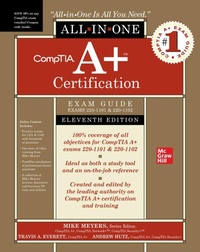
CompTIA A+ Certification All-in-One Exam Guide, Eleventh Edition (Exams 220-1101 & 220-1102)
11th Edition
Published on 12. January 2023
Book
Hardback
1472 pages
978-1-264-60990-1 (ISBN)
Description
This bestselling on-the-job reference and test preparation guide has been fully revised for new 2022 exam objectives
This fully revised and updated resource offers complete coverage of the latest release of CompTIA A+ exams 220-1101 & 220-1102. You'll find learning objectives at the beginning of each chapter, exam tips, practice exam questions, and in-depth explanations. Designed to help you pass the CompTIA A+ exams with ease, this definitive guide also serves as an essential on-the-job IT reference.
Covers all exam topics, including how to:
Work with CPUs, RAM, BIOS, motherboards, power supplies, and other personal computer components
Install, configure, and maintain hard drives
Manage input devices and removable media
Set up, upgrade, and maintain Microsoft Windows
Troubleshoot and fix computer problems
Install printers and other peripherals
Configure and secure mobile devices
Connect to the Internet
Set up wired and wireless networks
Protect your personal computer and your network
Implement virtualization and cloud-based technologies
Online content includes:
Practice exams for 1101 & 1102 with hundreds of questions
One hour of video training from Mike Meyers
TotalSim simulations of performance-based questions
A collection of Mike Meyers' favorite shareware and freeware PC tools and utilities
This fully revised and updated resource offers complete coverage of the latest release of CompTIA A+ exams 220-1101 & 220-1102. You'll find learning objectives at the beginning of each chapter, exam tips, practice exam questions, and in-depth explanations. Designed to help you pass the CompTIA A+ exams with ease, this definitive guide also serves as an essential on-the-job IT reference.
Covers all exam topics, including how to:
Work with CPUs, RAM, BIOS, motherboards, power supplies, and other personal computer components
Install, configure, and maintain hard drives
Manage input devices and removable media
Set up, upgrade, and maintain Microsoft Windows
Troubleshoot and fix computer problems
Install printers and other peripherals
Configure and secure mobile devices
Connect to the Internet
Set up wired and wireless networks
Protect your personal computer and your network
Implement virtualization and cloud-based technologies
Online content includes:
Practice exams for 1101 & 1102 with hundreds of questions
One hour of video training from Mike Meyers
TotalSim simulations of performance-based questions
A collection of Mike Meyers' favorite shareware and freeware PC tools and utilities
More details
Edition
11th edition
Language
English
Place of publication
OH
United States
Illustrations
788 Illustrations
Dimensions
Height: 238 mm
Width: 196 mm
Thickness: 59 mm
Weight
2426 gr
ISBN-13
978-1-264-60990-1 (9781264609901)
Copyright in bibliographic data and cover images is held by Nielsen Book Services Limited or by the publishers or by their respective licensors: all rights reserved.
Schweitzer Classification
Other editions
Additional editions
Mike Meyers | Travis A. Everett | Andrew Hutz
CompTIA A+ Certification All-in-One Exam Guide, Eleventh Edition (Exams 220-1101 & 220-1102)
E-Book
11/2022
1st Edition
McGraw Hill LLC
€123.99
Available for download
Previous edition
Mike Meyers
CompTIA A+ Certification All-in-One Exam Guide, Tenth Edition (Exams 220-1001 & 220-1002)
Book
03/2019
10th Edition
McGraw-Hill Education
€58.17
Article exhausted; check for reprint
Persons
Michael Meyers, MCP, CompTIA A+, CompTIA Network+, CompTIA Security+ (Houston, TX), is one of the industry's leading authorities on CompTIA certification. He is the president and founder and Total Seminars, LLC, a major provider of PC and network repair seminars for thousands of organizations including IBM, Lucent Technologies, GE, the FBI, the FAA and the United Nations. Mike is the best-selling author of the A+ Certification All-in-One Exam Guide.
Content
CH 1 Safety and Professionalism
CH 2 The Visible Computer
CH 3 CPUs
CH 4 RAM
CH 5 Firmware
CH 6 Motherboards
CH 7 Power Supplies
CH 8 Mass Storage Technologies
CH 9 Implementing Mass Storage
CH 10 Essential Peripherals
CH 11 Installing and Upgrading Operating Systems
CH 12 Operating System Operations
CH 13 Users, Groups, and Permissions
CH 14 Maintaining and Optimizing Operating Systems
CH 15 Command Line Interface
CH 16 Troubleshooting Operating Systems
CH 17 Display Technologies
CH 18 Networking Essentials
CH 19 Local Area Networking
CH 20 Wireless Networking
CH 21 The Internet
CH 22 Virtualization
CH 23 Portable Computing
CH 24 Mobile Devices
CH 25 Securing Mobile Devices
CH 26 Printers and Multifunction Devices
CH 27 Securing Computers
CH 28 Operational Procedures
App A Mapping to the CompTIA A+ Objectives
App B About the Online Content
GL Glossary
CH 2 The Visible Computer
CH 3 CPUs
CH 4 RAM
CH 5 Firmware
CH 6 Motherboards
CH 7 Power Supplies
CH 8 Mass Storage Technologies
CH 9 Implementing Mass Storage
CH 10 Essential Peripherals
CH 11 Installing and Upgrading Operating Systems
CH 12 Operating System Operations
CH 13 Users, Groups, and Permissions
CH 14 Maintaining and Optimizing Operating Systems
CH 15 Command Line Interface
CH 16 Troubleshooting Operating Systems
CH 17 Display Technologies
CH 18 Networking Essentials
CH 19 Local Area Networking
CH 20 Wireless Networking
CH 21 The Internet
CH 22 Virtualization
CH 23 Portable Computing
CH 24 Mobile Devices
CH 25 Securing Mobile Devices
CH 26 Printers and Multifunction Devices
CH 27 Securing Computers
CH 28 Operational Procedures
App A Mapping to the CompTIA A+ Objectives
App B About the Online Content
GL Glossary