

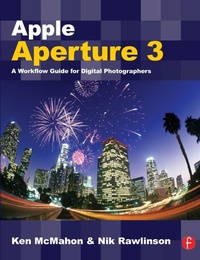
Apple Aperture 3
A Workflow Guide for Digital Photographers
1st Edition
Published on 2. August 2010
Book
Paperback/Softback
322 pages
978-0-240-52178-7 (ISBN)
Description
With over 200 brand new features, Apple's leading photo management and image processing package just got a whole lot bigger! From Faces to Places and Brushes to Presets, Mac experts Ken McMahon and Nik Rawlinson will guide you through everything you could ever need to know about Aperture 3 including how to:
Find, tag, and protect your images with advanced metadata techniques
Use Presets, Nondestructive brushes and the powerful new Curves tool to dramatically enhance your photos
Seamlessly integrate Aperture 3 with other programs for incredible results
Apple Aperture 3 - A Workflow Guide for Digital Photographers shows you how to put this powerful software right at the heart of your digital photography workflow. Inside you will find information on how to import, sort and navigate thousands of Raw files like a pro; how to fully utilize the new rush-based adjustments and quick fix adjustment presets to creatively edit your images; and how to export your images to slideshows, the Web, or even create your own coffee table style photobook.
Find, tag, and protect your images with advanced metadata techniques
Use Presets, Nondestructive brushes and the powerful new Curves tool to dramatically enhance your photos
Seamlessly integrate Aperture 3 with other programs for incredible results
Apple Aperture 3 - A Workflow Guide for Digital Photographers shows you how to put this powerful software right at the heart of your digital photography workflow. Inside you will find information on how to import, sort and navigate thousands of Raw files like a pro; how to fully utilize the new rush-based adjustments and quick fix adjustment presets to creatively edit your images; and how to export your images to slideshows, the Web, or even create your own coffee table style photobook.
More details
Language
English
Place of publication
Oxford
United Kingdom
Publishing group
Taylor & Francis Ltd
Target group
Professional and scholarly
General and Professional Practice & Development
Dimensions
Height: 246 mm
Width: 189 mm
Thickness: 18 mm
Weight
655 gr
ISBN-13
978-0-240-52178-7 (9780240521787)
Copyright in bibliographic data and cover images is held by Nielsen Book Services Limited or by the publishers or by their respective licensors: all rights reserved.
Schweitzer Classification
Other editions
Additional editions
Book
08/2017
1st Edition
Routledge
€244.50
Shipment within 10-20 days
E-Book
09/2012
1st Edition
Routledge
€59.49
Available for download
E-Book
09/2012
1st Edition
Routledge
€59.49
Available for download
Persons
Ken McMahon runs Pelican Graphics, a digital design consultancy specializing in design and artwork production for print media and the web. He is also a freelance journalist, writing for PCWorld, Mac User and PC Pro in the UK, and a best-selling author.
Nik is a UK-based journalist, formerly editor of MacUser magazine, and before that deputy editor of Personal Computer World. He is currently CNET's resident camera reviewer. He is the author of Independent Guide to the iPhone, Independent Guide to the iPad and Independent Guide to the Mac. He is also the co-author of Apple Aperture 3: A Workflow Guide for Digital Photographers, which is currently commissioned for an update this year when Apple releases the next revision of the software.
Nik is a UK-based journalist, formerly editor of MacUser magazine, and before that deputy editor of Personal Computer World. He is currently CNET's resident camera reviewer. He is the author of Independent Guide to the iPhone, Independent Guide to the iPad and Independent Guide to the Mac. He is also the co-author of Apple Aperture 3: A Workflow Guide for Digital Photographers, which is currently commissioned for an update this year when Apple releases the next revision of the software.
Content
From Previous edition (this ed TBC):
Raw Files; How Aperture Works; Managing Your Images; Working with Metadata; Adjusting Images; Aperture Workflow; Working with Other Applications; Output.
Raw Files; How Aperture Works; Managing Your Images; Working with Metadata; Adjusting Images; Aperture Workflow; Working with Other Applications; Output.