

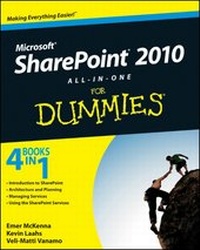
SharePoint 2010 All-in-One For Dummies
Published on 5. November 2010
Book
Paperback/Softback
912 pages
978-0-470-58716-4 (ISBN)
Unfortunately, price unknown
Article exhausted; check different version
Description
Simplify SharePoint with this comprehensive, understandable guide
SharePoint is a Microsoft technology that enables project collaboration through a single portal. It can be complex, but not when approached the Dummies way!
This guide offers eight self-contained minibooks that examine each aspect of SharePoint 2010. Whether you're an experienced administrator or developer or you're just getting your feet wet, you'll find it's easy to locate what you need and learn to install, configure, and manage a SharePoint portal. You can dig as deeply into SharePoint as you want or need to.
* SharePoint 2010 is the newest version of collaboration technology that allows you to aggregate SharePoint sites, information, and applications into a single portal
* Administrators, page producers, and developers will be able to get SharePoint installed, configured, and running with the advice in this guide
* Eight minibooks address the Microsoft Office SharePoint system, SharePoint services, collaboration, SharePoint Server, enterprise content management, managing users, architecting SharePoint, and SharePoint deployment
* Covers planning, installation, configuration, performance, troubleshooting, data structure, and more
If you work with SharePoint, you'll find Microsoft SharePoint 2010 All-in-One For Dummies provides what you need to get starting and keep going with SharePoint 2010.
SharePoint is a Microsoft technology that enables project collaboration through a single portal. It can be complex, but not when approached the Dummies way!
This guide offers eight self-contained minibooks that examine each aspect of SharePoint 2010. Whether you're an experienced administrator or developer or you're just getting your feet wet, you'll find it's easy to locate what you need and learn to install, configure, and manage a SharePoint portal. You can dig as deeply into SharePoint as you want or need to.
* SharePoint 2010 is the newest version of collaboration technology that allows you to aggregate SharePoint sites, information, and applications into a single portal
* Administrators, page producers, and developers will be able to get SharePoint installed, configured, and running with the advice in this guide
* Eight minibooks address the Microsoft Office SharePoint system, SharePoint services, collaboration, SharePoint Server, enterprise content management, managing users, architecting SharePoint, and SharePoint deployment
* Covers planning, installation, configuration, performance, troubleshooting, data structure, and more
If you work with SharePoint, you'll find Microsoft SharePoint 2010 All-in-One For Dummies provides what you need to get starting and keep going with SharePoint 2010.
More details
Other editions
Additional editions
Emer McKenna | Kevin Laahs | Veli-Matti Vanamo
SharePoint 2010 All-in-One For Dummies
E-Book
10/2010
Wiley
€30.99
Available for download
Emer McKenna | Kevin Laahs | Veli-Matti Vanamo
SharePoint 2010 All-in-One For Dummies
E-Book
10/2010
Wiley
€30.99
Available for download
Persons
Emer McKenna founded N2C Inc., a consulting service focused on Microsoft technologies. She has worked with SharePoint since its initial beta release.
Kevin Laahs is a Microsoft Certified Architect, a SharePoint MVP, and a Technology Strategist at HP.
Veli-Matti Vanamo is a technical architect at HP.
Kevin Laahs is a Microsoft Certified Architect, a SharePoint MVP, and a Technology Strategist at HP.
Veli-Matti Vanamo is a technical architect at HP.
Content
Introduction.
Book I: Introduction to SharePoint.
Chapter 1: Getting to Know SharePoint.
Chapter 2: Introducing Microsoft SharePoint Foundation 2010.
Chapter 3: Getting Started with a Basic Site.
Chapter 4: Introducing SharePoint Server 2010.
Chapter 5: Enterprise Content Management.
Chapter 6: Offi ce 2010 and Offi ce Web Applications.
Book II: Architecture and Planning.
Chapter 1: The Framework.
Chapter 2: Assessing Authentication Options.
Chapter 3: Considering the Logical Architecture.
Chapter 4: Designing the Logical Architecture.
Chapter 5: Planning for Performance and Scalability.
Chapter 6: Touring Central Administration.
Chapter 7: Automating with PowerShell.
Chapter 8: Using Service Applications.
Book III: Services Configuration and Management.
Chapter 1: Analyzing Access Services.
Chapter 2: Burrowing into Business Connectivity Services.
Chapter 3: Exploring Excel Services.
Chapter 4: Investigating InfoPath Forms Services.
Chapter 5: Maneuvering the Managed Metadata Service.
Chapter 6: Submerging into Search.
Chapter 7: User Profi les, Organization Profi les, and Audiences.
Chapter 8: Considering PerformancePoint Services.
Chapter 9: Considering Visio Services.
Book IV: Using the SharePoint Services.
Chapter 1: Publishing Access Applications.
Chapter 2: Connecting to External Data.
Chapter 3: Using External Content.
Chapter 4: Working with Excel Services.
Chapter 5: Investigating InfoPath Designer 2010.
Chapter 6: Designing Browser Compatible Forms.
Chapter 7: Examining the InfoPath Forms Services Tools.
Chapter 8: Designing and Administering Search.
Chapter 9: SharePoint Gets Social.
Index.
Book I: Introduction to SharePoint.
Chapter 1: Getting to Know SharePoint.
Chapter 2: Introducing Microsoft SharePoint Foundation 2010.
Chapter 3: Getting Started with a Basic Site.
Chapter 4: Introducing SharePoint Server 2010.
Chapter 5: Enterprise Content Management.
Chapter 6: Offi ce 2010 and Offi ce Web Applications.
Book II: Architecture and Planning.
Chapter 1: The Framework.
Chapter 2: Assessing Authentication Options.
Chapter 3: Considering the Logical Architecture.
Chapter 4: Designing the Logical Architecture.
Chapter 5: Planning for Performance and Scalability.
Chapter 6: Touring Central Administration.
Chapter 7: Automating with PowerShell.
Chapter 8: Using Service Applications.
Book III: Services Configuration and Management.
Chapter 1: Analyzing Access Services.
Chapter 2: Burrowing into Business Connectivity Services.
Chapter 3: Exploring Excel Services.
Chapter 4: Investigating InfoPath Forms Services.
Chapter 5: Maneuvering the Managed Metadata Service.
Chapter 6: Submerging into Search.
Chapter 7: User Profi les, Organization Profi les, and Audiences.
Chapter 8: Considering PerformancePoint Services.
Chapter 9: Considering Visio Services.
Book IV: Using the SharePoint Services.
Chapter 1: Publishing Access Applications.
Chapter 2: Connecting to External Data.
Chapter 3: Using External Content.
Chapter 4: Working with Excel Services.
Chapter 5: Investigating InfoPath Designer 2010.
Chapter 6: Designing Browser Compatible Forms.
Chapter 7: Examining the InfoPath Forms Services Tools.
Chapter 8: Designing and Administering Search.
Chapter 9: SharePoint Gets Social.
Index.