

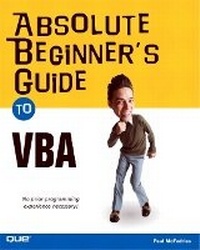
Absolute Beginner's Guide to VBA
Will be published approx. on 7. April 2004
Book
Paperback/Softback
384 pages
978-0-7897-3076-3 (ISBN)
Description
Visual Basic for Applications (VBA) is a set of tools based on the Visual Basic language. The great thing about using it to enhance Office applications is that it's easier to learn than Visual Basic and it comes with your Office license. After reading this book, the reader will be proficient in the VBA language and will have extensive knowledge of the Office 2003 Object Model. This book will cover all features of the VBA editor and show how to program some of the more useful new features in the Office 2003 applications.
This book assumes no prior programming experience, so even programming novices can get up to speed quickly on the basics of the VBA language. It is very practical and offers the reader tested programs and projects that he or she can implement right away. This book reinforces the reader's learning by presenting useful, end-of-chapter pedagogical resources, including question-and-answer sessions and quizzes, as well as practical exercises that cement and extend the reader's knowledge. It explorers not only the object models of Word and Excel, but also other members of the Office 2003 suite, including PowerPoint, Access, and Outlook.
This book assumes no prior programming experience, so even programming novices can get up to speed quickly on the basics of the VBA language. It is very practical and offers the reader tested programs and projects that he or she can implement right away. This book reinforces the reader's learning by presenting useful, end-of-chapter pedagogical resources, including question-and-answer sessions and quizzes, as well as practical exercises that cement and extend the reader's knowledge. It explorers not only the object models of Word and Excel, but also other members of the Office 2003 suite, including PowerPoint, Access, and Outlook.
More details
Series
Language
English
Place of publication
United States
Publishing group
Pearson Education (US)
Target group
Professional and scholarly
Dimensions
Height: 231 mm
Width: 187 mm
Thickness: 22 mm
Weight
641 gr
ISBN-13
978-0-7897-3076-3 (9780789730763)
Copyright in bibliographic data and cover images is held by Nielsen Book Services Limited or by the publishers or by their respective licensors: all rights reserved.
Schweitzer Classification
Other editions
Additional editions
Paul McFedries
VBA for the 2007 Microsoft Office System
E-Book
03/2007
1st Edition
Addison Wesley
€19.99
Available for download
Paul McFedries
Absolute Beginner's Guide to VBA
E-Book
03/2004
1st Edition
Addison Wesley
€10.99
Available for download
Person
Paul McFedries is the president of Logophilia Limited, a technical writing company. While now primarily a writer, Paul has worked as a programmer, consultant, spreadsheet developer, and Web site developer. Paul has written more than 40 books that have sold nearly three million copies worldwide. These books include Access 2003 Forms, Reports, and Queries, Formulas and FUnctions with Microsoft Excel 2003, and The Complete Idiot's Guide to Windows XP.
Content
Introduction.
I. GETTING STARTED WITH VBA.
1. Recording Your First Macro.
2. Writing Your Own Macros.
3. Understanding Program Variables.
4. Building VBA Expressions.
5. Working with Objects.
6. Controlling Your VBA Code.
II. PUTTING VBA TO WORK.
7. Programming Word.
8. Programming Excel.
9. Programming PowerPoint.
10. Programming Access Databases.
11. Programming Outlook Email.
III. GETTING THE MOST OUT OF VBA.
12. Interacting with the User.
13. Creating Custom VBA Dialog Boxes.
14. Creating Custom Menus and Toolbars.
15. Debugging VBA Procedures.
IV. APPENDIXES.
Appendix A. VBA Statements.
Appendix B. VBA Functions.
I. GETTING STARTED WITH VBA.
1. Recording Your First Macro.
2. Writing Your Own Macros.
3. Understanding Program Variables.
4. Building VBA Expressions.
5. Working with Objects.
6. Controlling Your VBA Code.
II. PUTTING VBA TO WORK.
7. Programming Word.
8. Programming Excel.
9. Programming PowerPoint.
10. Programming Access Databases.
11. Programming Outlook Email.
III. GETTING THE MOST OUT OF VBA.
12. Interacting with the User.
13. Creating Custom VBA Dialog Boxes.
14. Creating Custom Menus and Toolbars.
15. Debugging VBA Procedures.
IV. APPENDIXES.
Appendix A. VBA Statements.
Appendix B. VBA Functions.