

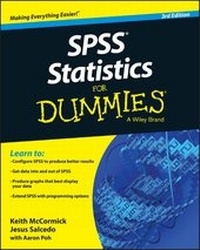
SPSS Statistics for Dummies
3rd Edition
Published on 3. July 2015
Book
Paperback/Softback
384 pages
978-1-118-98901-2 (ISBN)
Description
The ultimate beginner's guide to SPSS and statistical analysis SPSS Statistics For Dummies is the fun and friendly guide to mastering SPSS. This book contains everything you need to know to get up and running quickly with this industry-leading software, with clear, helpful guidance on working with both the software and your data. Every chapter of this new edition has been updated with screenshots and steps that align with SPSS 23.0. You'll learn how to set up the software and organize your workflow, then delve deep into analysis to discover the power of SPSS capabilities. You'll discover the mechanics behind the calculations, perform predictive analysis, produce informative graphs, and maximize your data, even if it's been awhile since your last statistics class. SPSS is the leading statistical software for social sciences, marketing, health care, demography, government, education, data mining, and more. This powerful package gives you the tools you need to get more out of your data, and this book is your beginner-friendly guide to getting the most out of the software. Install and configure SPSS and learn the basics of how it works Master the process of getting data into SPSS and manipulating it to produce results See how to display data in dozens of different graphic formats to fit specific needs Make SPSS manufacture the numbers you want and take advantage of the many analysis options Discover ways to customize the SPSS interface and the look of your results, edit graphics and pivot tables, and program SPSS with Command Syntax Statistical analysis is crucial to so many industries, and accuracy and efficiency are crucial. SPSS offers you the capability to deliver, but you still must know how to take utmost advantage of the tools at your fingertips. SPSS Statistics For Dummies shows you how to handle data like a pro, with step-by-step instruction and expert advice.
More details
Other editions
New editions
Keith McCormick | Jesus Salcedo
SPSS Statistics for Dummies
Book
08/2020
4th Edition
Wiley
€37.50
Shipment within 15-20 days
Previous edition
Arthur Griffith
SPSS For Dummies
Book
01/2010
2nd Edition
Wiley
€31.90
Article exhausted; check for reprint
Persons
Keith McCormick is an independent predictive analytics consultant, speaker, trainer, and author. Keith is the lead author of the IBM SPSS Modeler Cookbook. Jesus Salcedo is QueBIT's Director of Advanced Analytics Training and the former SPSS Curriculum Team Lead for IBM. Both have done extensive SPSS training. Aaron Poh is a business analyst supporting IT strategy, enterprise architecture, and analytics at Booz Allen Hamilton and serves as a director at the Institute for Supply Management-Northern Virginia.
Content
Introduction 1
Part I: Getting Started with SPSS 5
Chapter 1: Introducing SPSS 7
Chapter 2: Installing SPSS 15
Chapter 3: A Simple Statistical Analysis Example 23
Part II: Getting Data in and out of SPSS 43
Chapter 4: Entering and Defining Data 45
Chapter 5: Opening Data Files 63
Chapter 6: Getting Data and Results out of SPSS 81
Chapter 7: More About Defining Your Data 99
Part III: Messing with Data in SPSS 113
Chapter 8: The Transform and Data Menus 115
Chapter 9: Using Functions 135
Chapter 10: Manipulating Files 143
Part IV: Graphing Data 157
Chapter 11: On the Menu: Graphing Choices in SPSS 159
Chapter 12: Building Graphs Using the Chart Builder 175
Part V: Analyzing Data 199
Chapter 13: Using Descriptive Statistics 201
Chapter 14: Showing Relationships between Categorical Dependent and Independent Variables 217
Chapter 15: Showing Relationships between Continuous Dependent and Categorical Independent Variables 235
Chapter 16: Showing Relationships between Continuous Dependent and Independent Variables 249
Part VI: Making SPSS Your Own: Settings, Templates, and Looks 263
Chapter 17: Changing Settings 265
Chapter 18: Editing Charts and Chart Templates 283
Chapter 19: Editing Tables 293
Part VII: Programming SPSS with Command Syntax 303
Chapter 20: Getting Acquainted with Syntax 305
Chapter 21: Adding Syntax to Your Toolkit 311
Part VIII: The Part of Tens 321
Chapter 22: Ten (Or So) Modules You Can Add to SPSS 323
Chapter 23: Ten (Or So) Useful SPSS Online Resources 333
Chapter 24: Ten Professional Development Projects for SPSS Users 341
Glossary 347
Index 355
Part I: Getting Started with SPSS 5
Chapter 1: Introducing SPSS 7
Chapter 2: Installing SPSS 15
Chapter 3: A Simple Statistical Analysis Example 23
Part II: Getting Data in and out of SPSS 43
Chapter 4: Entering and Defining Data 45
Chapter 5: Opening Data Files 63
Chapter 6: Getting Data and Results out of SPSS 81
Chapter 7: More About Defining Your Data 99
Part III: Messing with Data in SPSS 113
Chapter 8: The Transform and Data Menus 115
Chapter 9: Using Functions 135
Chapter 10: Manipulating Files 143
Part IV: Graphing Data 157
Chapter 11: On the Menu: Graphing Choices in SPSS 159
Chapter 12: Building Graphs Using the Chart Builder 175
Part V: Analyzing Data 199
Chapter 13: Using Descriptive Statistics 201
Chapter 14: Showing Relationships between Categorical Dependent and Independent Variables 217
Chapter 15: Showing Relationships between Continuous Dependent and Categorical Independent Variables 235
Chapter 16: Showing Relationships between Continuous Dependent and Independent Variables 249
Part VI: Making SPSS Your Own: Settings, Templates, and Looks 263
Chapter 17: Changing Settings 265
Chapter 18: Editing Charts and Chart Templates 283
Chapter 19: Editing Tables 293
Part VII: Programming SPSS with Command Syntax 303
Chapter 20: Getting Acquainted with Syntax 305
Chapter 21: Adding Syntax to Your Toolkit 311
Part VIII: The Part of Tens 321
Chapter 22: Ten (Or So) Modules You Can Add to SPSS 323
Chapter 23: Ten (Or So) Useful SPSS Online Resources 333
Chapter 24: Ten Professional Development Projects for SPSS Users 341
Glossary 347
Index 355