

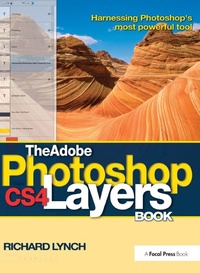
The Adobe Photoshop CS4 Layers Book
Harnessing Photoshop's most powerful tool
1st Edition
Published on 17. July 2017
Book
Hardback
320 pages
978-1-138-40106-8 (ISBN)
Description
MasterPhotoshop CS4 with this visual, hands-on guide to using layers, under the expert guidance of digital imaging specialist Richard Lynch. Layers, Photoshop's most powerful feature, is the core of a nondestructive image-editing workflow.Step-by-step instructions and practical examples illustrate how to. Polish: correct and enhance color, fix composition problems, and repair damage or flaws Manipulate: isolate image areas for changes, adjustments and experimental concepts Understand: use all forms of layer blending, including transparency, clipping masks, opacity/fill, layer masks, layer modes, channel targeting, Blend If, and Effects/Styles. The accompanying downloadable resources come complete with a generous library of practical actions based on techniques from the book that add functional power to Photoshop, along with practice images for all the exercises in the book. This focused, highly accurate, comprehensive, and practical guide offers invaluable advice for all users of Adobe Photoshop CS4.
More details
Language
English
Place of publication
London
United Kingdom
Publishing group
Taylor & Francis Ltd
Target group
Professional and scholarly
General and Professional Practice & Development
Dimensions
Height: 252 mm
Width: 194 mm
Thickness: 22 mm
Weight
826 gr
ISBN-13
978-1-138-40106-8 (9781138401068)
Copyright in bibliographic data and cover images is held by Nielsen Book Services Limited or by the publishers or by their respective licensors: all rights reserved.
Schweitzer Classification
Other editions
Additional editions
Book
05/2009
1st Edition
Focal Press
€37.13
Article exhausted; check different version
E-Book
03/2009
1st Edition
Routledge
€264.99
Available for download
E-Book
03/2009
1st Edition
Routledge
€264.99
Available for download
Person
Richard Lynch
Content
Basics; Layer Management; Object & Image Area Isolation in Layers; Masking; Applying Layer Effects; Exploring Layer Modes; Advanced Blending; Breaking Out Components; Taking an Image Through the Process; Making a Layered Collage or Composite Image; Index