

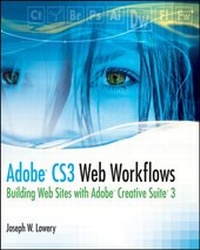
Adobe CS3 Web Workflows
Building Websites with Adobe Creative Suite 3
1st Edition
Published on 3. June 2008
Book
Paperback/Softback
336 pages
978-0-470-26127-9 (ISBN)
Description
CS3 is more than the sum of its parts
Today's Web is an artful blend of images, illustrations, text, animations, and video, all skillfully woven into a single package that is instantly delivered to the site visitor. And you, the Web designer, create that package. It's much easier when you know how to use all the tools in Adobe CS3 as they were intended to be used - together. This book describes the workflow from one product to another and details essential techniques in each program, so you can get your work done.
Maximize your productivity with these workflows:
*
Photoshop(r) to Dreamweaver(r)
*
Fireworks(r) to Dreamweaver
*
Flash(r) to Dreamweaver
*
Photoshop to Fireworks to Bridge to Dreamweaver
Companion Web site
Visit www.wiley.com/go/adobecs3webworkflows to download exercise files for each chapter as well as a sample AVI file.
Today's Web is an artful blend of images, illustrations, text, animations, and video, all skillfully woven into a single package that is instantly delivered to the site visitor. And you, the Web designer, create that package. It's much easier when you know how to use all the tools in Adobe CS3 as they were intended to be used - together. This book describes the workflow from one product to another and details essential techniques in each program, so you can get your work done.
Maximize your productivity with these workflows:
*
Photoshop(r) to Dreamweaver(r)
*
Fireworks(r) to Dreamweaver
*
Flash(r) to Dreamweaver
*
Photoshop to Fireworks to Bridge to Dreamweaver
Companion Web site
Visit www.wiley.com/go/adobecs3webworkflows to download exercise files for each chapter as well as a sample AVI file.
More details
Edition
1., Auflage
Language
English
Place of publication
Chichester
United Kingdom
Publishing group
John Wiley and Sons Ltd
Target group
Professional and scholarly
Edition type
New edition
Illustrations
Illustrations
Dimensions
Height: 23.4 cm
Width: 18.7 cm
Weight
771 gr
ISBN-13
978-0-470-26127-9 (9780470261279)
Schweitzer Classification
Other editions
New editions
Book
08/2009
2nd Edition
Wiley
€43.90
Article is exhausted; no reprint
Additional editions
E-Book
06/2008
Wiley
€40.90
Available for download
Person
Joseph W. Lowery is a professional Web developer who has been writing about computers and technology since 1981. He is the author of numerous editions of the Dreamweaver Bible and Fireworks Bible as well as CSS Hacks and Filters, all published by Wiley. He is well-known for his presentations at Web conferences, including Adobe MAX, in the U.S. and Europe, and is currently Vice President of Marketing for WebAssist, the leading provider of Adobe extensions.
Content
Part I. Photoshop to Dreamweaver.
1. Creating the Comp.
Initializing the Comp.
Setting Preferences.
Working with Layers.
Making Selections.
Adding Gradients.
Inserting Images.
2. Completing the Comp.
Aligning Graphic Elements.
Positioning with the Layers Palette.
Working with Text.
Applying Simple Text Labels.
Adding Headings and Blocks of Text.
Inserting Decorative Text.
Applying Effects.
3. From Comp to Layout.
Setting Up a Dreamweaver Site.
Establishing Basic Preferences.
Creating CSS Layout Styles.
Inserting div Tags.
Incorporating Background Images.
Adding a Background Image to the body.
Layering Background Images.
Bringing in Foreground Images.
Inserting and Styling Text.
Including Navigation.
Part II. Fireworks to Dreamweaver.
4. Composing with Vectors.
Getting Started in Fireworks.
Working with Vector-Based Graphics.
Adding Rounded Rectangles.
Inserting Navigation Tabs.
Drawing with the Pen Tool.
Integrating Gradients.
Integrating Bitmapped Images.
5. Comping Multipage Sites.
Working with Text.
Creating Logos and Display Text.
Adding Navigation Labels.
Including Sidebar Placeholder Content.
Comping Main Content Text.
Applying Live Filters.
Adding Pages.
Creating a Master Page
Building New Pages.
Linking Pages.
Exporting Comp Pages.
6. Combining Navigation and Layouts.
Incorporating Background Images
Creating Background Slices.
Crafting CSS Backgrounds.
Integrating Foreground Images
Slicing Foreground Graphics.
Placing Fireworks Images in Dreamweaver.
Implementing CSS Navigation.
Exporting the Navigation States.
Creating Web Standard CSS Navigation.
Part III. Flash to Dreamweaver.
7. Building Flash Intros.
Setting the Stage.
Importing Images.
Working with the Timeline.
Inserting Text.
Creating Navigation Buttons.
Making the Button Symbol.
Adding ActionScript Code.
Displaying in Dreamweaver.
8. Setting up Flash video.
Integrating video in Flash animations.
Encoding video.
Working with Playback components.
Adding Captions to Flash video.
Inserting video into Dreamweaver.
Editing Flash from Dreamweaver.
Part IV. Photoshop to Fireworks to Bridge to Dreamweaver.
9. Asset Creation and Comping.
Straightening Photos.
Aligning Crooked Shots.
Removing perspective.
Healing images.
Automatic spot healing.
Targeted sampling for healing.
Moving assets into Fireworks via Bridge.
Increasing productivity with commands.
Comping forms with rich symbols.
10. Adding Interactive Forms in Dreamweaver.
A. Additional Workflows.
Illustrator - Photoshop - Flash - Dreamweaver.
The Flow: Illustrator to Flash and Photoshop and Flash to Dreamweaver.
Dreamweaver - Contribute.
The Flow: Dreamweaver to Contribute.
Fireworks - Flash - Dreamweaver.
The Flow: Fireworks to Flash to Dreamweaver.
1. Creating the Comp.
Initializing the Comp.
Setting Preferences.
Working with Layers.
Making Selections.
Adding Gradients.
Inserting Images.
2. Completing the Comp.
Aligning Graphic Elements.
Positioning with the Layers Palette.
Working with Text.
Applying Simple Text Labels.
Adding Headings and Blocks of Text.
Inserting Decorative Text.
Applying Effects.
3. From Comp to Layout.
Setting Up a Dreamweaver Site.
Establishing Basic Preferences.
Creating CSS Layout Styles.
Inserting div Tags.
Incorporating Background Images.
Adding a Background Image to the body.
Layering Background Images.
Bringing in Foreground Images.
Inserting and Styling Text.
Including Navigation.
Part II. Fireworks to Dreamweaver.
4. Composing with Vectors.
Getting Started in Fireworks.
Working with Vector-Based Graphics.
Adding Rounded Rectangles.
Inserting Navigation Tabs.
Drawing with the Pen Tool.
Integrating Gradients.
Integrating Bitmapped Images.
5. Comping Multipage Sites.
Working with Text.
Creating Logos and Display Text.
Adding Navigation Labels.
Including Sidebar Placeholder Content.
Comping Main Content Text.
Applying Live Filters.
Adding Pages.
Creating a Master Page
Building New Pages.
Linking Pages.
Exporting Comp Pages.
6. Combining Navigation and Layouts.
Incorporating Background Images
Creating Background Slices.
Crafting CSS Backgrounds.
Integrating Foreground Images
Slicing Foreground Graphics.
Placing Fireworks Images in Dreamweaver.
Implementing CSS Navigation.
Exporting the Navigation States.
Creating Web Standard CSS Navigation.
Part III. Flash to Dreamweaver.
7. Building Flash Intros.
Setting the Stage.
Importing Images.
Working with the Timeline.
Inserting Text.
Creating Navigation Buttons.
Making the Button Symbol.
Adding ActionScript Code.
Displaying in Dreamweaver.
8. Setting up Flash video.
Integrating video in Flash animations.
Encoding video.
Working with Playback components.
Adding Captions to Flash video.
Inserting video into Dreamweaver.
Editing Flash from Dreamweaver.
Part IV. Photoshop to Fireworks to Bridge to Dreamweaver.
9. Asset Creation and Comping.
Straightening Photos.
Aligning Crooked Shots.
Removing perspective.
Healing images.
Automatic spot healing.
Targeted sampling for healing.
Moving assets into Fireworks via Bridge.
Increasing productivity with commands.
Comping forms with rich symbols.
10. Adding Interactive Forms in Dreamweaver.
A. Additional Workflows.
Illustrator - Photoshop - Flash - Dreamweaver.
The Flow: Illustrator to Flash and Photoshop and Flash to Dreamweaver.
Dreamweaver - Contribute.
The Flow: Dreamweaver to Contribute.
Fireworks - Flash - Dreamweaver.
The Flow: Fireworks to Flash to Dreamweaver.