

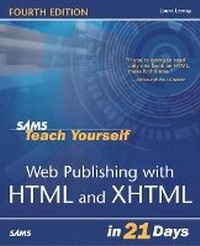
Sams Teach Yourself Web Publishing with HTML & XHTML in 21 Days
4th Edition
Published on 22. May 2003
Book
Paperback/Softback
816 pages
978-0-672-32519-9 (ISBN)
Description
Sams Teach Yourself Web Publishing with HTML and XHTML in 21 Days, Fourth Edition is a new edition of the best-selling book that started the whole HTML/Web publishing phenomenon.
The entire book has been revised and refined to freshen up its appearance and to bring it up to date with current Web publishing practices and technologies. Yet all the original style, flavor, and features that have made this book so popular since its first edition are retained and expanded upon.
The entire book has been revised and refined to freshen up its appearance and to bring it up to date with current Web publishing practices and technologies. Yet all the original style, flavor, and features that have made this book so popular since its first edition are retained and expanded upon.
More details
Edition
4th edition
Language
English
Place of publication
Indianapolis
United States
Publishing group
Pearson Education (US)
Target group
College/higher education
Dimensions
Height: 230 mm
Width: 186 mm
Thickness: 50 mm
Weight
1329 gr
ISBN-13
978-0-672-32519-9 (9780672325199)
Copyright in bibliographic data and cover images is held by Nielsen Book Services Limited or by the publishers or by their respective licensors: all rights reserved.
Schweitzer Classification
Other editions
New editions
Laura Lemay | Rafe Colburn
Sams Teach Yourself Web Publishing with HTML and CSS in One Hour a Day
Book
06/2006
5th Edition
Sams Publishing
€35.89
Article exhausted; check for reprint
Previous edition
Book
03/2001
3rd Edition
Sams Publishing
€31.57
Article exhausted; check for reprint
Persons
Laura Lemay is a technical writer, author, Web addict, and motorcycle enthusiast. One of the world's most popular authors on Web development topics, she is the author of Sams Teach Yourself Web Publishing with HTML, Sams Teach Yourself Java in 21 Days, and Sams Teach Yourself Perl in 21 Days. You can visit her home page at http://www.lne.com/lemay/.
Rafe Colburn is a Web application developer and author living in North Carolina. His other books include Sams Teach Yourself CGI in 24 Hours and Special Edition Using SQL. If you'd like to read more of his writings, check out his home page at http://rc3.org/.
Rafe Colburn is a Web application developer and author living in North Carolina. His other books include Sams Teach Yourself CGI in 24 Hours and Special Edition Using SQL. If you'd like to read more of his writings, check out his home page at http://rc3.org/.
Content
Introduction.
I. GETTING STARTED.
Day 1. The World of the World Wide Web.
Day 2. Get Organized.
Day 3. An Introduction to HTML.
Day 4. Begin with the Basics.
II. CREATING SIMPLE WEB PAGES.
Day 5. All About Links.
Day 6. More Text Formatting with HTML and CSS.
Day 7. Using Images, Color, and Backgrounds.
III. DOING MORE WITH HTML AND XHTML.
Day 8. Tables.
Day 9. Formatting Pages with Cascading Style Sheets.
Day 10. Designing Forms.
IV. GRAPHICS AND MULTIMEDIA.
Day 11. Imagemaps and Animated Graphics.
Day 12. Multimedia: Adding Sounds, Videos, and More.
V. JAVASCRIPT AND DYNAMIC HTML.
Day 13. JavaScript.
Day 14. Working with JavaScript.
Day 15. Working with Frames and Linked Windows.
Day 16. Using Dynamic HTML.
VI. DESIGNING EFFECTIVE WEB PAGES.
Day 17. Writing Good Web Pages: Do's and Don'ts.
Day 18. Designing for the Real World.
Day 19. Creating Accessible Sites.
VII. GOING LIVE ON THE WEB.
Day 20. Putting Your Site Online.
Day 21. Taking Advantage of the Server.
VIII. APPENDIXES.
Appendix A. Sources for Further Information.
Appendix B. HTML 4.01 Quick Reference.
Appendix C. Cascading Style Sheet Quick Reference.
Appendix D. Colors by Name and Hexadecimal Value.
Appendix E. MIME Types and File Extensions.
Index.
I. GETTING STARTED.
Day 1. The World of the World Wide Web.
Day 2. Get Organized.
Day 3. An Introduction to HTML.
Day 4. Begin with the Basics.
II. CREATING SIMPLE WEB PAGES.
Day 5. All About Links.
Day 6. More Text Formatting with HTML and CSS.
Day 7. Using Images, Color, and Backgrounds.
III. DOING MORE WITH HTML AND XHTML.
Day 8. Tables.
Day 9. Formatting Pages with Cascading Style Sheets.
Day 10. Designing Forms.
IV. GRAPHICS AND MULTIMEDIA.
Day 11. Imagemaps and Animated Graphics.
Day 12. Multimedia: Adding Sounds, Videos, and More.
V. JAVASCRIPT AND DYNAMIC HTML.
Day 13. JavaScript.
Day 14. Working with JavaScript.
Day 15. Working with Frames and Linked Windows.
Day 16. Using Dynamic HTML.
VI. DESIGNING EFFECTIVE WEB PAGES.
Day 17. Writing Good Web Pages: Do's and Don'ts.
Day 18. Designing for the Real World.
Day 19. Creating Accessible Sites.
VII. GOING LIVE ON THE WEB.
Day 20. Putting Your Site Online.
Day 21. Taking Advantage of the Server.
VIII. APPENDIXES.
Appendix A. Sources for Further Information.
Appendix B. HTML 4.01 Quick Reference.
Appendix C. Cascading Style Sheet Quick Reference.
Appendix D. Colors by Name and Hexadecimal Value.
Appendix E. MIME Types and File Extensions.
Index.