

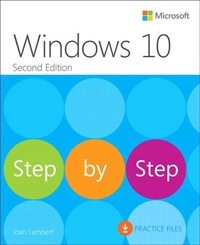
Windows 10 Step by Step
2nd Edition
Published on 20. March 2018
Book
Paperback/Softback
640 pages
978-1-5093-0672-5 (ISBN)
Description
The quick way to learn today's Windows 10!
This is learning made easy. Get more done quickly with the newest version of Windows 10. Jump in wherever you need answers-brisk lessons and colorful screenshots show you exactly what to do, step by step.
Do what you want to do with Windows 10!
Explore fun and functional improvements in the newest version
Customize your sign-in and manage connections
Quickly find files on your computer or in the cloud
Tailor your Windows 10 experience for easy access to the information and tools you want
Work more efficiently with Quick Action and other shortcuts
Get personalized assistance and manage third-party services with Cortana
Interact with the web faster and more safely with Microsoft Edge
Protect your computer, information, and privacy
This is learning made easy. Get more done quickly with the newest version of Windows 10. Jump in wherever you need answers-brisk lessons and colorful screenshots show you exactly what to do, step by step.
Do what you want to do with Windows 10!
Explore fun and functional improvements in the newest version
Customize your sign-in and manage connections
Quickly find files on your computer or in the cloud
Tailor your Windows 10 experience for easy access to the information and tools you want
Work more efficiently with Quick Action and other shortcuts
Get personalized assistance and manage third-party services with Cortana
Interact with the web faster and more safely with Microsoft Edge
Protect your computer, information, and privacy
More details
Series
Edition
2nd edition
Language
English
Place of publication
Boston
United States
Publishing group
Microsoft Press,U.S.
Target group
Professional and scholarly
Dimensions
Height: 228 mm
Width: 187 mm
Thickness: 27 mm
Weight
1043 gr
ISBN-13
978-1-5093-0672-5 (9781509306725)
Copyright in bibliographic data and cover images is held by Nielsen Book Services Limited or by the publishers or by their respective licensors: all rights reserved.
Schweitzer Classification
Other editions
Additional editions
Joan Lambert
Windows 10 Step by Step
E-Book
12/2017
2nd Edition
Microsoft Press
€39.43
Available for download
Joan Lambert
Windows 10 Step by Step
E-Book
12/2017
2nd Edition
Microsoft Press
€39.43
Available for download
Previous edition
Joan Lambert | Steve Lambert
Windows 10 Step by Step
Book
11/2015
Microsoft Press
€52.18
Article exhausted; check for reprint
Person
Joan Lambert has worked closely with Microsoft technologies since 1986, and in the training and certification industry since 1997. As President and CEO of Online Training Solutions, Inc. (OTSI), Joan guides the translation of technical information and requirements into useful, relevant, and measurable resources for people who are seeking certification of their computer skills or who simply want to get things done efficiently.
Joan is the author or coauthor of more than four dozen books about Windows and Office apps (for Windows, Mac, and iPad), five generations of Microsoft Office Specialist certification study guides, video-based training courses for SharePoint and OneNote, QuickStudy guides for Windows and Office apps, and the GO! series book for Outlook 2016.
Blissfully based in America's Finest City, Joan is a Microsoft Certified Professional, Microsoft Office Specialist Master (for all versions of Office since Office 2003), Microsoft Certified Technology Specialist (for Windows and Windows Server), Microsoft Certified Technology Associate (for Windows), Microsoft Dynamics Specialist, and Microsoft Certified Trainer.
Joan is the author or coauthor of more than four dozen books about Windows and Office apps (for Windows, Mac, and iPad), five generations of Microsoft Office Specialist certification study guides, video-based training courses for SharePoint and OneNote, QuickStudy guides for Windows and Office apps, and the GO! series book for Outlook 2016.
Blissfully based in America's Finest City, Joan is a Microsoft Certified Professional, Microsoft Office Specialist Master (for all versions of Office since Office 2003), Microsoft Certified Technology Specialist (for Windows and Windows Server), Microsoft Certified Technology Associate (for Windows), Microsoft Dynamics Specialist, and Microsoft Certified Trainer.
Content
Part 1: The Windows 10 environment
Introduction
1 Get started using Windows 10
2 Personalize your working environment
Part 2: Apps and files
3 Work with shortcuts and tiles
4 Work with apps and notifications
5 Explore files and folders
6 Manage folders and files
Part 3: Devices and resources
7 Manage peripheral devices
8 Manage network and storage resources
9 Get assistance from Cortana
10 Safely and efficiently browse the internet
Part 4: Behind the scenes
11 Manage user accounts and settings
12 Manage computer settings
13 Manage power and access options
14 Work more efficiently
15 Protect your computer and data
Introduction
1 Get started using Windows 10
2 Personalize your working environment
Part 2: Apps and files
3 Work with shortcuts and tiles
4 Work with apps and notifications
5 Explore files and folders
6 Manage folders and files
Part 3: Devices and resources
7 Manage peripheral devices
8 Manage network and storage resources
9 Get assistance from Cortana
10 Safely and efficiently browse the internet
Part 4: Behind the scenes
11 Manage user accounts and settings
12 Manage computer settings
13 Manage power and access options
14 Work more efficiently
15 Protect your computer and data