

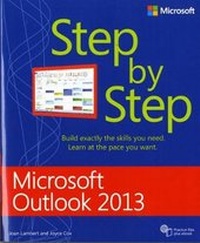
Microsoft Outlook 2013 Step by Step
Published on 24. March 2014
Book
Paperback/Softback
576 pages
978-0-7356-6909-3 (ISBN)
Description
Experience learning made easy-and quickly teach yourself how to stay organized and stay connected using Outlook 2013. With Step by Step, you set the pace-building and practicing the skills you need, just when you them! Includes downloadable practice files and a companion eBook.
Set up your email and social media accounts
Send, search, filter, and organize messages
Manage one or more calendars, and share your schedule
Help protect your inbox and outbox
Create and track tasks, to-do lists, and appointments
Set up your email and social media accounts
Send, search, filter, and organize messages
Manage one or more calendars, and share your schedule
Help protect your inbox and outbox
Create and track tasks, to-do lists, and appointments
More details
Other editions
New editions
Joan Lambert
Microsoft Outlook 2016 Step by Step
Book
02/2016
Microsoft Press
€52.18
Shipment within 10-20 days
Additional editions
Joan Lambert | Joyce Cox
Microsoft Outlook 2013 Step by Step
E-Book
03/2013
1st Edition
Microsoft Press
€30.89
Available for download
Joan Lambert | Joyce Cox
Microsoft Outlook 2013 Step by Step
E-Book
03/2013
1st Edition
Microsoft Press
€25.99
Available for download
Previous edition
Joan Lambert | Joyce Cox
Microsoft Outlook 2010 Step by Step
Book
06/2010
Microsoft Press
€47.22
Article exhausted; check for reprint
Persons
Joan Lambert has worked closely with Microsoft technologies since 1986 and in the training and certification industry since 1997. As President and CEO of Online Training Solutions, Inc. (OTSI), Joan guides the translation of technical information and requirements into useful, relevant, and measurable resources for people who are seeking certification of their computer skills or who simply want to get things done efficiently.
Joan is the author or coauthor of more than three dozen books about Windows and Office (for the Windows, Mac, and iPad platforms) and three generations of Microsoft Office Specialist certification study guides. Joan is a Microsoft Certified Professional, Microsoft Office Specialist Master (for Office 2013, Office 2010, and Office 2007), Microsoft Certified Technology Specialist (for Windows and Windows Server), Microsoft Certified Technology Associate (for Windows), Microsoft Dynamics Specialist, and Microsoft Certified Trainer.
Joyce Cox has 20+ years' experience developing training materials on technical subjects for non-technical audiences, including dozens of books about Office and Windows.
Joan is the author or coauthor of more than three dozen books about Windows and Office (for the Windows, Mac, and iPad platforms) and three generations of Microsoft Office Specialist certification study guides. Joan is a Microsoft Certified Professional, Microsoft Office Specialist Master (for Office 2013, Office 2010, and Office 2007), Microsoft Certified Technology Specialist (for Windows and Windows Server), Microsoft Certified Technology Associate (for Windows), Microsoft Dynamics Specialist, and Microsoft Certified Trainer.
Joyce Cox has 20+ years' experience developing training materials on technical subjects for non-technical audiences, including dozens of books about Office and Windows.
Content
Introduction
Basic skills
Chapter 1: Get started with Outlook 2013
Chapter 2: Explore Outlook 2013
Chapter 3: Send and receive email messages
Chapter 4: Store and access contact information
Chapter 5: Manage scheduling
Chapter 6: Track tasks
Content management
Chapter 7: Organize your Inbox
Chapter 8: Manage your calendar
Chapter 9: Manage contact records
Chapter 10: Enhance message content
Program management
Chapter 11: Customize Outlook
Chapter 12: Manage email settings
Chapter 13: Work remotely
Glossary
Keyboard shortcuts
About the authors
Basic skills
Chapter 1: Get started with Outlook 2013
Chapter 2: Explore Outlook 2013
Chapter 3: Send and receive email messages
Chapter 4: Store and access contact information
Chapter 5: Manage scheduling
Chapter 6: Track tasks
Content management
Chapter 7: Organize your Inbox
Chapter 8: Manage your calendar
Chapter 9: Manage contact records
Chapter 10: Enhance message content
Program management
Chapter 11: Customize Outlook
Chapter 12: Manage email settings
Chapter 13: Work remotely
Glossary
Keyboard shortcuts
About the authors