

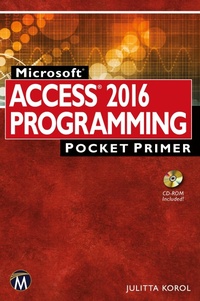
Microsoft Access 2016 Programming Pocket Primer
1st Edition
Published on 6. May 2016
Book
Paperback/Softback
212 pages
978-1-942270-81-2 (ISBN)
Description
No detailed description available for "Microsoft Access 2016 Programming Pocket Primer".
More details
Series
Edition
1. Auflage
Language
English
Place of publication
Herndon, VA
United States
Target group
College/higher education
US School Grade: College Graduate Student
Product notice
Klappenbroschur
Dimensions
Height: 229 mm
Width: 152 mm
Thickness: 13 mm
Weight
340 gr
ISBN-13
978-1-942270-81-2 (9781942270812)
Copyright in bibliographic data and cover images is held by Nielsen Book Services Limited or by the publishers or by their respective licensors: all rights reserved.
Schweitzer Classification
Other editions
Additional editions
Julitta Korol
Microsoft Access 2016 Programming Pocket Primer
E-Book
05/2016
1st Edition
Mercury Learning & Information
€34.95
Available for download
Julitta Korol
Microsoft Access 2016 Programming Pocket Primer
E-Book
03/2016
1st Edition
Mercury Learning and Information
€23.49
Available for download
Person
Korol Julitta:
Since 1993, Julitta Korol has published two dozen computer books on using and programming Microsoft Excel and Microsoft Access. She has completed professional certifications by Microsoft Corporation and the Computing Technology Industry Association (CompTIA).
Content
1. Getting Started with Access VBA.
2. Getting to Know Visual Basic Editor (VBE).
3. Access VBA Fundamentals.
4. Access VBA Built-in and Custom Functions
5. Adding Decisions to your Access VBA Programs.
6. Adding Repeating Actions to Access VBA Programs.
7. Keeping Track of Multiple Values Using Arrays.
8. Keeping Track of Multiple Values Using Object Collections.
9. Getting to Know Built-in Tools for Testing and Debugging.
Index.
2. Getting to Know Visual Basic Editor (VBE).
3. Access VBA Fundamentals.
4. Access VBA Built-in and Custom Functions
5. Adding Decisions to your Access VBA Programs.
6. Adding Repeating Actions to Access VBA Programs.
7. Keeping Track of Multiple Values Using Arrays.
8. Keeping Track of Multiple Values Using Object Collections.
9. Getting to Know Built-in Tools for Testing and Debugging.
Index.