

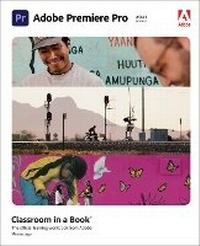
Adobe Premiere Pro Classroom in a Book (2021 release)
Will be published approx. on 1. July 2021
Book
Paperback/Softback
480 pages
978-0-13-728092-6 (ISBN)
Description
The fastest, easiest, most comprehensive way to learn Adobe Premiere Pro Classroom in a Book (R), the best-selling series of hands-on software training workbooks, offers what no other book or training program does-an official training series from Adobe, developed with the support of Adobe product experts.
Adobe Premiere Pro Classroom in a Book (2021 release) contains 17 lessons that cover the basics and beyond, providing countless tips and techniques to help you become more productive with the program. You can follow the book from start to finish or choose only those lessons that interest you.
Purchase of this book includes valuable online features. Follow the instructions in the book's "Getting Started" section to unlock access to:
Downloadable lesson files you need to work through the projects in the book
DVD containing the lesson files are included with the print book
Web Edition containing the complete text of the book that walk you through the lessons step by step
What you need to use this book: Adobe Premiere Pro (2021 release) software, for either Windows or macOS. (Software not included.)
Note: Classroom in a Book does not replace the documentation, support, updates, or any other benefits of being a registered owner of Adobe Premiere Pro software.
Adobe Premiere Pro Classroom in a Book (2021 release) contains 17 lessons that cover the basics and beyond, providing countless tips and techniques to help you become more productive with the program. You can follow the book from start to finish or choose only those lessons that interest you.
Purchase of this book includes valuable online features. Follow the instructions in the book's "Getting Started" section to unlock access to:
Downloadable lesson files you need to work through the projects in the book
DVD containing the lesson files are included with the print book
Web Edition containing the complete text of the book that walk you through the lessons step by step
What you need to use this book: Adobe Premiere Pro (2021 release) software, for either Windows or macOS. (Software not included.)
Note: Classroom in a Book does not replace the documentation, support, updates, or any other benefits of being a registered owner of Adobe Premiere Pro software.
More details
Series
Language
English
Place of publication
Boston
United States
Publishing group
Pearson Education (US)
Target group
Professional and scholarly
Dimensions
Height: 230 mm
Width: 188 mm
Thickness: 24 mm
Weight
900 gr
ISBN-13
978-0-13-728092-6 (9780137280926)
Copyright in bibliographic data and cover images is held by Nielsen Book Services Limited or by the publishers or by their respective licensors: all rights reserved.
Schweitzer Classification
Other editions
New editions
Book
10/2022
1st Edition
Addison Wesley
€59.91
Shipment within 15-20 days
Additional editions
E-Book
06/2021
1st Edition
Addison Wesley
€47.49
Available for download
E-Book
06/2021
1st Edition
Addison Wesley
€56.99
Available for download
Previous edition
Book
07/2020
Addison Wesley
€56.00
Shipment within 15-20 days
Person
Maxim Jago is an Adobe Master Trainer, award-winning writer-director, consultant Futurist, and the author of several editions of Adobe Premiere Pro Classroom in a Book. He speaks at film festivals and media technology events around the world, and has trained all types of editors - from schoolchildren to university professors, from ABC's top editors in Australia to the BBC's tech gurus in the UK.
Content
Getting Started
1 Touring Adobe Premiere Pro
2 Setting Up a Project
3 Importing Media
4 Organizing Media
5 Mastering the Essentials of Video Editing
6 Working with Clips and Markers
7 Adding Transitions
8 Mastering Advanced Editing Techniques
9 Putting Clips in Motion
10 Editing and Mixing Audio
11 Improving Audio
12 Adding Visual Effects
13 Applying Color Correction and Grading
14 Exploring Compositing Techniques
15 Creating New Graphics
16 Exporting Frames, Clips, and Sequences
Glossary
17 Managing Your Projects (Online)
1 Touring Adobe Premiere Pro
2 Setting Up a Project
3 Importing Media
4 Organizing Media
5 Mastering the Essentials of Video Editing
6 Working with Clips and Markers
7 Adding Transitions
8 Mastering Advanced Editing Techniques
9 Putting Clips in Motion
10 Editing and Mixing Audio
11 Improving Audio
12 Adding Visual Effects
13 Applying Color Correction and Grading
14 Exploring Compositing Techniques
15 Creating New Graphics
16 Exporting Frames, Clips, and Sequences
Glossary
17 Managing Your Projects (Online)