

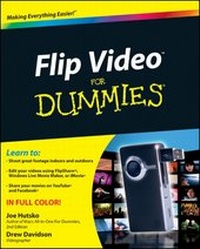
Flip Video For Dummies
1st Edition
Published on 1. October 2010
Book
Paperback/Softback
240 pages
978-0-470-87916-0 (ISBN)
Unfortunately, price unknown
Article exhausted; check different version
Description
The full-color guide to shooting great video with the Flip Video camera
The inexpensive Flip Video camera is currently one of the hottest must-have gadgets. It's portable and connects easily to any computer to transfer video you shoot onto your PC or Mac. Although the Flip Video camera comes with a quick-start guide, it lacks a how-to manual, and this full-color book fills that void! Packed with full-color screen shots throughout, Flip Video For Dummies shows you how to shoot the best possible footage in a variety of situations. You'll learn how to transfer video to your computer and then edit it and share your Flip Video movies.
* Walks you through the basics of using a Flip Video camera and connecting it to your Mac or PC
* Explains how to shoot footage indoors, outdoors, and even underwater
* Covers editing video footage using FlipShare, Windows Movie Maker, or iMovie
* Shows you how to share Flip Video movies or upload them to YouTube, Facebook, and other sites
You'll flip out when you discover just how easy a Flip Video camera can be when you have this book by your side!
The inexpensive Flip Video camera is currently one of the hottest must-have gadgets. It's portable and connects easily to any computer to transfer video you shoot onto your PC or Mac. Although the Flip Video camera comes with a quick-start guide, it lacks a how-to manual, and this full-color book fills that void! Packed with full-color screen shots throughout, Flip Video For Dummies shows you how to shoot the best possible footage in a variety of situations. You'll learn how to transfer video to your computer and then edit it and share your Flip Video movies.
* Walks you through the basics of using a Flip Video camera and connecting it to your Mac or PC
* Explains how to shoot footage indoors, outdoors, and even underwater
* Covers editing video footage using FlipShare, Windows Movie Maker, or iMovie
* Shows you how to share Flip Video movies or upload them to YouTube, Facebook, and other sites
You'll flip out when you discover just how easy a Flip Video camera can be when you have this book by your side!
More details
Product info
PB
Edition
1., Auflage
Language
English
Place of publication
United States
Publishing group
John Wiley & Sons Inc
Illustrations
Photos: 0 B&W, 25 Color; Screen captures: 0 B&W, 100 Color
Dimensions
Height: 23.3 cm
Width: 19 cm
Thickness: 1.3 cm
Weight
553 gr
ISBN-13
978-0-470-87916-0 (9780470879160)
Schweitzer Classification
Other editions
Additional editions
Persons
Joe Hutsko is a technology enthusiast and journalist who writes about high-tech gadgets, gear, and video games.
Drew Davidson is a professional editor and cameraman. His video work is represented by Getty Images.
Drew Davidson is a professional editor and cameraman. His video work is represented by Getty Images.
Content
Introduction.
Part I: Getting to Know Your Flip.
Chapter 1: Touring Flip Models and Features.
Chapter 2: Adjusting Flip Settings.
Chapter 3: Maintaining, Upgrading, and Troubleshooting Your Flip.
Part II: Putting Your Flip to Work.
Chapter 4: Recording and Viewing Videos.
Chapter 5: Transferring Video to Your Computer.
Part III: Creating and Sharing Movies with FlipShare.
Chapter 6: Getting Familiar with FlipShare.
Chapter 7: Creating Movies, Snapshots, and Photo Slideshows.
Chapter 8: Creating Video E-Mails, Greeting Cards, and DVDs.
Chapter 9: Uploading Your Creations to the Web.
Part IV: Editing and Sharing Movies with Mac and Windows Programs.
Chapter 10: Making Movies with iMovie.
Chapter 11: Making Movies with Windows Live Movie Maker.
Part V: The Part of Tens.
Chapter 12: Ten Super Shooting Tips.
Chapter 13: Ten Excellent Editing Tips.
Index.
Part I: Getting to Know Your Flip.
Chapter 1: Touring Flip Models and Features.
Chapter 2: Adjusting Flip Settings.
Chapter 3: Maintaining, Upgrading, and Troubleshooting Your Flip.
Part II: Putting Your Flip to Work.
Chapter 4: Recording and Viewing Videos.
Chapter 5: Transferring Video to Your Computer.
Part III: Creating and Sharing Movies with FlipShare.
Chapter 6: Getting Familiar with FlipShare.
Chapter 7: Creating Movies, Snapshots, and Photo Slideshows.
Chapter 8: Creating Video E-Mails, Greeting Cards, and DVDs.
Chapter 9: Uploading Your Creations to the Web.
Part IV: Editing and Sharing Movies with Mac and Windows Programs.
Chapter 10: Making Movies with iMovie.
Chapter 11: Making Movies with Windows Live Movie Maker.
Part V: The Part of Tens.
Chapter 12: Ten Super Shooting Tips.
Chapter 13: Ten Excellent Editing Tips.
Index.