

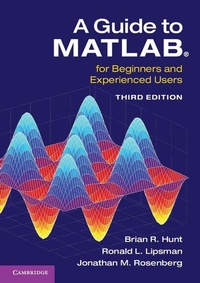
A Guide to MATLAB (R)
For Beginners and Experienced Users
3rd Edition
Published on 21. August 2014
Book
Paperback/Softback
330 pages
978-1-107-66222-3 (ISBN)
Description
Now in its third edition, this outstanding textbook explains everything you need to get started using MATLAB (R). It contains concise explanations of essential MATLAB commands, as well as easily understood instructions for using MATLAB's programming features, graphical capabilities, simulation models, and rich desktop interface. MATLAB 8 and its new user interface is treated extensively in the book. New features in this edition include: a complete treatment of MATLAB's publish feature; new material on MATLAB graphics, enabling the user to master quickly the various symbolic and numerical plotting routines; and a robust presentation of MuPAD (R) and how to use it as a stand-alone platform. The authors have also updated the text throughout, reworking examples and exploring new applications. The book is essential reading for beginners, occasional users and experienced users wishing to brush up their skills. Further resources are available from the authors' website at www-math.umd.edu/schol/a-guide-to-matlab.html.
Reviews / Votes
Review of previous edition: 'Major highlights of the book are completely transparent examples of classical yet always intriguing mathematical, statistical, engineering, economics, and physics problems. In addition, the book explains a seamless use with Microsoft Word for integrating MATLAB (R) outputs with documents, reports, presentations, or other online processes. Advanced topics with examples include: Monte Carlo simulation, population dynamics, and linear programming. ... an outstanding textbook, and, likewise, should be an integral part of the technical reference shelf for most IT professionals. It is a great resource for wherever MATLAB (R) is available!' ACM Ubiquity Review of previous edition: 'This is a short, focused introduction to MATLAB (R), a comprehensive software system for mathematical and technical computing. For the beginner it explains everything needed to start using MATLAB (R), while experienced users ... will find much useful information here.' L'enseignement mathematiqueMore details
Edition
3rd Revised edition
Language
English
Place of publication
Cambridge
United Kingdom
Target group
College/higher education
Professional and scholarly
Edition type
Revised edition
Product notice
Paperback (trade)
Illustrations
Worked examples or Exercises; 25 Tables, black and white; 80 Halftones, unspecified; 85 Line drawings, unspecified
Dimensions
Height: 244 mm
Width: 170 mm
Thickness: 18 mm
Weight
578 gr
ISBN-13
978-1-107-66222-3 (9781107662223)
Copyright in bibliographic data and cover images is held by Nielsen Book Services Limited or by the publishers or by their respective licensors: all rights reserved.
Schweitzer Classification
Other editions
Additional editions
E-Book
08/2014
Cambridge University Press
€44.49
Available for download
Brian R. Hunt | Ronald L. Lipsman | Jonathan M. Rosenberg
A Guide to MATLAB (R)
For Beginners and Experienced Users
E-Book
08/2014
3rd Edition
Cambridge University Press
€52.99
Available for download
Previous edition
Brian R. Hunt | Ronald L. Lipsman | Jonathan M. Rosenberg
A Guide to MATLAB
For Beginners and Experienced Users
Book
06/2006
2nd Edition
Cambridge University Press
€49.51
Article exhausted; check for reprint
Persons
Brian R. Hunt is a Professor in the Department of Mathematics and the Institute for Physical Science and Technology at the University of Maryland. Ronald L. Lipsman is Professor Emeritus of Mathematics at the University of Maryland. Jonathan M. Rosenberg is Ruth M. Davis Professor of Mathematics at the University of Maryland.
Content
Preface; 1. Getting started; 2. MATLAB basics; 3. Interacting with MATLAB; Practice Set A. Algebra and arithmetic; 4. Beyond the basics; 5. MATLAB graphics; 6. MATLAB programming; 7. Publishing and M-books; Practice Set B. Math, graphics, and programming; 8. MuPAD; 9. Simulink; 10. GUIs; 11. Applications; Practice Set C. Developing your MATLAB skills; 12. Troubleshooting; Solutions to the practice sets; Glossary; Index.