

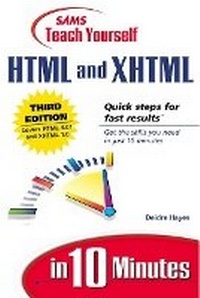
Sams Teach Yourself HTML and XHTML in 10 Minutes
3rd Edition
Published on 21. September 2001
Book
Paperback/Softback
256 pages
978-0-672-32254-9 (ISBN)
Description
Sams Teach Yourself HTML & XHTML in 10 Minutes, Third Edition is a compact, task-oriented tutorial that shows the beginning Web page author how to perform the most common tasks involved in designing, creating, publishing, and administering Web pages and sites.
The book covers only those HTML tags and technologies that are likely to be used on a beginner's Web page, and it is organized in a logical step-by-step order that reflects the natural progression a new Web page author will follow in developing a Web site.
This edition of the book will be thoroughly revised to make it more accessible for the beginning Windows or Macintosh user, to include more easily accessible reference material, and to refine the book's examples
The book covers only those HTML tags and technologies that are likely to be used on a beginner's Web page, and it is organized in a logical step-by-step order that reflects the natural progression a new Web page author will follow in developing a Web site.
This edition of the book will be thoroughly revised to make it more accessible for the beginning Windows or Macintosh user, to include more easily accessible reference material, and to refine the book's examples
More details
Edition
3rd edition
Language
English
Place of publication
Indianapolis
United States
Publishing group
Pearson Education (US)
Target group
College/higher education
Dimensions
Width: 209 mm
Thickness: 16 mm
Weight
291 gr
ISBN-13
978-0-672-32254-9 (9780672322549)
Copyright in bibliographic data and cover images is held by Nielsen Book Services Limited or by the publishers or by their respective licensors: all rights reserved.
Schweitzer Classification
Other editions
New editions
Deidre Hayes
Sams Teach Yourself HTML in 10 Minutes
Book
05/2006
4th Edition
Sams Publishing
€14.84
Article exhausted; check for reprint
Previous edition
Deidre Hayes
Sams Teach Yourself HTML 4 in 10 Minutes
Book
09/1999
2nd Edition
Sams Publishing
€13.61
Article exhausted; check for reprint
Person
Deidre Hayes is an information architect with a Web services group that created and manages a very successful corporate intranet. She is continually looking for ways to increase productivity with online workflow technologies and has spoken to national audiences on her favorite Web-related topics: information design and usability. She is a member of the Society for Technical Communications, the Usability Professionals Association, and the HTML Writers' Guild.
Content
Introduction.
1. What's It All About?
What Is the Internet? What Is HTML? Then, What's XHTML? How Do They Work? Getting Connected.
2. Creating Your First Page.
Getting Started. HTML Required Elements. Saving and Viewing an HTML Page. How Browsers Work. XHTML Required Elements. Don't Forget the Basics.
3. Adding Text and More.
Paragraphs. Text Emphasis. Headings. Special Characters. Math and Science Notations. English Isn't the Only Language. Meta Tags.
4. Linking Text and Documents.
What Is a URL? Hyperlinks. Linking to Other Files and E-mail. Linking Within the Same Page.
5. Adding Your Own Style.
Style Sheets. Defining the Rules. Applying Styles. Formatting Text with Styles. Adding Lines.
6. Creating Lists.
Types of Lists. Bulleted (Unordered) Lists. Numbered (Ordered) Lists. Definition Lists.
7. Creating Tables.
Simple Tables. Formatting Tables. Advanced Tables. Using Tables for Layout.
8. Adding Images.
Adding Images. Adding Alternate Text. Image Attributes. Using Images as Links. Image Etiquette.
9. Mapping Images.
What Are Image Maps? Creating Client-Side Image Maps. Adding Text Links for Older Browsers. Creating a Separate Map File.
10. Creating Frames.
Simple Frames. Nested Frames. Linking Between Frames. The Two Biggest Problems with Frames. Using Frames Effectively.
11. Creating Forms.
Creating Forms. Form Fields. Receiving Form Data.
12. Making It Sing: Sound and Other Multimedia.
Adding Sound and Video. Finding Plug-ins
13. Designing with HTML.
Design Basics. Layout, Content, and Navigation. Fonts and Colors. Images.
14. Creating Active Web Pages.
What Are Active Web Pages? Java and ActiveX. JavaScript and VBScript. DHTML.
15. Web Page Authoring Tools.
Why Use a Tool? Microsoft FrontPage. Macromedia Dreamweaver. Other Popular Web Tools.
16. Making a Name for Yourself.
Web Hosting. Search Pages and Indexes. Adding Your Web Site to the Search Engine. Advertising.
17. XML and the Future of the Internet.
The Future of the Internet. What Is XML? Planning for the Future.
Appendix A. XHTML Quick Reference.
Required Elements. Text Phrases and Paragraphs. Text Formatting Elements. Lists. Links. Tables. Frames. Embedded Content. Style. Forms. Scripts. Common Attributes and Events.
Appendix B. Style Sheet Quick Reference.
Background. Border. Text. List. Page Properties. Table Properties. Positioning.
Index.
1. What's It All About?
What Is the Internet? What Is HTML? Then, What's XHTML? How Do They Work? Getting Connected.
2. Creating Your First Page.
Getting Started. HTML Required Elements. Saving and Viewing an HTML Page. How Browsers Work. XHTML Required Elements. Don't Forget the Basics.
3. Adding Text and More.
Paragraphs. Text Emphasis. Headings. Special Characters. Math and Science Notations. English Isn't the Only Language. Meta Tags.
4. Linking Text and Documents.
What Is a URL? Hyperlinks. Linking to Other Files and E-mail. Linking Within the Same Page.
5. Adding Your Own Style.
Style Sheets. Defining the Rules. Applying Styles. Formatting Text with Styles. Adding Lines.
6. Creating Lists.
Types of Lists. Bulleted (Unordered) Lists. Numbered (Ordered) Lists. Definition Lists.
7. Creating Tables.
Simple Tables. Formatting Tables. Advanced Tables. Using Tables for Layout.
8. Adding Images.
Adding Images. Adding Alternate Text. Image Attributes. Using Images as Links. Image Etiquette.
9. Mapping Images.
What Are Image Maps? Creating Client-Side Image Maps. Adding Text Links for Older Browsers. Creating a Separate Map File.
10. Creating Frames.
Simple Frames. Nested Frames. Linking Between Frames. The Two Biggest Problems with Frames. Using Frames Effectively.
11. Creating Forms.
Creating Forms. Form Fields. Receiving Form Data.
12. Making It Sing: Sound and Other Multimedia.
Adding Sound and Video. Finding Plug-ins
13. Designing with HTML.
Design Basics. Layout, Content, and Navigation. Fonts and Colors. Images.
14. Creating Active Web Pages.
What Are Active Web Pages? Java and ActiveX. JavaScript and VBScript. DHTML.
15. Web Page Authoring Tools.
Why Use a Tool? Microsoft FrontPage. Macromedia Dreamweaver. Other Popular Web Tools.
16. Making a Name for Yourself.
Web Hosting. Search Pages and Indexes. Adding Your Web Site to the Search Engine. Advertising.
17. XML and the Future of the Internet.
The Future of the Internet. What Is XML? Planning for the Future.
Appendix A. XHTML Quick Reference.
Required Elements. Text Phrases and Paragraphs. Text Formatting Elements. Lists. Links. Tables. Frames. Embedded Content. Style. Forms. Scripts. Common Attributes and Events.
Appendix B. Style Sheet Quick Reference.
Background. Border. Text. List. Page Properties. Table Properties. Positioning.
Index.