

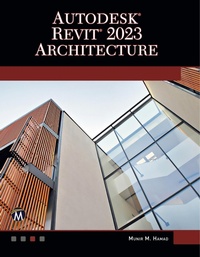
Autodesk (R) Revit (R) 2023 Architecture
1st Edition
Will be published approx. on 8. November 2022
Book
Paperback/Softback
574 pages
978-1-68392-844-7 (ISBN)
Description
No detailed description available for "Autodesk® Revit® 2023 Architecture".
More details
Edition
1. Auflage
Language
English
Place of publication
Herndon, VA
United States
Target group
Professional and scholarly
US School Grade: College Graduate Student
Product notice
Klappenbroschur
Illustrations
Includes Disc
Dimensions
Height: 229 mm
Width: 178 mm
Thickness: 32 mm
Weight
999 gr
ISBN-13
978-1-68392-844-7 (9781683928447)
Copyright in bibliographic data and cover images is held by Nielsen Book Services Limited or by the publishers or by their respective licensors: all rights reserved.
Schweitzer Classification
Other editions
Additional editions
Munir Hamad
Autodesk (R) Revit (R) 2023 Architecture
E-Book
08/2022
1st Edition
Mercury Learning & Information
€198.99
Available for download
Munir Hamad
Autodesk® Revit® 2023 Architecture
E-Book
08/2022
1st Edition
Mercury Learning and Information
€85.99
Available for download
Person
Munir Hamad is an Autodesk(R) Approved Instructor and certified Autodesk AutoCAD Master, who has authored several AutoCAD titles and taught various levels of AutoCAD training.
Content
1: Introduction to Revit 2023
2: How to Draw and Modify in Revit
3: Project Preparation
4: All You Need to Know about Walls
5: Inserting Doors and Windows
6: Creating and Controlling Curtain Walls
7: Creating Floors
8: Creating Roofs
9: Components & Ceiling
10: Creating Stairs, Ramps, and Railings
11: Creating and Manipulating Views
12: Annotation and Legends
13: Visualize in Revit and Printing
14: Creating Schedules
15: Project Phasing, Design Options, and Path of Travel
16: Toposurfaces in Revit
17: Creating Rooms and Areas
18: Tagging and Detailing
19: Creating Groups and Revit Links
20: Importing and Exporting Files in Revit
21: Creating Masses in Revit
22: Customizing Walls, Roofs, Floors, & Compound Ceilings
23: Creating Families in Revit
24: Customizing Doors, Windows, and Railing Families
25: Worksets and Shared Views
Index
2: How to Draw and Modify in Revit
3: Project Preparation
4: All You Need to Know about Walls
5: Inserting Doors and Windows
6: Creating and Controlling Curtain Walls
7: Creating Floors
8: Creating Roofs
9: Components & Ceiling
10: Creating Stairs, Ramps, and Railings
11: Creating and Manipulating Views
12: Annotation and Legends
13: Visualize in Revit and Printing
14: Creating Schedules
15: Project Phasing, Design Options, and Path of Travel
16: Toposurfaces in Revit
17: Creating Rooms and Areas
18: Tagging and Detailing
19: Creating Groups and Revit Links
20: Importing and Exporting Files in Revit
21: Creating Masses in Revit
22: Customizing Walls, Roofs, Floors, & Compound Ceilings
23: Creating Families in Revit
24: Customizing Doors, Windows, and Railing Families
25: Worksets and Shared Views
Index