

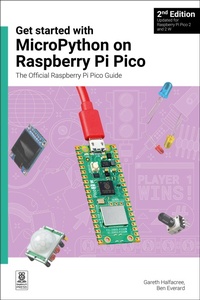
Get started with MicroPython on Raspberry Pi Pico
The Official Raspberry Pi Pico Guide
2nd Edition
Will be published approx. on 25. June 2024
Book
Paperback/Softback
192 pages
978-1-912047-29-1 (ISBN)
Description
Microcontrollers, like the RP2350 chip at the heart of Raspberry Pi Pico 2, are computers stripped back to their bare essentials. You don't use monitors or keyboards with them - instead, you program them over USB to take their input from (and send their output to) on-board input/output pins.
Using these programmable connections, you can light LEDs, make noises, send text to screens, and much more. In Get started with MicroPython on Raspberry Pi Pico 2nd Edition, you will learn how to use the beginner-friendly MicroPython language to write programs, and you'll connect up hardware to make your Raspberry Pi Pico interact with the world around it. Using these skills, you can create your own electromechanical projects.
Fully updated for Raspberry Pi Pico 2 and 2 W, as well as the latest version of MicroPython, this book shows you how to:
Get started with Raspberry Pi Pico 2 and Pico 2 W, as well as the original Pico and Pico W
Work with various electronic components
Create your own programmable electronic contraptions
Turn Pico 2 W into a network-connected node for the Internet of Things
Link your Pico 2 W to your smartphone, tablet, or another Pico 2 W with Bluetooth Low Energy (BLE)
Whether you're using Raspberry Pi Pico for a home project, industrial automation, or learning (or teaching!) electronics and programming, this book will show you how.
Using these programmable connections, you can light LEDs, make noises, send text to screens, and much more. In Get started with MicroPython on Raspberry Pi Pico 2nd Edition, you will learn how to use the beginner-friendly MicroPython language to write programs, and you'll connect up hardware to make your Raspberry Pi Pico interact with the world around it. Using these skills, you can create your own electromechanical projects.
Fully updated for Raspberry Pi Pico 2 and 2 W, as well as the latest version of MicroPython, this book shows you how to:
Get started with Raspberry Pi Pico 2 and Pico 2 W, as well as the original Pico and Pico W
Work with various electronic components
Create your own programmable electronic contraptions
Turn Pico 2 W into a network-connected node for the Internet of Things
Link your Pico 2 W to your smartphone, tablet, or another Pico 2 W with Bluetooth Low Energy (BLE)
Whether you're using Raspberry Pi Pico for a home project, industrial automation, or learning (or teaching!) electronics and programming, this book will show you how.
More details
Edition
2nd New edition
Language
English
Place of publication
Cambridge
United Kingdom
Edition type
New edition
Product notice
Paperback (UK-trade)
Dimensions
Height: 230 mm
Width: 152 mm
Thickness: 10 mm
Weight
376 gr
ISBN-13
978-1-912047-29-1 (9781912047291)
Copyright in bibliographic data and cover images is held by Nielsen Book Services Limited or by the publishers or by their respective licensors: all rights reserved.
Schweitzer Classification
Other editions
Additional editions
Gareth Halfacree | Ben Everard
Get started with MicroPython on Raspberry Pi Pico
The Official Raspberry Pi Pico Guide
E-Book
06/2024
2nd Edition
Raspberry Pi Press
€5.49
Available for download
Previous edition
Gareth Halfacree | Ben Everard
Get Started with MicroPython on Raspberry Pi Pico
Book
01/2021
Raspberry Pi Press
€32.38
Article exhausted; check for reprint
Persons
Gareth Halfacree is a freelance technology journalist, writer, and former system administrator in the education sector. With a passion for open-source software and hardware, he was an early adopter of the Raspberry Pi platform and has written several publications on its capabilities and flexibility. He can be found on Mastodon as @ghalfacree@mastodon.social or via his website at freelance.halfacree.co.uk. Ben Everard is a geek who has stumbled into a career that lets him play with new hardware. As the editor of HackSpace magazine (hsmag.cc), he spends more time than he really should experimenting with the latest (and not-so latest) DIY tech. He lives in Bristol with his wife and two daughters in a house that's slowly filling up with electronics equipment and 3D printers.
Content
Chapter 1: Get to know your Raspberry Pi Pico
Chapter 2: Programming with MicroPython
Chapter 3: Physical computing
Chapter 4: Physical computing with Raspberry Pi Pico
Chapter 5: Traffic light controller
Chapter 6: Reaction game
Chapter 7: Burglar alarm
Chapter 8: Temperature gauge
Chapter 9: Data logger
Chapter 10: Digital communication protocols: I2C and SPI
Chapter 11: Wi-Fi connectivity with Pico W
Chapter 12: Bluetooth connectivity with Pico W
Appendix A: Raspberry Pi Pico specifications
Appendix B: Pinout guide
Appendix C: Programmable I/O
Chapter 2: Programming with MicroPython
Chapter 3: Physical computing
Chapter 4: Physical computing with Raspberry Pi Pico
Chapter 5: Traffic light controller
Chapter 6: Reaction game
Chapter 7: Burglar alarm
Chapter 8: Temperature gauge
Chapter 9: Data logger
Chapter 10: Digital communication protocols: I2C and SPI
Chapter 11: Wi-Fi connectivity with Pico W
Chapter 12: Bluetooth connectivity with Pico W
Appendix A: Raspberry Pi Pico specifications
Appendix B: Pinout guide
Appendix C: Programmable I/O