

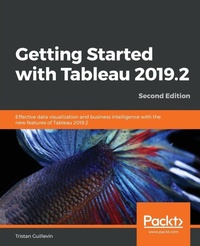
Getting Started with Tableau 2019.2
Effective data visualization and business intelligence with the new features of Tableau 2019.2
2nd Edition
Published on 14. June 2019
Book
Paperback/Softback
260 pages
978-1-83855-306-7 (ISBN)
Description
Leverage the power of Tableau 2019.2's new features to create impactful data visualization
Key Features
Discover the latest features of Tableau 2019.2
Create enterprise-grade dashboards and reports to communicate your insights effectively
Get started with Tableau by understanding its core functionalities
Book DescriptionTableau is one of the leading data visualization tools and is regularly updated with new functionalities and features. The latest release, Tableau 2019.2, promises new and advanced features related to visual analytics, reporting, dashboarding, and a host of other data visualization aspects. Getting Started with Tableau 2019.2 will get you up to speed with these additional functionalities.
The book starts by highlighting the new functionalities of Tableau 2019.2, providing concrete examples of how to use them. However, if you're new to Tableau, you won't have to worry as the book also covers the major aspects of Tableau with relevant examples. You'll learn how to connect to data, build a data source, visualize your data, build a dashboard, and even share data online. In the concluding chapters, you'll delve into advanced techniques such as creating a cross-database join and data blending.
By the end of this book, you will be able to use Tableau effectively to create quick, cost-effective, and business-efficient Business Intelligence (BI) solutions.What you will learn
Discover new functionalities such as 'Ask Data', the new way to interact with your data using natural language
Connect tables and make transformations such as pivoting the field and splitting columns
Build an efficient data source for analysis
Design insightful data visualization using different mark types and properties
Develop powerful dashboards and stories
Share your work and interact with Tableau Server
Use Tableau to explore your data and find new insights
Explore Tableau s advanced features and gear up for upcoming challenges
Who this book is forExisting Tableau users and BI professionals who want to get up to speed with what's new in Tableau 2019 will find this beginner-level book to be a very useful resource. Some experience of Tableau is assumed, however, the book also features introductory concepts, which even beginners can take advantage of.
Key Features
Discover the latest features of Tableau 2019.2
Create enterprise-grade dashboards and reports to communicate your insights effectively
Get started with Tableau by understanding its core functionalities
Book DescriptionTableau is one of the leading data visualization tools and is regularly updated with new functionalities and features. The latest release, Tableau 2019.2, promises new and advanced features related to visual analytics, reporting, dashboarding, and a host of other data visualization aspects. Getting Started with Tableau 2019.2 will get you up to speed with these additional functionalities.
The book starts by highlighting the new functionalities of Tableau 2019.2, providing concrete examples of how to use them. However, if you're new to Tableau, you won't have to worry as the book also covers the major aspects of Tableau with relevant examples. You'll learn how to connect to data, build a data source, visualize your data, build a dashboard, and even share data online. In the concluding chapters, you'll delve into advanced techniques such as creating a cross-database join and data blending.
By the end of this book, you will be able to use Tableau effectively to create quick, cost-effective, and business-efficient Business Intelligence (BI) solutions.What you will learn
Discover new functionalities such as 'Ask Data', the new way to interact with your data using natural language
Connect tables and make transformations such as pivoting the field and splitting columns
Build an efficient data source for analysis
Design insightful data visualization using different mark types and properties
Develop powerful dashboards and stories
Share your work and interact with Tableau Server
Use Tableau to explore your data and find new insights
Explore Tableau s advanced features and gear up for upcoming challenges
Who this book is forExisting Tableau users and BI professionals who want to get up to speed with what's new in Tableau 2019 will find this beginner-level book to be a very useful resource. Some experience of Tableau is assumed, however, the book also features introductory concepts, which even beginners can take advantage of.
More details
Edition
2nd Revised edition
Language
English
Place of publication
Birmingham
United Kingdom
Target group
Professional and scholarly
US School Grade: College Graduate Student
Edition type
Revised edition
Dimensions
Height: 235 mm
Width: 191 mm
Thickness: 15 mm
Weight
492 gr
ISBN-13
978-1-83855-306-7 (9781838553067)
Copyright in bibliographic data and cover images is held by Nielsen Book Services Limited or by the publishers or by their respective licensors: all rights reserved.
Schweitzer Classification
Other editions
Additional editions
Tristan Guillevin
Getting Started with Tableau 2019.2
Effective data visualization and business intelligence with the new features of Tableau 2019.2
E-Book
09/2024
2nd Edition
Packt Publishing
€23.49
Available for download
Person
Tristan Guillevin is a Business Analyst at Ogury. In 2017, he won the Iron Viz - the ultimate data visualization battle, organized by Tableau every year in Las Vegas. His passion for data visualization and for Tableau has taken him around the world. He enjoys helping people with Tableau by making webinars, conferences, and writing blog articles.
Content
Table of Contents
Catching Up with Tableau 2019
The Tableau Core
A First Dashboard and Exploration
Connecting to Data and Simple Transformations
Building an Efficient Data Source
Design Insightful Visualizations
Powerful Dashboards, Stories, and Actions
Publishing and Interacting in Tableau Server
An Introduction to Calculations
Analytics and Parameters
Advanced Data Connections
Dealing with Security
How to Keep Growing Your Skills
Catching Up with Tableau 2019
The Tableau Core
A First Dashboard and Exploration
Connecting to Data and Simple Transformations
Building an Efficient Data Source
Design Insightful Visualizations
Powerful Dashboards, Stories, and Actions
Publishing and Interacting in Tableau Server
An Introduction to Calculations
Analytics and Parameters
Advanced Data Connections
Dealing with Security
How to Keep Growing Your Skills