

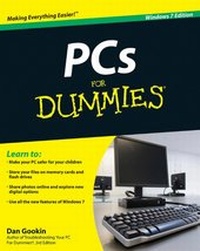
PCs For Dummies
Windows 7 Edition
12th Edition
Published on 6. November 2009
Book
Paperback/Softback
388 pages
978-0-470-46542-4 (ISBN)
Unfortunately, price unknown
Article exhausted; check different version
Description
Get the latest edition of the bestselling PC book on the planet!
What better way to make friends with your new PC than with this new edition of the bestselling PC book in the world? PCs For Dummies, Windows 7 Edition explains the latest Windows operating system in a refreshingly jargon-free way that's loaded with good humor and great help.
Discover how to make your PC safe for your kids, get in touch with your digital life, use flash drives, learn about green computing, and much more.
* Dan Gookin, author of the original DOS For Dummies, helped launch the worldwide popularity of the series; his books have been translated in 32 languages and have more than 12 million copies in print
* This guide gets you up to speed on the latest PC hardware and software and covers all the innovations and changes in Windows 7, all without the boring jargon
* Covers making your PC safe for kids, organizing your digital life, green computing, storage on memory cards and flash drives, online photo sharing, and much more
Make your life easier the Dummies way with PCs For Dummies, Windows 7 Edition.
What better way to make friends with your new PC than with this new edition of the bestselling PC book in the world? PCs For Dummies, Windows 7 Edition explains the latest Windows operating system in a refreshingly jargon-free way that's loaded with good humor and great help.
Discover how to make your PC safe for your kids, get in touch with your digital life, use flash drives, learn about green computing, and much more.
* Dan Gookin, author of the original DOS For Dummies, helped launch the worldwide popularity of the series; his books have been translated in 32 languages and have more than 12 million copies in print
* This guide gets you up to speed on the latest PC hardware and software and covers all the innovations and changes in Windows 7, all without the boring jargon
* Covers making your PC safe for kids, organizing your digital life, green computing, storage on memory cards and flash drives, online photo sharing, and much more
Make your life easier the Dummies way with PCs For Dummies, Windows 7 Edition.
More details
Other editions
Additional editions
Dan Gookin
PCs For Dummies, Windows 7 Edition
E-Book
11/2009
12th Edition
Wiley
€17.99
Available for download
Dan Gookin
PCs For Dummies, Windows 7 Edition
E-Book
10/2009
12th Edition
Wiley
€17.99
Available for download
Previous edition
Person
Dan Gookin wrote the very first For Dummies book in 1991. With more than 11 million copies in print, his books have been translated into 32 languages. PCs For Dummies, now in its 12th edition, is the bestselling beginning PC book in the world. Dan offers tips, games, and fun at www.wambooli.com.
Content
Introduction.
Part I: Hello, PC!
Chapter 1: Your Computer Won't Explode.
Chapter 2: Your Basic PC Tour.
Chapter 3: Computer Assembly.
Chapter 4: On and Off.
Chapter 5: The Windows Tour.
Part II: The Nerd's-Eye View.
Chapter 6: Deep Inside the Console.
Chapter 7: Connect This to That.
Chapter 8: PC Memory.
Chapter 9: The Mass Storage System.
Chapter 10: The PC's Display.
Chapter 11: Input This!
Chapter 12: P Is for Printer.
Chapter 13: PC Audio Abilities.
Chapter 14: PC Leftovers.
Part III: Communications, Sharing, Networking.
Chapter 15: Necessary Networking Things.
Chapter 16: Basic Networking Stuff.
Chapter 17: The Internet Quick and Dirty.
Chapter 18: Flinging Files.
Part IV: Basic Computing.
Chapter 19: Be Safe Out There.
Chapter 20: Know What a File Is.
Chapter 21: Organizing Files with Folders.
Chapter 22: Files Managed.
Chapter 23: Software Installed, Uninstalled,and Upgraded.
Part V: Your Digital Life.
Chapter 24: Your Personal Disc Factory.
Chapter 25: The Whole Digital Photography Thing.
Chapter 26: Video on the PC.
Chapter 27: Music to Your Digital Ear.
Chapter 28: Sharing Your Life Online.
Chapter 29: Kid-Safe Computing.
Part VI: The Part of Tens.
Chapter 30: Ten PC Commandments.
Chapter 31: Ten Tips from a PC Guru.
Index.
Part I: Hello, PC!
Chapter 1: Your Computer Won't Explode.
Chapter 2: Your Basic PC Tour.
Chapter 3: Computer Assembly.
Chapter 4: On and Off.
Chapter 5: The Windows Tour.
Part II: The Nerd's-Eye View.
Chapter 6: Deep Inside the Console.
Chapter 7: Connect This to That.
Chapter 8: PC Memory.
Chapter 9: The Mass Storage System.
Chapter 10: The PC's Display.
Chapter 11: Input This!
Chapter 12: P Is for Printer.
Chapter 13: PC Audio Abilities.
Chapter 14: PC Leftovers.
Part III: Communications, Sharing, Networking.
Chapter 15: Necessary Networking Things.
Chapter 16: Basic Networking Stuff.
Chapter 17: The Internet Quick and Dirty.
Chapter 18: Flinging Files.
Part IV: Basic Computing.
Chapter 19: Be Safe Out There.
Chapter 20: Know What a File Is.
Chapter 21: Organizing Files with Folders.
Chapter 22: Files Managed.
Chapter 23: Software Installed, Uninstalled,and Upgraded.
Part V: Your Digital Life.
Chapter 24: Your Personal Disc Factory.
Chapter 25: The Whole Digital Photography Thing.
Chapter 26: Video on the PC.
Chapter 27: Music to Your Digital Ear.
Chapter 28: Sharing Your Life Online.
Chapter 29: Kid-Safe Computing.
Part VI: The Part of Tens.
Chapter 30: Ten PC Commandments.
Chapter 31: Ten Tips from a PC Guru.
Index.