

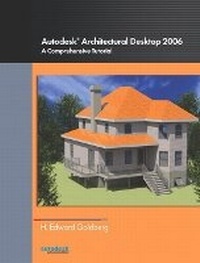
Autodesk Architectural Desktop 2006
A Comprehensive Tutorial
Published on 15. November 2005
Book
Paperback/Softback
624 pages
978-0-13-171407-6 (ISBN)
Description
Written from the perspective of a practicing architect, Autodesk Architectural Desktop 2006: A Comprehensive Tutorial is a self-paced text that introduces students to the interface, commands, and features of the Autodesk Architectural Desktop 2006 drawing program. Organized to develop skills incrementally, this text contains numerous walk-throughs, step-by-step illustrations and over 150 hands-on exercises that acquaint users with the robust features and functions of this program. Using the author's knowledge of architecture, education and the Autodesk Architectural Desktop program, this text gives students an opportunity to learn how to operate the program, improve their own productivity and apply their skills to a commercial design problem
More details
Language
English
Place of publication
Berkeley
United States
Publishing group
Pearson Education (US)
Target group
Professional and scholarly
Dimensions
Height: 212 mm
Width: 275 mm
Thickness: 29 mm
Weight
1343 gr
ISBN-13
978-0-13-171407-6 (9780131714076)
Copyright in bibliographic data and cover images is held by Nielsen Book Services Limited or by the publishers or by their respective licensors: all rights reserved.
Schweitzer Classification
Other editions
New editions
Ed V. Goldberg
Autodesk Architectural Desktop 2007
Book
10/2006
Peachpit Press Publications
€50.83
Article is exhausted; no reprint
Content
A. HOW TO USE THIS BOOK
B. DEFINITIONS
C. CONCEPTS
D. QUESTIONS AND ANSWERS ABOUT ARCHITECTURAL DESKTOP 2006
E. INSTALLING ARCHITECTURAL DESKTOP 2006
F. ABBREVIATIONS
G. THE AUTODESK ARCHITECTURAL DESKTOP 2006 INTERFACE
H. TOOL PATTERS
I. THE PROPERTIES PALETTE
J. THE CONTENT BROWSER
K. THE OPEN DRAWING MENU
L. SECTION AND TUTORIALS
1. MASSING/MASS ELEMENTS & MASS GROUPS
2. SPACE & SPACE BOUNDARY OBJECTS
3. WALLS
4. WINDOWS
5. DOORS
6. CURTAIN WALLS
7. DOOR and WINDOW ASSEMBLIES
8. STAIRS
9. RAILINGS
10. ROOF & ROOF SLAB OBJECTS
11. SLABS & SLAB OBJECTS
12. STRUCTURAL MEMEBERS, COLUMN GRIDS, GRIDS & ANCHORS
13. AEC DIMENSIONS
14. ELEVATIONS
15. SECTIONS
16. DRAWING MANAGEMENT
17. CALLOUTS
18. DETAIL COMPNENTS AND THE DETAIL COMPONENT MANAGER
19. PROPERTY SET DEFINITIONS AND PROPERTY SETS
20. SCHEDULES & SCHEDULE TAGS
21. SHEET SETS
22. MASK BLOCKS
23. MULTI-VIEW BLOCKS
24. THE DESIGN CENTER
25. AEC PROJECT STANDARDS
26. DISPLAY CTHEMES
27. The VIZ RENDERER
28. PUTTING IT ALL TOGETHER - THE SMALL COUNTRY HOUSE
B. DEFINITIONS
C. CONCEPTS
D. QUESTIONS AND ANSWERS ABOUT ARCHITECTURAL DESKTOP 2006
E. INSTALLING ARCHITECTURAL DESKTOP 2006
F. ABBREVIATIONS
G. THE AUTODESK ARCHITECTURAL DESKTOP 2006 INTERFACE
H. TOOL PATTERS
I. THE PROPERTIES PALETTE
J. THE CONTENT BROWSER
K. THE OPEN DRAWING MENU
L. SECTION AND TUTORIALS
1. MASSING/MASS ELEMENTS & MASS GROUPS
2. SPACE & SPACE BOUNDARY OBJECTS
3. WALLS
4. WINDOWS
5. DOORS
6. CURTAIN WALLS
7. DOOR and WINDOW ASSEMBLIES
8. STAIRS
9. RAILINGS
10. ROOF & ROOF SLAB OBJECTS
11. SLABS & SLAB OBJECTS
12. STRUCTURAL MEMEBERS, COLUMN GRIDS, GRIDS & ANCHORS
13. AEC DIMENSIONS
14. ELEVATIONS
15. SECTIONS
16. DRAWING MANAGEMENT
17. CALLOUTS
18. DETAIL COMPNENTS AND THE DETAIL COMPONENT MANAGER
19. PROPERTY SET DEFINITIONS AND PROPERTY SETS
20. SCHEDULES & SCHEDULE TAGS
21. SHEET SETS
22. MASK BLOCKS
23. MULTI-VIEW BLOCKS
24. THE DESIGN CENTER
25. AEC PROJECT STANDARDS
26. DISPLAY CTHEMES
27. The VIZ RENDERER
28. PUTTING IT ALL TOGETHER - THE SMALL COUNTRY HOUSE