

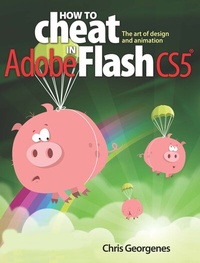
How to Cheat in Adobe Flash CS5
The Art of Design and Animation
1st Edition
Published on 4. August 2021
Book
Paperback/Softback
372 pages
978-0-240-52207-4 (ISBN)
Description
Need to solve problems quickly to develop creative projects to time and to budget? Want to hone your Flash skills so you can concentrate on your animation? Then How to Cheat in Flash is for you! Chris Georgenes shows how to work from the problem to the solution - from the viewpoint of an animator who has been commissioned to create a job and is working to a deadline and to a budget.
With his in-depth knowledge of the little-known secrets used by the pros to produce creative, professional animations, Chris is the go-to guru for designers and animators who want to create great animation, applications or motion design with Flash. Fully updated for CS5, How to Cheat in Flash CS5, is a goldmine of artistic inspiration, timesaving practical tips, tricks and step-by-step workthroughs that you'll wonder how you survived without it.
Each techniques is designed as a double-page spread so you can prop the book up behind your keyboard or next to your monitor as a visual reference while working alongside it. Many of these workthroughs are real-world client projects, with the source files supplied for you to open and explore. With these real-life professional projects you'll discover how to: bring objects to life with cool motion effects, make it rain, snow or set your world ablaze, develop flash mobile applications and many more tips and tricks not found anywhere else!
With his in-depth knowledge of the little-known secrets used by the pros to produce creative, professional animations, Chris is the go-to guru for designers and animators who want to create great animation, applications or motion design with Flash. Fully updated for CS5, How to Cheat in Flash CS5, is a goldmine of artistic inspiration, timesaving practical tips, tricks and step-by-step workthroughs that you'll wonder how you survived without it.
Each techniques is designed as a double-page spread so you can prop the book up behind your keyboard or next to your monitor as a visual reference while working alongside it. Many of these workthroughs are real-world client projects, with the source files supplied for you to open and explore. With these real-life professional projects you'll discover how to: bring objects to life with cool motion effects, make it rain, snow or set your world ablaze, develop flash mobile applications and many more tips and tricks not found anywhere else!
Reviews / Votes
"All new content and cheats on ActionScript and MotionEditor are included in a pick from veteran Flash animator who packs in a range of Flash animation techniques. No Flash or animation computer collection should be without this!"--BookwatchMore details
Language
English
Place of publication
Oxford
United Kingdom
Publishing group
Taylor & Francis Ltd
Target group
Professional and scholarly
Professional Practice & Development
Illustrations
850 farbige Abbildungen
850 Illustrations, color
Dimensions
Height: 248 mm
Width: 190 mm
Thickness: 29 mm
Weight
1025 gr
ISBN-13
978-0-240-52207-4 (9780240522074)
Copyright in bibliographic data and cover images is held by Nielsen Book Services Limited or by the publishers or by their respective licensors: all rights reserved.
Schweitzer Classification
Other editions
Additional editions
Book
02/2018
1st Edition
Routledge
€252.55
Shipment within 10-20 days
E-Book
10/2012
1st Edition
Routledge
€52.49
Available for download
E-Book
10/2012
1st Edition
Routledge
€52.49
Available for download
Person
Chris Georgenes is a full-time freelance artist, animator, and all-around designer for the web, CD-ROM, and television. His clients include Macromedia, LucasArts, Universal Records, Hasbro, Ogilvy, Yahoo! and AOL, to name a few. He maintains www.mudbubble.com as his online portfolio and www.keyframer.com as his Flash tutorial website. He is also a course author and instructor for sessions.edu.
Content
Design Styles; Transformation and Distortion; Masking; Motion tips & tricks; Character animation; Flash to video; Animation Examples; Working with sound; Working with Video; Interactivity; Going Mobile; Extending Flash; Time-Saving Tips