

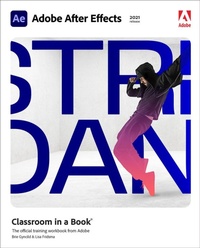
Adobe After Effects Classroom in a Book (2021 release)
Published on 8. April 2021
Book
Paperback/Softback
416 pages
978-0-13-681564-8 (ISBN)
Description
The fastest, easiest, most comprehensive way to learn Adobe After Effects
Classroom in a Book (R), the best-selling series of hands-on software training workbooks, offers what no other book or training program does -- an official training series from Adobe, developed with the support of Adobe product experts.
Adobe After Effects Classroom in a Book (2021 release) contains 15 lessons that cover the basics and beyond, providing countless tips and techniques to help you become more productive with the program. Learn how to create, manipulate, and optimize motion graphics for film, video, DVD, the web, and mobile devices. You can follow the book from start to finish or choose only those lessons that interest you.
Purchasing this book includes valuable online extras. Follow the instructions in the book's "Getting Started" section to unlock access to:
Downloadable lesson files you need to work through the projects in the book
Web Edition containing the complete text of the book, interactive quizzes, and videos that walk you through the lessons step by step
What you need to use this book: Adobe After Effects (2021 release) software, for either Windows or macOS. (Software not included.)
Note: Classroom in a Book does not replace the documentation, support, updates, or any other benefits of being a registered owner of Adobe After Effects software.
Classroom in a Book (R), the best-selling series of hands-on software training workbooks, offers what no other book or training program does -- an official training series from Adobe, developed with the support of Adobe product experts.
Adobe After Effects Classroom in a Book (2021 release) contains 15 lessons that cover the basics and beyond, providing countless tips and techniques to help you become more productive with the program. Learn how to create, manipulate, and optimize motion graphics for film, video, DVD, the web, and mobile devices. You can follow the book from start to finish or choose only those lessons that interest you.
Purchasing this book includes valuable online extras. Follow the instructions in the book's "Getting Started" section to unlock access to:
Downloadable lesson files you need to work through the projects in the book
Web Edition containing the complete text of the book, interactive quizzes, and videos that walk you through the lessons step by step
What you need to use this book: Adobe After Effects (2021 release) software, for either Windows or macOS. (Software not included.)
Note: Classroom in a Book does not replace the documentation, support, updates, or any other benefits of being a registered owner of Adobe After Effects software.
More details
Series
Language
English
Place of publication
Boston
United States
Publishing group
Pearson Education (US)
Target group
Professional and scholarly
Product notice
Paperback (trade)
Unsewn / adhesive bound
Dimensions
Height: 232 mm
Width: 190 mm
Thickness: 25 mm
Weight
821 gr
ISBN-13
978-0-13-681564-8 (9780136815648)
Copyright in bibliographic data and cover images is held by Nielsen Book Services Limited or by the publishers or by their respective licensors: all rights reserved.
Schweitzer Classification
Other editions
New editions
Lisa Fridsma | Brie Gyncild
Adobe After Effects Classroom in a Book (2022 release)
Book
03/2022
Addison Wesley
€60.65
Article not available at the moment
Additional editions
Lisa Fridsma | Brie Gyncild
Adobe After Effects Classroom in a Book (2021 release)
E-Book
04/2021
1st Edition
Addison Wesley
€52.49
Available for download
Lisa Fridsma | Brie Gyncild
Adobe After Effects Classroom in a Book (2021 release)
E-Book
03/2021
1st Edition
Addison Wesley
from
€35.99
Available for download
Previous edition

Lisa Fridsma | Brie Gyncild
Adobe After Effects Classroom in a Book (2020 release)
Book
03/2020
Addison Wesley
€55.70
Shipment within 15-20 days
Persons
Lisa Fridsma has long loved the process of teaching others to use Adobe products. She has helped create over thirty books in the Classroom in a Book series over the last two decades (including books on Photoshop, After Effects, and Acrobat), going back to her time on-staff at Adobe. She's currently the owner of Darlington Hill Productions which provides production, design, illustration, and writing publishing services.
Brie Gyncild aims to make technical information accessible to those who need it. Brie has authored The Photoshop CS5 Pocket Guide and The Photoshop Elements 8 Pocket Guide. She has also co-written The Photoshop Show Starring Russell Brown; numerous editions of the Classroom in a Book series on Photoshop, After Effects, Flash, and Acrobat; and several editions of the How to Wow series.
Brie Gyncild aims to make technical information accessible to those who need it. Brie has authored The Photoshop CS5 Pocket Guide and The Photoshop Elements 8 Pocket Guide. She has also co-written The Photoshop Show Starring Russell Brown; numerous editions of the Classroom in a Book series on Photoshop, After Effects, Flash, and Acrobat; and several editions of the How to Wow series.
Content
GETTING STARTED
1 GETTING TO KNOW THE WORKFLOW
2 CREATING A BASIC ANIMATION USING EFFECTS AND PRESETS
3 ANIMATING TEXT
4 WORKING WITH SHAPE LAYERS
5 ANIMATING A MULTIMEDIA PRESENTATION
6 ANIMATING LAYERS
7 WORKING WITH MASKS
8 DISTORTING OBJECTS WITH THE PUPPET TOOLS
9 USING THE ROTO BRUSH TOOL
10 PERFORMING COLOR CORRECTION
11 CREATING MOTION GRAPHICS TEMPLATES
12 USING 3D FEATURES
13 WORKING WITH THE 3D CAMERA TRACKER
14 ADVANCED EDITING TECHNIQUES
15 RENDERING AND OUTPUTTING
1 GETTING TO KNOW THE WORKFLOW
2 CREATING A BASIC ANIMATION USING EFFECTS AND PRESETS
3 ANIMATING TEXT
4 WORKING WITH SHAPE LAYERS
5 ANIMATING A MULTIMEDIA PRESENTATION
6 ANIMATING LAYERS
7 WORKING WITH MASKS
8 DISTORTING OBJECTS WITH THE PUPPET TOOLS
9 USING THE ROTO BRUSH TOOL
10 PERFORMING COLOR CORRECTION
11 CREATING MOTION GRAPHICS TEMPLATES
12 USING 3D FEATURES
13 WORKING WITH THE 3D CAMERA TRACKER
14 ADVANCED EDITING TECHNIQUES
15 RENDERING AND OUTPUTTING