

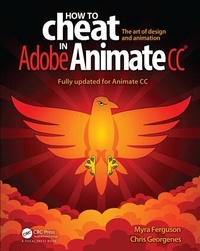
How to Cheat in Adobe Animate CC
The art of design and animation
1st Edition
Published on 13. November 2017
Book
Paperback/Softback
411 pages
978-1-4987-9738-2 (ISBN)
Description
Would you rather take months to learn every tool, every feature, and every concept in Adobe Animate or start right now making your own creations with just a few steps? Myra Ferguson is teaming up with Chris Georgenes to help you create great animation, bring objects to life with cool motion effects, and enhance your productivity in Animate CC!
How to Cheat in Adobe Animate CC is a goldmine of artistic inspiration, time-saving practical tips, and step-by-step walkthroughs. Let your sasquatch sunbathe, your coyote howl, and your lint spider see the light of day. With real-world projects and project source files, you can follow along and try for yourself. This book includes all NEW content and cheats for Animate CC, such as making cinemagraphs, creating a double exposure effect, speeding up the process of making real life doodles, simulating a bokeh effect, converting your documents to HTML5, and more.
Key Features
* Glimpse into the workflow of digital media and animation experts and apply practical techniques and tips to your own projects with source files, examples, and tutorials.
* Learn a myriad of tricks based on real-life working methods to help you work faster and more efficiently with new features in Adobe Animate CC and the Creative Cloud.
* Work from the problem to the solution to gain the best possible results from Animate.
How to Cheat in Adobe Animate CC is a goldmine of artistic inspiration, time-saving practical tips, and step-by-step walkthroughs. Let your sasquatch sunbathe, your coyote howl, and your lint spider see the light of day. With real-world projects and project source files, you can follow along and try for yourself. This book includes all NEW content and cheats for Animate CC, such as making cinemagraphs, creating a double exposure effect, speeding up the process of making real life doodles, simulating a bokeh effect, converting your documents to HTML5, and more.
Key Features
* Glimpse into the workflow of digital media and animation experts and apply practical techniques and tips to your own projects with source files, examples, and tutorials.
* Learn a myriad of tricks based on real-life working methods to help you work faster and more efficiently with new features in Adobe Animate CC and the Creative Cloud.
* Work from the problem to the solution to gain the best possible results from Animate.
More details
Language
English
Place of publication
Bosa Roca
United States
Publishing group
Taylor & Francis Inc
Target group
College/higher education
Professional and scholarly
Professional Practice & Development
Illustrations
400 farbige Abbildungen
400 Illustrations, color
Dimensions
Height: 254 mm
Width: 203 mm
Weight
1008 gr
ISBN-13
978-1-4987-9738-2 (9781498797382)
Copyright in bibliographic data and cover images is held by Nielsen Book Services Limited or by the publishers or by their respective licensors: all rights reserved.
Schweitzer Classification
Other editions
Additional editions
Book
11/2017
1st Edition
CRC Press
€171.50
Shipment within 10-20 days
Myra Ferguson | Chris Georgenes
How to Cheat in Adobe Animate CC
E-Book
11/2017
1st Edition
CRC Press
€57.99
Available for download
Myra Ferguson | Chris Georgenes
How to Cheat in Adobe Animate CC
E-Book
11/2017
CRC Press
€57.99
Available for download
Persons
Myra Ferguson, BJ, MA, delivers digital media training and solutions as a Pluralsight author and freelance multimedia designer/developer. Myra not only makes things pretty, she makes things work. Previous clients include Lynda.com, The Ritz-Carlton, and National Geographic. Myra has worked in a variety of settings including consultancy, university, and quasi-government agency environments. Myra enjoys regularly presenting the latest digital media creation tips and techniques as an Adobe Community Professional (ACP) and Adobe User Group Manager (UGM). She doesn't drink coffee but is sustained by an inordinate amount of diet soda and animal crackers.
Chris Georgenes spent a very long time as a freelance designer and animator specializing in Adobe Flash and Animate. Before that he worked for a small software company producing animated television shows for networks such as ABC and Cartoon Network. Chris spent a decade in the casual gaming arena designing and animating for Acclaim Games, Playdom, Disney Interactive, and GSN Games. He was also a weekly featured live streamer on the popular Adobe Creative Channel on Twitch. Today Chris is enjoying his position as Head of Interactive Design for a Boston based startup called Patient Discovery. Chris continues to teach animation, write articles for Adobe, evangelize as an Adobe Community Professional (ACP), and pursue his lifelong professional music career behind a set of drums almost every weekend.
Chris Georgenes spent a very long time as a freelance designer and animator specializing in Adobe Flash and Animate. Before that he worked for a small software company producing animated television shows for networks such as ABC and Cartoon Network. Chris spent a decade in the casual gaming arena designing and animating for Acclaim Games, Playdom, Disney Interactive, and GSN Games. He was also a weekly featured live streamer on the popular Adobe Creative Channel on Twitch. Today Chris is enjoying his position as Head of Interactive Design for a Boston based startup called Patient Discovery. Chris continues to teach animation, write articles for Adobe, evangelize as an Adobe Community Professional (ACP), and pursue his lifelong professional music career behind a set of drums almost every weekend.
Content
Chapter 1 What's New in Animate CC
Chapter 2 Design Styles
Chapter 3 Transformation and Distortion
Chapter 4 Masking
Chapter 5 Motion Techniques
Chapter 6 Character Animation
Chapter 7 Animation Examples
Chapter 8 Working with Sound
Chapter 9 Output Options
Chapter 10 Interactivity
Chapter 2 Design Styles
Chapter 3 Transformation and Distortion
Chapter 4 Masking
Chapter 5 Motion Techniques
Chapter 6 Character Animation
Chapter 7 Animation Examples
Chapter 8 Working with Sound
Chapter 9 Output Options
Chapter 10 Interactivity