

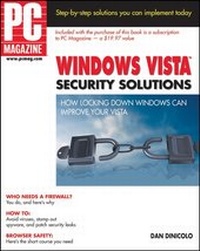
PC Magazine Windows Vista Security Solutions
1st Edition
Published on 17. January 2007
Book
Paperback/Softback
338 pages
978-0-470-04656-2 (ISBN)
Description
When you want to defend Windows Vista,it's good to know a PC Magazine expert
Unless a time machine just dropped you in the 21st century, you already know that protecting your computer is essential. Now, here's Vista--new enough that no one is sure exactly what security threats might arise to hijack your system. That's why the road map that Dan DiNicolo provides in this book is so valuable. Follow these steps, abide by the Golden Rules of Windows security, and you'll sleep better. We promise.
See at a glance what's critical for security
* Follow easy steps to implementing logon security, strong passwords, and firewall configuration
* Ensure that security holes are patched regularly
* Find out how to protect your Vista system against viruses--for free
* Recognize the difference between malware and viruses and install the right anti-spyware protection
* Implement parental controls to protect your kids online
* Explore additional layers of security, such as e-mail encryption and secure file deletion
Five Golden Rules of Windows security
* Implement user accounts properly and protect them all with strong passwords.
* Install a firewall.
* Update your system regularly to be sure you have all security patches and Service Packs installed.
* Use up-to-date anti-virus software and scan regularly for viruses.
* Use up-to-date anti-spyware protection and scan regularly for spyware and related threats.
Unless a time machine just dropped you in the 21st century, you already know that protecting your computer is essential. Now, here's Vista--new enough that no one is sure exactly what security threats might arise to hijack your system. That's why the road map that Dan DiNicolo provides in this book is so valuable. Follow these steps, abide by the Golden Rules of Windows security, and you'll sleep better. We promise.
See at a glance what's critical for security
* Follow easy steps to implementing logon security, strong passwords, and firewall configuration
* Ensure that security holes are patched regularly
* Find out how to protect your Vista system against viruses--for free
* Recognize the difference between malware and viruses and install the right anti-spyware protection
* Implement parental controls to protect your kids online
* Explore additional layers of security, such as e-mail encryption and secure file deletion
Five Golden Rules of Windows security
* Implement user accounts properly and protect them all with strong passwords.
* Install a firewall.
* Update your system regularly to be sure you have all security patches and Service Packs installed.
* Use up-to-date anti-virus software and scan regularly for viruses.
* Use up-to-date anti-spyware protection and scan regularly for spyware and related threats.
More details
Person
Dan DiNicolo holds a variety of certifications and contributes to numerous PC-related publications in the U.S., Australia, and the U.K. His work has appeared in The Official Windows Vista Magazine as well as PC Magazine. Dan operates 2000Trainers.com, an online learning site for IT professionals pursuing certifications.
Content
Acknowledgments.
Introduction.
Part I Getting Down to the Business of Securing Windows Vista.
Chapter 1 A Short Introduction to Securing Windows Vista.
Chapter 2 Implementing User Accounts and Logon Security.
Chapter 3 Implementing Password Security.
Chapter 4 Using Built-in Tools and Settings to Improve Windows Vista Security.
Part II Making Surfing Safer.
Chapter 5 Securing Your Web Browser.
Chapter 6 Implementing Parental Controls.
Part III Protecting Windows Vista Against Internet Threats.
Chapter 7 Protecting Windows Vista with a Firewall.
Chapter 8 Keeping Windows Vista Patched and Protected.
Chapter 9 Protecting Against Viruses.
Chapter 10 Fighting Malware: Protecting Against Spyware, Adware, and Browser Hijackers.
Part IV Messaging Your Way to E-mail Security.
Chapter 11 The Dark Side of Spam.
Chapter 12 Securing E-mail Messages Using Encryption and Digital Signatures.
Part V Protecting Your Files.
Chapter 13 Controlling Access to Your Personal Files.
Chapter 14 Improving File Security Using Encryption.
Chapter 15 Erasing Files and Hard Drives Securely.
Part VI Securing Your Home Network.
Chapter 16 Securing Shared Folders and Printers.
Chapter 17 Securing Windows Vista on Wireless Networks.
Part VII Appendixes.
Appendix A Reinstalling Windows Vista.
Appendix B Helpful Windows Vista Security Web Sites.
Index.
Introduction.
Part I Getting Down to the Business of Securing Windows Vista.
Chapter 1 A Short Introduction to Securing Windows Vista.
Chapter 2 Implementing User Accounts and Logon Security.
Chapter 3 Implementing Password Security.
Chapter 4 Using Built-in Tools and Settings to Improve Windows Vista Security.
Part II Making Surfing Safer.
Chapter 5 Securing Your Web Browser.
Chapter 6 Implementing Parental Controls.
Part III Protecting Windows Vista Against Internet Threats.
Chapter 7 Protecting Windows Vista with a Firewall.
Chapter 8 Keeping Windows Vista Patched and Protected.
Chapter 9 Protecting Against Viruses.
Chapter 10 Fighting Malware: Protecting Against Spyware, Adware, and Browser Hijackers.
Part IV Messaging Your Way to E-mail Security.
Chapter 11 The Dark Side of Spam.
Chapter 12 Securing E-mail Messages Using Encryption and Digital Signatures.
Part V Protecting Your Files.
Chapter 13 Controlling Access to Your Personal Files.
Chapter 14 Improving File Security Using Encryption.
Chapter 15 Erasing Files and Hard Drives Securely.
Part VI Securing Your Home Network.
Chapter 16 Securing Shared Folders and Printers.
Chapter 17 Securing Windows Vista on Wireless Networks.
Part VII Appendixes.
Appendix A Reinstalling Windows Vista.
Appendix B Helpful Windows Vista Security Web Sites.
Index.