

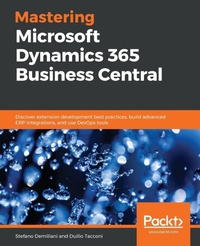
Mastering Microsoft Dynamics 365 Business Central
Discover extension development best practices, build advanced ERP integrations, and use DevOps tools
Published on 20. December 2019
Book
Paperback/Softback
770 pages
978-1-78995-125-7 (ISBN)
Description
Develop customized business management solutions with the latest features of Microsoft Dynamics 365 Business Central
Key Features
Learn Dynamics 365 Business Central, the next generation of Dynamics NAV
Explore advanced topics for handling complex integrations such as using APIs, OData, and Azure Functions
Discover best practices for developing SaaS extensions and moving existing solutions to the cloud
Book DescriptionDynamics 365 Business Central is an all-in-one business management solution, which is easy to adopt and helps you make smarter business decisions. This book is a comprehensive guide to developing solutions with Microsoft ERP (in the cloud and also on-premises). It covers all aspects of developing extensions, right from preparing a sandbox environment to deploying a complete solution.
The book starts by introducing you to the Dynamics 365 Business Central platform and the new Modern Development Environment. You'll then explore the sandbox concept, and see how to create sandboxes for development. As you advance, you'll be able to build a complete advanced solution for Dynamics 365 Business Central with AL language and Visual Studio Code. You'll then learn how to debug and deploy the extension and write automatic testing. The book will also take you through advanced topics like integration (with Azure Functions, web services, and APIs), DevOps and CI/CD techniques, and machine learning. You'll discover how Dynamics 365 Business Central can be used with Office 365 apps. Finally, you'll analyze different ways to move existing solutions to the new development model based on extensions.
By the end of this book, you'll be able to develop highly customized solutions that meet the requirements of modern businesses using Dynamics 365 Business Central.
What you will learn
Create a sandbox environment with Dynamics 365 Business Central
Handle source control management when developing solutions
Explore extension testing, debugging, and deployment
Create real-world business processes using Business Central and different Azure services
Integrate Business Central with external applications
Apply DevOps and CI/CD to development projects
Move existing solutions to the new extension-based architecture
Who this book is forIf you're a new developer looking to get started with Dynamics 365 Business Central, this book is for you. This book will also help experienced professionals enhance their knowledge and understanding of Dynamics 365 Business Central.
Key Features
Learn Dynamics 365 Business Central, the next generation of Dynamics NAV
Explore advanced topics for handling complex integrations such as using APIs, OData, and Azure Functions
Discover best practices for developing SaaS extensions and moving existing solutions to the cloud
Book DescriptionDynamics 365 Business Central is an all-in-one business management solution, which is easy to adopt and helps you make smarter business decisions. This book is a comprehensive guide to developing solutions with Microsoft ERP (in the cloud and also on-premises). It covers all aspects of developing extensions, right from preparing a sandbox environment to deploying a complete solution.
The book starts by introducing you to the Dynamics 365 Business Central platform and the new Modern Development Environment. You'll then explore the sandbox concept, and see how to create sandboxes for development. As you advance, you'll be able to build a complete advanced solution for Dynamics 365 Business Central with AL language and Visual Studio Code. You'll then learn how to debug and deploy the extension and write automatic testing. The book will also take you through advanced topics like integration (with Azure Functions, web services, and APIs), DevOps and CI/CD techniques, and machine learning. You'll discover how Dynamics 365 Business Central can be used with Office 365 apps. Finally, you'll analyze different ways to move existing solutions to the new development model based on extensions.
By the end of this book, you'll be able to develop highly customized solutions that meet the requirements of modern businesses using Dynamics 365 Business Central.
What you will learn
Create a sandbox environment with Dynamics 365 Business Central
Handle source control management when developing solutions
Explore extension testing, debugging, and deployment
Create real-world business processes using Business Central and different Azure services
Integrate Business Central with external applications
Apply DevOps and CI/CD to development projects
Move existing solutions to the new extension-based architecture
Who this book is forIf you're a new developer looking to get started with Dynamics 365 Business Central, this book is for you. This book will also help experienced professionals enhance their knowledge and understanding of Dynamics 365 Business Central.
More details
Language
English
Place of publication
Birmingham
United Kingdom
Target group
Professional and scholarly
Dimensions
Height: 235 mm
Width: 191 mm
Thickness: 42 mm
Weight
1410 gr
ISBN-13
978-1-78995-125-7 (9781789951257)
Copyright in bibliographic data and cover images is held by Nielsen Book Services Limited or by the publishers or by their respective licensors: all rights reserved.
Schweitzer Classification
Other editions
Additional editions
Stefano Demiliani | Duilio Tacconi
Mastering Microsoft Dynamics 365 Business Central
Discover extension development best practices, build advanced ERP integrations, and use DevOps tools
E-Book
09/2024
Packt Publishing
€33.99
Available for download
Persons
Stefano Demiliani is a Microsoft MVP (Most Valuable Professional) in Business Applications, a Microsoft Certified Solution Developer and Azure architect, and a long-time expert on different Microsoft technologies. He has a master's degree in computer engineering from Politecnico di Torino, he works as a CTO for EID/Navlab (one of the main Microsoft partners in Italy), and he has recently moved many customers from around the globe to the cloud. He has worked with Packt Publishing on many IT books, and he's the author of some of the most successful books in the Microsoft Dynamics world. Duilio Tacconi is a Microsoft Dynamics NAV/Microsoft Dynamics 365 Business Central Escalation Engineer at Microsoft EMEA Customer Support and Services (CSS). He joined Microsoft in 2008 after working in a customer IT department with a focus primarily on system administration and development. Despite graduating with the highest score in agricultural science in 1996, he has been on the ERP circuit since 1998 as a developer and a system implementer for several companies with Microsoft and non-Microsoft technologies. Currently, he is an SME at EMEA, one of Microsoft EMEA CSS references for Managed Service for Partners, and a three-time Iron Man finisher. Duilio lives in Cernusco Sul Naviglio (Italy) with his beloved wife, Laura, and his son, Leonardo.
Content
Table of Contents
Microsoft Dynamics 365 Business Central Overview
Mastering Modern Development Environment
Online and Container-based Sandboxes
Extension Development fundamentals
Developing a customized solution for Dynamics 365 Business Central
Advanced AL Development
Report Development with AL Language
Installing and Upgrading extensions
Debugging
Automated Tests development with AL
Source Control Management and DevOps with Dynamics 365 Business Central
Dynamics 365 Business Central APIs model
Serverless business processes with Dynamics 365 Business Central and Azure
Monitoring, scaling and CI/CD with Azure Functions
Dynamics 365 Business Central and integration with the Dynamics 365 Power Platform
Integrating Machine Learning into Dynamics 365 Business Central
Moving existing ISV solutions to the new extension model
Useful and proficient tools for AL developers
Microsoft Dynamics 365 Business Central Overview
Mastering Modern Development Environment
Online and Container-based Sandboxes
Extension Development fundamentals
Developing a customized solution for Dynamics 365 Business Central
Advanced AL Development
Report Development with AL Language
Installing and Upgrading extensions
Debugging
Automated Tests development with AL
Source Control Management and DevOps with Dynamics 365 Business Central
Dynamics 365 Business Central APIs model
Serverless business processes with Dynamics 365 Business Central and Azure
Monitoring, scaling and CI/CD with Azure Functions
Dynamics 365 Business Central and integration with the Dynamics 365 Power Platform
Integrating Machine Learning into Dynamics 365 Business Central
Moving existing ISV solutions to the new extension model
Useful and proficient tools for AL developers