

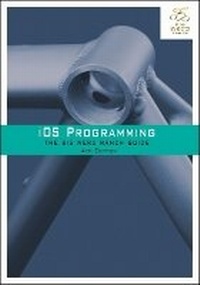
iOS Programming
The Big Nerd Ranch Guide
4th Edition
Published on 20. February 2014
Book
Paperback/Softback
560 pages
978-0-321-94205-0 (ISBN)
Description
Updated and expanded to cover iOS 7 and Xcode 5, iOS Programming: The Big Nerd Ranch Guide leads you through the essential concepts, tools, and techniques for developing iOS applications. After completing this book, you will have the know-how and the confidence you need to tackle iOS projects of your own. Based on Big Nerd Ranch's popular iOS Bootcamp course and its well-tested materials and methodology, this bestselling guide teaches iOS concepts and coding in tandem. The result is instruction that is relevant and useful.
Throughout the book, the authors explain what's important and share their insights into the larger context of the iOS platform. You get a real understanding of how iOS development works, the many features that are available, and when and where to apply what you've learned.
Here are some of the topics covered:
Xcode 5, Instruments, and Storyboards
Building interfaces using the iOS 7 aesthetic
ARC and strong and weak references
Handling touch events and gestures
Toolbars, navigation controllers, and split view controllers
Using Auto Layout to scale user interfaces
Using Dynamic Type to scale fonts
Localization and Internationalization
Block syntax and use
Saving/loading data: Archiving and Core Data
Core Location and Map Kit
Communicating with web services using JSON
Using the Model-View-Controller-Store design pattern
Throughout the book, the authors explain what's important and share their insights into the larger context of the iOS platform. You get a real understanding of how iOS development works, the many features that are available, and when and where to apply what you've learned.
Here are some of the topics covered:
Xcode 5, Instruments, and Storyboards
Building interfaces using the iOS 7 aesthetic
ARC and strong and weak references
Handling touch events and gestures
Toolbars, navigation controllers, and split view controllers
Using Auto Layout to scale user interfaces
Using Dynamic Type to scale fonts
Localization and Internationalization
Block syntax and use
Saving/loading data: Archiving and Core Data
Core Location and Map Kit
Communicating with web services using JSON
Using the Model-View-Controller-Store design pattern
More details
Edition
4th edition
Language
English
Place of publication
Indianapolis
United States
Publishing group
Pearson Education (US)
Target group
Professional and scholarly
Dimensions
Height: 100 mm
Width: 100 mm
Thickness: 100 mm
Weight
100 gr
ISBN-13
978-0-321-94205-0 (9780321942050)
Schweitzer Classification
Other editions
New editions
Book
12/2015
5th Edition
Big Nerd Ranch Guides
€45.79
Article exhausted; check for reprint
Additional editions
E-Book
02/2014
4th Edition
Big Nerd Ranch Guides
€45.99
Available for download
Previous edition
Book
03/2012
3rd Edition
Big Nerd Ranch Guides
€39.60
Article exhausted; check for reprint
Content
1. A Simple iOS Application
2. Objective-C
3. Managing Memory with ARC
4. Delegation and Core Location
5. MapKit and Text Input
6. Subclassing UIView and UIScrollView
7. View Controllers
8. Notification and Rotation
9. UITableView and UITableViewController
10. Editing UITableView
11. UINavigationController
12. Camera
13. UIPopoverController and Modal View Controllers
14. Saving, Loading, and Application States
15. Subclassing UITableViewCell
16. Core Data
17. Localization
18. NSUserDefaults
19. Touch Events and UIResponder
20. UIGestureRecognizer and UIMenuController
21. Instruments
22. Core Animation Layer
23. Controlling Animation with CAAnimation
24. UIStoryboard
25. Web Services and UIWebView
26. UISplitViewController and NSRegularExpression
27. Blocks
28. Unit Testing
29. Model-View-Controller-Store
30. Advanced MVCS
31. iCloud
2. Objective-C
3. Managing Memory with ARC
4. Delegation and Core Location
5. MapKit and Text Input
6. Subclassing UIView and UIScrollView
7. View Controllers
8. Notification and Rotation
9. UITableView and UITableViewController
10. Editing UITableView
11. UINavigationController
12. Camera
13. UIPopoverController and Modal View Controllers
14. Saving, Loading, and Application States
15. Subclassing UITableViewCell
16. Core Data
17. Localization
18. NSUserDefaults
19. Touch Events and UIResponder
20. UIGestureRecognizer and UIMenuController
21. Instruments
22. Core Animation Layer
23. Controlling Animation with CAAnimation
24. UIStoryboard
25. Web Services and UIWebView
26. UISplitViewController and NSRegularExpression
27. Blocks
28. Unit Testing
29. Model-View-Controller-Store
30. Advanced MVCS
31. iCloud