

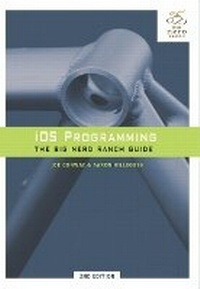
iOS Programming
The Big Nerd Ranch Guide
2nd Edition
Published on 7. July 2011
Book
Paperback/Softback
590 pages
978-0-321-77377-7 (ISBN)
Description
In this book, the world's leading Apple platform development trainers offer a complete, practical, hands-on introduction to iPhone and iPad programming. The authors walk through all the Apple tools and technologies needed to build successful iPhone/iPad/iPod touch apps, including the iOS 4.3 SDK, the Objective-C language, Xcode 4, Foundation framework, and the classes that make up the iOS UI framework. The many topics covered in this book include:
Easily setting up elegant, efficient user interfaces with UIKit
Creating effective visuals, animation, and effects with Core Graphics and Core Animation
Making the most of the iOS multi-touch event handling and accelerometer data
Building location-aware iOS applications utilizing Core Location and MapKit
Localizing applications for international use
Creating applications that capture audio and play media
Storing data in files or with Core Data
New chapters added to this edition include:
iPad-friendly interfaces, including UIPopoverController and UISplitViewController
Blocks and Categories
Instruments and Xcode's static analyzer
UIWebView and connecting with web servers
Push Notifications
iOS Programming also includes a handy Xcode Quick Reference Card that lists Xcode 4's most commonly used keyboard shortcuts.
Easily setting up elegant, efficient user interfaces with UIKit
Creating effective visuals, animation, and effects with Core Graphics and Core Animation
Making the most of the iOS multi-touch event handling and accelerometer data
Building location-aware iOS applications utilizing Core Location and MapKit
Localizing applications for international use
Creating applications that capture audio and play media
Storing data in files or with Core Data
New chapters added to this edition include:
iPad-friendly interfaces, including UIPopoverController and UISplitViewController
Blocks and Categories
Instruments and Xcode's static analyzer
UIWebView and connecting with web servers
Push Notifications
iOS Programming also includes a handy Xcode Quick Reference Card that lists Xcode 4's most commonly used keyboard shortcuts.
Reviews / Votes
"Pick up this book and turn yourself into an iPhone developer."- Dietrich Kappe, CTO Pathfinder Development
More details
Edition
2nd edition
Language
English
Place of publication
Indianapolis
United States
Publishing group
Pearson Education (US)
Target group
Professional and scholarly
Dimensions
Height: 181 mm
Width: 254 mm
Thickness: 34 mm
Weight
1128 gr
ISBN-13
978-0-321-77377-7 (9780321773777)
Copyright in bibliographic data is held by Nielsen Book Services Limited or its licensors: all rights reserved.
Schweitzer Classification
Other editions
New editions
Book
03/2012
3rd Edition
Big Nerd Ranch Guides
€39.60
Article exhausted; check for reprint
Previous edition
Book
04/2010
Big Nerd Ranch Guides
€45.79
Article exhausted; check for reprint
Persons
Joe Conway, iPhone instructor for The Big Nerd Ranch, has been writing software on the Mac platform since he was a teenager, and began consulting and training for The Big Nerd Ranch shortly after graduating from the University of Wisconsin.
Aaron Hillegass, CEO of Big Nerd Ranch, has more than 18 years of experience as a software engineer and developer trainer. He wrote the Big Nerd Ranch course on Cocoa, drawing from his experiences working at Apple and NeXT as senior trainer and curriculum developer. He is the author of Cocoa Programming for Mac OS X (Addison-Wesley), the definitive guide to Cocoa programming.
Aaron Hillegass, CEO of Big Nerd Ranch, has more than 18 years of experience as a software engineer and developer trainer. He wrote the Big Nerd Ranch course on Cocoa, drawing from his experiences working at Apple and NeXT as senior trainer and curriculum developer. He is the author of Cocoa Programming for Mac OS X (Addison-Wesley), the definitive guide to Cocoa programming.
Content
Introduction
Chapter 1: Simple iOS Application
Chapter 2: Objective-C
Chapter 3: Memory Management
Chapter 4: Delegation and Core Location
Chapter 5: Map Kit and Text input
Chapter 6: Subclassing UIView
Chapter 7: View Controllers (Low Memory Warnings)
Chapter 8: The Accelerometer
Chapter 9: Notification and Rotation
Chapter 10: UITableView and UITableViewController
Chapter 11: Editing UITableView
Chapter 12: UINavigationController
Chapter 13: Camera
Chapter 14: UIPopoverController and UISplitViewController (New)
Chapter 15: Saving, Loading and Multitasking
Chapter 16: Subclassing UITableViewCell
Chapter 17: Core Data (New)
Chapter 18: Localization
Chapter 19: Settings
Chapter 20: Touch Events and UIResponder
Chapter 21: Instruments
Chapter 22: Core Animation Layers
Chapter 23: Controlling Animation with CAAnimation
Chapter 24: Blocks and Categories (New)
Chapter 25: Web Services and UIWebView (New)
Chapter 26: UISplitViewController (New)
Chapter 27: Media Playback and Background Execution
Chapter 28: Bonjour and Web Servers (New)
Chapter 29: Push Notifications and Networking (New)
Chapter 30: Afterword
Chapter 1: Simple iOS Application
Chapter 2: Objective-C
Chapter 3: Memory Management
Chapter 4: Delegation and Core Location
Chapter 5: Map Kit and Text input
Chapter 6: Subclassing UIView
Chapter 7: View Controllers (Low Memory Warnings)
Chapter 8: The Accelerometer
Chapter 9: Notification and Rotation
Chapter 10: UITableView and UITableViewController
Chapter 11: Editing UITableView
Chapter 12: UINavigationController
Chapter 13: Camera
Chapter 14: UIPopoverController and UISplitViewController (New)
Chapter 15: Saving, Loading and Multitasking
Chapter 16: Subclassing UITableViewCell
Chapter 17: Core Data (New)
Chapter 18: Localization
Chapter 19: Settings
Chapter 20: Touch Events and UIResponder
Chapter 21: Instruments
Chapter 22: Core Animation Layers
Chapter 23: Controlling Animation with CAAnimation
Chapter 24: Blocks and Categories (New)
Chapter 25: Web Services and UIWebView (New)
Chapter 26: UISplitViewController (New)
Chapter 27: Media Playback and Background Execution
Chapter 28: Bonjour and Web Servers (New)
Chapter 29: Push Notifications and Networking (New)
Chapter 30: Afterword