

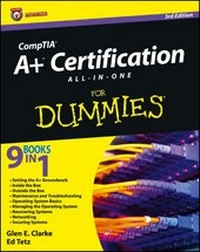
CompTIA A+ Certification All-in-One For Dummies
3rd Edition
Published on 2. October 2012
Book
Paperback/Softback
1320 pages
978-1-118-09879-0 (ISBN)
Description
Comprehensive coverage of everything you must know to pass CompTIA's A+ exam
A+ is the gateway certification into many IT careers, and interest in certification is exploding. This bestselling A+ certification guide is updated to cover the new A+ exam. It includes the new Windows coverage and reflects the revised emphasis on objectives. Nine minibooks focus individually on specific hardware and OS characteristics including installation and configuration, diagnostics, preventive maintenance, motherboard and processors, printers, networking, and fundamentals. A companion website contains the popular Dummies Test Engine test-prep software.
* A+ certification is the first step toward a variety of IT careers, and this guide is fully updated for the latest revision of the exam
* Nine minibooks cover the domains of the exam in detail, reflecting the enhanced emphasis on hardware and new Windows content
* Covers installation, configuration, and upgrading; diagnosing and troubleshooting; preventive maintenance; motherboards, processors and memory; printers; networking; and OS fundamentals
* Companion website provides the popular Dummies Test Engine, an exclusive, customizable test-prep software package now with twice as many sample test questions as previous editions
Anyone seeking CompTIA A+ certification will be better prepared with help from CompTIA A+ Certification All-in-One For Dummies, 3rd Edition.
A+ is the gateway certification into many IT careers, and interest in certification is exploding. This bestselling A+ certification guide is updated to cover the new A+ exam. It includes the new Windows coverage and reflects the revised emphasis on objectives. Nine minibooks focus individually on specific hardware and OS characteristics including installation and configuration, diagnostics, preventive maintenance, motherboard and processors, printers, networking, and fundamentals. A companion website contains the popular Dummies Test Engine test-prep software.
* A+ certification is the first step toward a variety of IT careers, and this guide is fully updated for the latest revision of the exam
* Nine minibooks cover the domains of the exam in detail, reflecting the enhanced emphasis on hardware and new Windows content
* Covers installation, configuration, and upgrading; diagnosing and troubleshooting; preventive maintenance; motherboards, processors and memory; printers; networking; and OS fundamentals
* Companion website provides the popular Dummies Test Engine, an exclusive, customizable test-prep software package now with twice as many sample test questions as previous editions
Anyone seeking CompTIA A+ certification will be better prepared with help from CompTIA A+ Certification All-in-One For Dummies, 3rd Edition.
More details
Edition
3. Auflage
Language
English
Place of publication
New York
United States
Target group
Professional and scholarly
Edition type
Revised edition
Illustrations
Illustrations
Dimensions
Height: 23.4 cm
Width: 18.6 cm
Thickness: 4.1 cm
Weight
1802 gr
ISBN-13
978-1-118-09879-0 (9781118098790)
Schweitzer Classification
Other editions
New editions
Glen E. Clarke | Edward Tetz | Timothy Warner
CompTIA A+ Certification All-in-One For Dummies
Book
08/2016
4th Edition
Wiley
€38.90
Article exhausted; check for reprint
Previous edition
Glen E. Clarke
CompTIA A+ Certification All-In-One For Dummies
Book
10/2009
2nd Edition
Wiley
€35.90
Article exhausted; check for reprint
Content
Introduction 1
Book I: Setting the A+ Groundwork 7
Chapter 1: The 2012 A+ Exams 9
Chapter 2: A+ Soft Skills 17
Chapter 3: Protecting Yourself and Your PC 33
Chapter 4: An Overview of System Components 49
Book II: Inside the Box 65
Chapter 1: Knowing Your Motherboard 67
Chapter 2: Picking Your Processor 117
Chapter 3: What to Remember about Memory 157
Chapter 4: Telling Your BIOS from Your CMOS 189
Chapter 5: Managing Storage Technology 221
Chapter 6: Working with File Systems261
Chapter 7: Working with Power 299
Book III: Outside the Box 319
Chapter 1: Describing Ports, Cables, and Connectors 321
Chapter 2: Installing and Confi guring Input Devices 349
Chapter 3: Installing and Confi guring Output Devices 385
Chapter 4: Managing Printers 407
Chapter 5: Working with Multimedia Devices 443
Chapter 6: Dealing with Laptops and Mobile Devices 459
Book IV: Maintenance and Troubleshooting 503
Chapter 1: Performing Preventive Maintenance 505
Chapter 2: Troubleshooting Procedures and Guidelines 527
Book V: Operating System Basics 559
Chapter 1: Comparison of Major Operating Systems 561
Chapter 2: Operating System Functions 581
Chapter 3: Installing and Upgrading Windows 617
Chapter 4: Managing Files and Directories 661
Chapter 5: Command Prompt Procedures 697
Chapter 6: Working with System Files and the Boot Process 721
Book VI: Managing the Operating System 737
Chapter 1: Loading and Confi guring Device Drivers 739
Chapter 2: Working with Applications 761
Chapter 3: Optimizing the Windows Environment 795
Chapter 4: Using Windows-Based Troubleshooting Utilities 833
Book VII: Recovering Systems 871
Chapter 1: Managing Error Codes and Startup Messages 873
Chapter 2: Managing Common Problems 891
Chapter 3: Preparing for Disasters with Disaster Recovery 909
Book VIII: Networking 945
Chapter 1: Down to the Networking Basics 947
Chapter 2: Understanding Common Wireless Communications 995
Chapter 3: Networking the Operating System 1025
Chapter 4: Configuring Internet Access 1093
Book IX: Securing Systems 1129
Chapter 1: Fundamentals of Security 1131
Chapter 2: Implementing Security 1167
Chapter 3: Viruses and Malicious Software 1201
Appendix: CompTIA A+ Exam Reference Matrix 1221
Index 1235
Book I: Setting the A+ Groundwork 7
Chapter 1: The 2012 A+ Exams 9
Chapter 2: A+ Soft Skills 17
Chapter 3: Protecting Yourself and Your PC 33
Chapter 4: An Overview of System Components 49
Book II: Inside the Box 65
Chapter 1: Knowing Your Motherboard 67
Chapter 2: Picking Your Processor 117
Chapter 3: What to Remember about Memory 157
Chapter 4: Telling Your BIOS from Your CMOS 189
Chapter 5: Managing Storage Technology 221
Chapter 6: Working with File Systems261
Chapter 7: Working with Power 299
Book III: Outside the Box 319
Chapter 1: Describing Ports, Cables, and Connectors 321
Chapter 2: Installing and Confi guring Input Devices 349
Chapter 3: Installing and Confi guring Output Devices 385
Chapter 4: Managing Printers 407
Chapter 5: Working with Multimedia Devices 443
Chapter 6: Dealing with Laptops and Mobile Devices 459
Book IV: Maintenance and Troubleshooting 503
Chapter 1: Performing Preventive Maintenance 505
Chapter 2: Troubleshooting Procedures and Guidelines 527
Book V: Operating System Basics 559
Chapter 1: Comparison of Major Operating Systems 561
Chapter 2: Operating System Functions 581
Chapter 3: Installing and Upgrading Windows 617
Chapter 4: Managing Files and Directories 661
Chapter 5: Command Prompt Procedures 697
Chapter 6: Working with System Files and the Boot Process 721
Book VI: Managing the Operating System 737
Chapter 1: Loading and Confi guring Device Drivers 739
Chapter 2: Working with Applications 761
Chapter 3: Optimizing the Windows Environment 795
Chapter 4: Using Windows-Based Troubleshooting Utilities 833
Book VII: Recovering Systems 871
Chapter 1: Managing Error Codes and Startup Messages 873
Chapter 2: Managing Common Problems 891
Chapter 3: Preparing for Disasters with Disaster Recovery 909
Book VIII: Networking 945
Chapter 1: Down to the Networking Basics 947
Chapter 2: Understanding Common Wireless Communications 995
Chapter 3: Networking the Operating System 1025
Chapter 4: Configuring Internet Access 1093
Book IX: Securing Systems 1129
Chapter 1: Fundamentals of Security 1131
Chapter 2: Implementing Security 1167
Chapter 3: Viruses and Malicious Software 1201
Appendix: CompTIA A+ Exam Reference Matrix 1221
Index 1235