

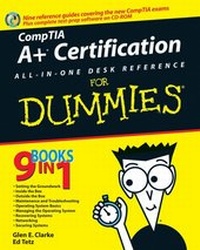
CompTIA A+ Certification All-In-One Desk Reference For Dummies
1st Edition
Published on 1. January 2007
Book
Paperback/Softback
1176 pages
978-0-471-74811-3 (ISBN)
Description
Covers CompTIA A+ exams 220-601, 220-602, 220-603, and 220-604
Here's what you need to pass the A+ Certification exam -- in one value-priced package
This book covers the A+ Essentials, IT Technician, Remote Support Technician, and Depot Technician exams in topic-specific chunks for easy review. Packed with proven tips, practice tests, and practical information that will still be handy in the real world after you've passed the exam!
All this on the bonus CD-Rom
* Dummies Test Engine, our exclusive test-prep software featuring hundreds of sample questions
* Lab manual offering hands-on exercises of test topics
* See the About the CD Appendix for details and complete system requirements
Discover how to
* Install and upgrade motherboards, memory, and processors
* Understand ports and install external devices
* Perform maintenance and diagnose problems
* Recognize exam pitfalls
* Recover from system failure
Here's what you need to pass the A+ Certification exam -- in one value-priced package
This book covers the A+ Essentials, IT Technician, Remote Support Technician, and Depot Technician exams in topic-specific chunks for easy review. Packed with proven tips, practice tests, and practical information that will still be handy in the real world after you've passed the exam!
All this on the bonus CD-Rom
* Dummies Test Engine, our exclusive test-prep software featuring hundreds of sample questions
* Lab manual offering hands-on exercises of test topics
* See the About the CD Appendix for details and complete system requirements
Discover how to
* Install and upgrade motherboards, memory, and processors
* Understand ports and install external devices
* Perform maintenance and diagnose problems
* Recognize exam pitfalls
* Recover from system failure
More details
Edition
1., Auflage
Language
English
Place of publication
New York
United States
Publishing group
John Wiley and Sons Ltd
Target group
Professional and scholarly
Edition type
New edition
Illustrations
Illustrations
Dimensions
Height: 23.5 cm
Width: 18.7 cm
Thickness: 58 mm
Weight
1492 gr
ISBN-13
978-0-471-74811-3 (9780471748113)
Schweitzer Classification
Other editions
New editions
Glen E. Clarke
CompTIA A+ Certification All-In-One For Dummies
Book
10/2009
2nd Edition
Wiley
€35.90
Article exhausted; check for reprint
Additional editions
Glen E. Clarke | Edward Tetz
CompTIA A+ Certification All-In-One Desk Reference For Dummies
E-Book
07/2007
Wiley
€26.99
Available for download
Persons
Glen E. Clarke (MCSE/MCSD/MCDBA/MCT/CIW SA/Security+/Network+/A+) is an independent trainer and consultant, focusing on network security and security auditing services. Glen spends most of his time delivering certified courses on A+, Network+, Windows Server 2003, SQL Server, Exchange Server, Visual Basic.NET, and ASP.NET. Glen also teaches a number of security related courses covering topics such as vulnerability testing, firewall design, and packet analysis.
Glen is an experienced author and technical editor who has worked on nine certification books. Glen designed and coauthored the award nominated A+ Certification Bible and has worked on certification titles involving topics such as Windows 2000/2003 certification, CIW certification, Network+ certification, and Security+ certification. When he's not working, Glen loves to spend quality time with his wife, Tanya, and their three children, Sara, Brendon, and Ashlyn. He is an active member of the martial arts community, where he currently holds his first-degree black belt in Tae Kwon Do. You can visit Glen online at www.gleneclarke.com, or contact him at glenclarke@accesswave.ca.
Ed Tetz graduated in 1990 from Saint Lawrence College in Cornwall, Ontario with a degree in Business Administration. He spent a short time in computer sales, which eventually led to a computer support position. After several years of providing system and LAN support to small and large organizations, in 1994 he added training to his repertoire. He holds certifications for A+, ITIL Foundations Certificate in IT Service Management (IT Infrastructure Library), Microsoft Certified Trainer (MCT), Microsoft Certified Systems Engineer (MCSE), Microsoft Certified Database Administrator (MCDBA), and Chauncey Group's Certified Technical Trainer (CTT). Since 2002, he has been a full-time consultant for a value added reseller in Halifax, Nova Scotia. Over his years of work experience, he has supported Apple Macintosh, IBM OS/2, Linux, Novell NetWare, and all Microsoft operating systems from MS-DOS to Windows Vista, as well as hardware from most of the major vendors. He welcomes comments from his readers and can be contacted at ed_tetz@hotmail.com, if you are not trapped by the junk mail filters, or info@edtetz.net.
Glen is an experienced author and technical editor who has worked on nine certification books. Glen designed and coauthored the award nominated A+ Certification Bible and has worked on certification titles involving topics such as Windows 2000/2003 certification, CIW certification, Network+ certification, and Security+ certification. When he's not working, Glen loves to spend quality time with his wife, Tanya, and their three children, Sara, Brendon, and Ashlyn. He is an active member of the martial arts community, where he currently holds his first-degree black belt in Tae Kwon Do. You can visit Glen online at www.gleneclarke.com, or contact him at glenclarke@accesswave.ca.
Ed Tetz graduated in 1990 from Saint Lawrence College in Cornwall, Ontario with a degree in Business Administration. He spent a short time in computer sales, which eventually led to a computer support position. After several years of providing system and LAN support to small and large organizations, in 1994 he added training to his repertoire. He holds certifications for A+, ITIL Foundations Certificate in IT Service Management (IT Infrastructure Library), Microsoft Certified Trainer (MCT), Microsoft Certified Systems Engineer (MCSE), Microsoft Certified Database Administrator (MCDBA), and Chauncey Group's Certified Technical Trainer (CTT). Since 2002, he has been a full-time consultant for a value added reseller in Halifax, Nova Scotia. Over his years of work experience, he has supported Apple Macintosh, IBM OS/2, Linux, Novell NetWare, and all Microsoft operating systems from MS-DOS to Windows Vista, as well as hardware from most of the major vendors. He welcomes comments from his readers and can be contacted at ed_tetz@hotmail.com, if you are not trapped by the junk mail filters, or info@edtetz.net.
Content
Introduction.
Book I: Setting the A+ Groundwork.
Chapter 1: The New A+ Exams.
Chapter 2: A+ Soft Skills.
Chapter 3: Protecting Yourself and Your PC.
Chapter 4: An Overview of System Components.
Book II: Inside the Box.
Chapter 1: Knowing Your Motherboard.
Chapter 2: Picking Your Processor.
Chapter 3: What to Remember about Memory.
Chapter 4: Telling Your BIOS from Your CMOS.
Chapter 5: Working with Storage.
Chapter 6: Working with Power.
Book III: Outside the Box.
Chapter 1: Ports, Cables, and Connectors.
Chapter 2: Installing and Configuring Input Devices.
Chapter 3: Installing and Configuring Output Devices.
Chapter 4: Examining System Resources.
Chapter 5: Managing Printers.
Chapter 6: Working with Multimedia Devices.
Chapter 7: Dealing with Portable Computers.
Book IV: Maintenance and Troubleshooting.
Chapter 1: Performing Preventative Maintenance.
Chapter 2: Troubleshooting Procedures and Guidelines.
Book V: Operating System Basics.
Chapter 1: Comparison of Major Operating Systems.Chapter 2: Operating System Functions.
Chapter 3: Installing and Upgrading Windows.
Chapter 4: Managing Files and Directories.
Chapter 5: Command Prompt Procedures.
Chapter 6: Working with System Files and the Boot Process.
Book VI: Managing the Operating System.
Chapter 1: Loading and Configuring Device Drivers.
Chapter 2: Working with Applications.
Chapter 3: Optimizing the Windows Environment.
Chapter 4: Using Windows-Based Troubleshooting Utilities.
Book VII: Recovering Systems.
Chapter 1: Managing Error Codes and Startup Messages.
Chapter 2: Managing Common Problems.
Chapter 3: Preparing for Disasters with Disaster Recovery.
Book VIII: Networking.
Chapter 1: Down to the Networking Basics.
Chapter 2: Understanding Common Wireless.
Chapter 3: Networking the Operating System.
Chapter 4: Configuring Internet Access.
Book IX: Securing Systems.
Chapter 1: Fundamentals of Security.
Chapter 2: Implementing Security.
Chapter 3: Viruses and Malicious Software.
Appendix A: About the CD.
Appendix B: CompTIA A+ Exam Reference Matrix.
Index.
Book I: Setting the A+ Groundwork.
Chapter 1: The New A+ Exams.
Chapter 2: A+ Soft Skills.
Chapter 3: Protecting Yourself and Your PC.
Chapter 4: An Overview of System Components.
Book II: Inside the Box.
Chapter 1: Knowing Your Motherboard.
Chapter 2: Picking Your Processor.
Chapter 3: What to Remember about Memory.
Chapter 4: Telling Your BIOS from Your CMOS.
Chapter 5: Working with Storage.
Chapter 6: Working with Power.
Book III: Outside the Box.
Chapter 1: Ports, Cables, and Connectors.
Chapter 2: Installing and Configuring Input Devices.
Chapter 3: Installing and Configuring Output Devices.
Chapter 4: Examining System Resources.
Chapter 5: Managing Printers.
Chapter 6: Working with Multimedia Devices.
Chapter 7: Dealing with Portable Computers.
Book IV: Maintenance and Troubleshooting.
Chapter 1: Performing Preventative Maintenance.
Chapter 2: Troubleshooting Procedures and Guidelines.
Book V: Operating System Basics.
Chapter 1: Comparison of Major Operating Systems.Chapter 2: Operating System Functions.
Chapter 3: Installing and Upgrading Windows.
Chapter 4: Managing Files and Directories.
Chapter 5: Command Prompt Procedures.
Chapter 6: Working with System Files and the Boot Process.
Book VI: Managing the Operating System.
Chapter 1: Loading and Configuring Device Drivers.
Chapter 2: Working with Applications.
Chapter 3: Optimizing the Windows Environment.
Chapter 4: Using Windows-Based Troubleshooting Utilities.
Book VII: Recovering Systems.
Chapter 1: Managing Error Codes and Startup Messages.
Chapter 2: Managing Common Problems.
Chapter 3: Preparing for Disasters with Disaster Recovery.
Book VIII: Networking.
Chapter 1: Down to the Networking Basics.
Chapter 2: Understanding Common Wireless.
Chapter 3: Networking the Operating System.
Chapter 4: Configuring Internet Access.
Book IX: Securing Systems.
Chapter 1: Fundamentals of Security.
Chapter 2: Implementing Security.
Chapter 3: Viruses and Malicious Software.
Appendix A: About the CD.
Appendix B: CompTIA A+ Exam Reference Matrix.
Index.