

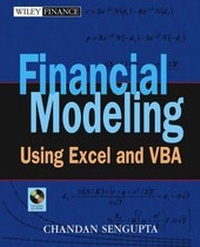
Financial Modeling Using Excel and VBA
1st Edition
Published on 26. February 2004
Book
Paperback/Softback
672 pages
978-0-471-26768-3 (ISBN)
Description
There are many financial modeling books on the market today, but most discuss models in theory not practice. Financial Modeling Using Excel and VBAbreaks this mold. By providing readers with the information they need to create financial models this book shows them how to use basic how-to information in actual practice. Sengupta offers a perfect blend of theory and practice by discussing the ins and outs of financial modeling-from statements and the time value of money problems, to the measuring and comparing of returns on investments.
More details
Series
Edition
1., Auflage
Language
English
Place of publication
New York
United States
Publishing group
John Wiley and Sons Ltd
Target group
College/higher education
Professional and scholarly
Edition type
New edition
Illustrations
Illustrations
Dimensions
Height: 23.6 cm
Width: 19.4 cm
Thickness: 38 mm
Weight
1134 gr
ISBN-13
978-0-471-26768-3 (9780471267683)
Schweitzer Classification
Other editions
New editions
Chandan SenGupta
Financial Analysis and Modeling Using Excel and VBA
Book
11/2009
2nd Edition
Wiley
€145.50
Shipment within 10-20 days
Additional editions
Chandan SenGupta
Financial Modeling Using Excel and VBA
E-Book
04/2004
Wiley
€62.99
Available for download
Person
CHANDAN SENGUPTA teaches at the Fordham University Graduate School of Business Administration, specializing in Financial Modeling, Business Valuation, Corporate Finance, and Investment Management. Formerly, he was vice president at the Chase Manhattan Bank for eight years and senior financial advisor for Mobil Corporation for ten years. He is the author of The Only Proven Road to Investment Success, also published by Wiley.
Content
About This Book.
CHAPTER 1: Introduction to Financial Modeling.
Part One: Excel for Financial Modeling.
CHAPTER 2: Excel Basics.
CHAPTER 3: Advanced Excel Features.
CHAPTER 4: Excel's Built-In Functions and Analysis Tools.
Part Two: Financial Modeling Using Excel.
CHAPTER 5: How to Build Good Excel Models.
CHAPTER 6: Financial Statements Forecasting.
CHAPTER 7: Time Value of Money.
CHAPTER 8: Financial Planning and Investments.
CHAPTER 9: Analyzing Market History.
CHAPTER 10: Bond Pricing and Duration.
CHAPTER 11: Simulating Stock Prices.
CHAPTER 12: Options and Option Portfolios.
CHAPTER 13: Binomial Option Pricing.
Part Three: VBA for Financial Modeling.
CHAPTER 14: Introduction to VBA.
CHAPTER 15: VBA Essentials.
CHAPTER 16: Sub and Function Procedures.
CHAPTER 17: Debugging VBA Models.
Part Four: Financial Modeling Using VBA.
CHAPTER 18: How to Build Good VBA Models.
CHAPTER 19: Time Value of Money.
CHAPTER 20: Financial Planning and Investments.
CHAPTER 21: Analyzing Market History.
CHAPTER 22: Simulating Stock Prices.
CHAPTER 23: Options and Option Portfolios.
CHAPTER 24: Binomial Option Pricing.
Appendix A: Keyboard Shortcuts for Excel.
Appendix B: VBA Quick Reference.
Appendix C: Excel and VBA Built-In Functions.
Index.
About the CD-ROM.
CHAPTER 1: Introduction to Financial Modeling.
Part One: Excel for Financial Modeling.
CHAPTER 2: Excel Basics.
CHAPTER 3: Advanced Excel Features.
CHAPTER 4: Excel's Built-In Functions and Analysis Tools.
Part Two: Financial Modeling Using Excel.
CHAPTER 5: How to Build Good Excel Models.
CHAPTER 6: Financial Statements Forecasting.
CHAPTER 7: Time Value of Money.
CHAPTER 8: Financial Planning and Investments.
CHAPTER 9: Analyzing Market History.
CHAPTER 10: Bond Pricing and Duration.
CHAPTER 11: Simulating Stock Prices.
CHAPTER 12: Options and Option Portfolios.
CHAPTER 13: Binomial Option Pricing.
Part Three: VBA for Financial Modeling.
CHAPTER 14: Introduction to VBA.
CHAPTER 15: VBA Essentials.
CHAPTER 16: Sub and Function Procedures.
CHAPTER 17: Debugging VBA Models.
Part Four: Financial Modeling Using VBA.
CHAPTER 18: How to Build Good VBA Models.
CHAPTER 19: Time Value of Money.
CHAPTER 20: Financial Planning and Investments.
CHAPTER 21: Analyzing Market History.
CHAPTER 22: Simulating Stock Prices.
CHAPTER 23: Options and Option Portfolios.
CHAPTER 24: Binomial Option Pricing.
Appendix A: Keyboard Shortcuts for Excel.
Appendix B: VBA Quick Reference.
Appendix C: Excel and VBA Built-In Functions.
Index.
About the CD-ROM.