

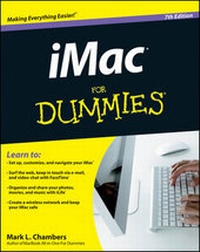
iMac For Dummies
7th Edition
Published on 6. July 2012
Book
Paperback/Softback
456 pages
978-1-118-20271-5 (ISBN)
Description
The bestselling guide to the ultimate all-in-one computer--now updated and revised throughout!
If you're looking for speed, performance, and power, the iMac is the ultimate all-in-one computer. From its superior performance, powerful operating system, and amazing applications, the iMac is one awesome machine, and the fun, friendly, and approachable style of iMac For Dummies is an ideal way to get started with the basics. You'll learn the fundamentals of the iMac including setting up and customizing your iMac and the software that comes with it, importing files from your old computer, sending and receiving e-mail, video calling, and more.
* Covers the latest iMac hardware, Mac OS X Lion, iCloud, and the Mac App Store
* Shows you how to surf the web with Safari and keep in touch by e-mail and FaceTime video calling
* Details how to find and download music, videos, TV shows, and more from the iTunes Store
* Gets you up to speed with the newest versions of iLife and iWork
* Walks you through storing and organizing digital photos, music, and other multimedia
* Explains how iCloud keeps everything, from your music to your documents, in sync
* Delves into creating a multi-user iMac and connecting to a wireless network
* Reviews troubleshooting tips and tricks
* Shows you how to automate mundane tasks
With iMac For Dummies, 7th Edition, you'll be able to proclaim, "iKnow" in no time!
If you're looking for speed, performance, and power, the iMac is the ultimate all-in-one computer. From its superior performance, powerful operating system, and amazing applications, the iMac is one awesome machine, and the fun, friendly, and approachable style of iMac For Dummies is an ideal way to get started with the basics. You'll learn the fundamentals of the iMac including setting up and customizing your iMac and the software that comes with it, importing files from your old computer, sending and receiving e-mail, video calling, and more.
* Covers the latest iMac hardware, Mac OS X Lion, iCloud, and the Mac App Store
* Shows you how to surf the web with Safari and keep in touch by e-mail and FaceTime video calling
* Details how to find and download music, videos, TV shows, and more from the iTunes Store
* Gets you up to speed with the newest versions of iLife and iWork
* Walks you through storing and organizing digital photos, music, and other multimedia
* Explains how iCloud keeps everything, from your music to your documents, in sync
* Delves into creating a multi-user iMac and connecting to a wireless network
* Reviews troubleshooting tips and tricks
* Shows you how to automate mundane tasks
With iMac For Dummies, 7th Edition, you'll be able to proclaim, "iKnow" in no time!
More details
Edition
7., Auflage
Language
English
Place of publication
Queensland
Australia
Target group
Professional and scholarly
Edition type
Revised edition
Illustrations
ill
Dimensions
Height: 23 cm
Width: 18.8 cm
Thickness: 25 mm
Weight
672 gr
ISBN-13
978-1-118-20271-5 (9781118202715)
Schweitzer Classification
Other editions
New editions
Mark L. Chambers
iMac For Dummies
Book
05/2014
8th Edition
Wiley
€24.90
Article exhausted; check for reprint
Previous edition
Mark L. Chambers
iMac For Dummies
Book
03/2010
6th Edition
Wiley
€23.90
Article exhausted; check for reprint
Person
Mark L. Chambers has been an author, computer consultant, BBS sysop, programmer, and hardware technician for more than 30 years -- pushing computers and their uses far beyond "normal" performance limits for decades now. His first love affair with a computer peripheral blossomed in 1984 when he bought his lightning-fast 300 BPS modem for his Atari 400. Now he spends entirely too much time on the Internet and drinks far too much caffeine-laden soda.
Content
Introduction 1
Part I: Know Your iMac 7
Chapter 1: Okay, This Machine Looks Really, Really Weird 9
Chapter 2: Life! Give My iMac Life! 25
Chapter 3: Introducing the Apple of Your iMac 35
Part II: Shaking Hands with Mac OS X 45
Chapter 4: Opening and Closing and Clicking and Such 47
Chapter 5: A Plethora of Powerful Fun 69
Chapter 6: A Nerd's Guide to System Preferences 85
Chapter 7: Searching amidst iMac Chaos 99
Part III: Connecting and Communicating 107
Chapter 8: Let's Go on Safari! 109
Chapter 9: Expanding Your Horizons with iCloud 127
Chapter 10: Hooking Up with Handy Helpers 131
Part IV: Living the iLife 143
Chapter 11: The Multimedia Joy of iTunes 145
Chapter 12: The Masterpiece That Is iPhoto 175
Chapter 13: Making Film History with iMovie 199
Chapter 14: iDVD -- Your DVD Movie Factory 221
Chapter 15: Recording Your Hits with GarageBand 243
Chapter 16: Creating a Website with iWeb 265
Part V: Getting Productive with iWork and Other Tools 277
Chapter 17: Desktop Publishing with Pages 279
Chapter 18: Creating Spreadsheets with Numbers 291
Chapter 19: Building Presentations with Keynote 305
Chapter 20: Creating a Multiuser iMac 319
Chapter 21: Building (Or Joining) a Network 337
Part VI: The Necessary Evils: Troubleshooting, Upgrading, Maintaining 359
Chapter 22: It Just. Sits. There 361
Chapter 23: I Want to Add Stuff 375
Chapter 24: Tackling the Housekeeping 385
Chapter 25: Running Windows on Your iMac 399
Part VII: The Part of Tens 407
Chapter 26: Ten Ways to Speed Up Your iMac 409
Chapter 27: Ten Things to Avoid Like the Plague 415
Index 421
Bonus Chapter on the Companion Website at www.dummies.com/go/imacfd7e BC1
Bonus Chapter: Communicating with That Bluetooth Guy BC1
Part I: Know Your iMac 7
Chapter 1: Okay, This Machine Looks Really, Really Weird 9
Chapter 2: Life! Give My iMac Life! 25
Chapter 3: Introducing the Apple of Your iMac 35
Part II: Shaking Hands with Mac OS X 45
Chapter 4: Opening and Closing and Clicking and Such 47
Chapter 5: A Plethora of Powerful Fun 69
Chapter 6: A Nerd's Guide to System Preferences 85
Chapter 7: Searching amidst iMac Chaos 99
Part III: Connecting and Communicating 107
Chapter 8: Let's Go on Safari! 109
Chapter 9: Expanding Your Horizons with iCloud 127
Chapter 10: Hooking Up with Handy Helpers 131
Part IV: Living the iLife 143
Chapter 11: The Multimedia Joy of iTunes 145
Chapter 12: The Masterpiece That Is iPhoto 175
Chapter 13: Making Film History with iMovie 199
Chapter 14: iDVD -- Your DVD Movie Factory 221
Chapter 15: Recording Your Hits with GarageBand 243
Chapter 16: Creating a Website with iWeb 265
Part V: Getting Productive with iWork and Other Tools 277
Chapter 17: Desktop Publishing with Pages 279
Chapter 18: Creating Spreadsheets with Numbers 291
Chapter 19: Building Presentations with Keynote 305
Chapter 20: Creating a Multiuser iMac 319
Chapter 21: Building (Or Joining) a Network 337
Part VI: The Necessary Evils: Troubleshooting, Upgrading, Maintaining 359
Chapter 22: It Just. Sits. There 361
Chapter 23: I Want to Add Stuff 375
Chapter 24: Tackling the Housekeeping 385
Chapter 25: Running Windows on Your iMac 399
Part VII: The Part of Tens 407
Chapter 26: Ten Ways to Speed Up Your iMac 409
Chapter 27: Ten Things to Avoid Like the Plague 415
Index 421
Bonus Chapter on the Companion Website at www.dummies.com/go/imacfd7e BC1
Bonus Chapter: Communicating with That Bluetooth Guy BC1