

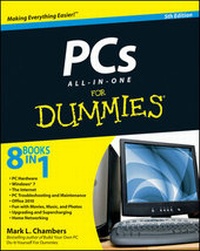
PCs All-in-One For Dummies
5th Edition
Published on 9. July 2010
Book
Paperback/Softback
648 pages
978-0-470-61454-9 (ISBN)
Description
One-stop shopping for everything you need to know about PCs!
If you're a PC owner, you have a pretty good idea of just how much there is to discover about your PC, whether you use it for work or play. Comprised of eight minibooks, this All-in-One guide covers essential PC topics from soup through nuts, including the latest updates to PC hardware, Windows 7, the Internet, Office 2010, digital media, upgrading and troubleshooting, social media, and home networking.
This new edition features expanded coverage of using popular social media such as Twitter, Facebook, WordPress, and blogging. Plus, you'll walk through the new Windows 7 operating system and explore revisions for each of the Office 2010 applications.
* Provides PCs users of all levels of experience with a series of eight minibooks that include the most up-to-date coverage of PC hardware, Windows 7, the Internet, Office 2010, digital media, upgrading and troubleshooting, social media, and home networking
* Explores step-by-step procedures for using the new Windows 7 operating system
* Discusses updates to each of the Office 2010 applications, the latest features of version 8 of Internet Explorer, and new information on the latest PC hardware
* Reviews ways to protect your PC from viruses, troubleshooting tips, and upgrading and supercharging your PC.
PCs All-in-One For Dummies covers everything you need to know in order to get acquainted with your PC!
If you're a PC owner, you have a pretty good idea of just how much there is to discover about your PC, whether you use it for work or play. Comprised of eight minibooks, this All-in-One guide covers essential PC topics from soup through nuts, including the latest updates to PC hardware, Windows 7, the Internet, Office 2010, digital media, upgrading and troubleshooting, social media, and home networking.
This new edition features expanded coverage of using popular social media such as Twitter, Facebook, WordPress, and blogging. Plus, you'll walk through the new Windows 7 operating system and explore revisions for each of the Office 2010 applications.
* Provides PCs users of all levels of experience with a series of eight minibooks that include the most up-to-date coverage of PC hardware, Windows 7, the Internet, Office 2010, digital media, upgrading and troubleshooting, social media, and home networking
* Explores step-by-step procedures for using the new Windows 7 operating system
* Discusses updates to each of the Office 2010 applications, the latest features of version 8 of Internet Explorer, and new information on the latest PC hardware
* Reviews ways to protect your PC from viruses, troubleshooting tips, and upgrading and supercharging your PC.
PCs All-in-One For Dummies covers everything you need to know in order to get acquainted with your PC!
More details
Edition
5., Auflage
Language
English
Place of publication
Chichester
United Kingdom
Publishing group
John Wiley and Sons Ltd
Edition type
Revised edition
Illustrations
ill
Dimensions
Height: 23.8 cm
Width: 19 cm
Thickness: 33 mm
Weight
907 gr
ISBN-13
978-0-470-61454-9 (9780470614549)
Schweitzer Classification
Other editions
New editions
Mark L. Chambers
PCs All-in-One For Dummies
Book
05/2013
6th Edition
Wiley
€33.90
Article is exhausted; no reprint
Previous edition
Mark L. Chambers
PCs All-in-One Desk Reference For Dummies
Book
02/2008
4th Edition
Wiley
€24.90
Article exhausted; check for reprint
Person
Mark L. Chambers has been an author, technical writer, and consultant for over twenty years and also has experience as a computer hardware technician. His books include Building a PC For Dummies, MacBook For Dummies, iMac For Dummies, and previous editions of PCs All-in-One For Dummies.
Content
Introduction.
Book I: PC Hardware.
Chapter 1: Starting with the Basics.
Chapter 2: Additional Toys Your PC Will Enjoy.
Chapter 3: Connectors, Ports, and Sundry Openings.
Book II: Windows 7.
Chapter 1: Shake Hands with Windows 7.
Chapter 2: The Many Windows of Windows.
Chapter 3: Windows 7 Basics.
Chapter 4: Advanced Windows 7.
Chapter 5: Taking Control of the Control Panel.
Book III: The Internet.
Chapter 1: Making Sense of the Internet.
Chapter 2: Adding an Internet Connection to Windows 7.
Chapter 3: Protecting Your Internet Privacy.
Chapter 4: Cruising the Web with Internet Explorer.
Chapter 5: Harnessing Your E-Mail.
Chapter 6: Instant Messaging Done Right.
Book VI: Fun with Movies, Music, and Photos.
Chapter 1: Scanning with Gusto.
Chapter 2: Dude, MP3 Rocks!
Chapter 3: Making Movies with Your PC.
Chapter 4: I Can Make My Own DVDs?
Chapter 5: I'm Okay, You're a Digital Camera.
Book VII: Upgrading and Supercharging.
Chapter 1: Determining What to Upgrade.
Chapter 2: Adding RAM to Your Hot Rod.
Chapter 3: Adding Hard Drive Territory to Your System.
Chapter 4: Partying with USB, FireWire, and eSATA.
Chapter 5: Pumping Up Your Sound and Video.
Book VIII: Home Networking.
Chapter 1: Do I Really Need a Network?
Chapter 2: Ethernet to the Rescue.
Chapter 3: Going Wireless.
Chapter 4: Sharing Your Internet Connection.
Chapter 5: Securing Your Home Network.
Index.
Book I: PC Hardware.
Chapter 1: Starting with the Basics.
Chapter 2: Additional Toys Your PC Will Enjoy.
Chapter 3: Connectors, Ports, and Sundry Openings.
Book II: Windows 7.
Chapter 1: Shake Hands with Windows 7.
Chapter 2: The Many Windows of Windows.
Chapter 3: Windows 7 Basics.
Chapter 4: Advanced Windows 7.
Chapter 5: Taking Control of the Control Panel.
Book III: The Internet.
Chapter 1: Making Sense of the Internet.
Chapter 2: Adding an Internet Connection to Windows 7.
Chapter 3: Protecting Your Internet Privacy.
Chapter 4: Cruising the Web with Internet Explorer.
Chapter 5: Harnessing Your E-Mail.
Chapter 6: Instant Messaging Done Right.
Book VI: Fun with Movies, Music, and Photos.
Chapter 1: Scanning with Gusto.
Chapter 2: Dude, MP3 Rocks!
Chapter 3: Making Movies with Your PC.
Chapter 4: I Can Make My Own DVDs?
Chapter 5: I'm Okay, You're a Digital Camera.
Book VII: Upgrading and Supercharging.
Chapter 1: Determining What to Upgrade.
Chapter 2: Adding RAM to Your Hot Rod.
Chapter 3: Adding Hard Drive Territory to Your System.
Chapter 4: Partying with USB, FireWire, and eSATA.
Chapter 5: Pumping Up Your Sound and Video.
Book VIII: Home Networking.
Chapter 1: Do I Really Need a Network?
Chapter 2: Ethernet to the Rescue.
Chapter 3: Going Wireless.
Chapter 4: Sharing Your Internet Connection.
Chapter 5: Securing Your Home Network.
Index.