

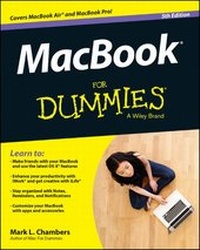
MacBook For Dummies
5th Edition
Published on 21. July 2014
Book
Paperback/Softback
432 pages
978-1-118-86234-6 (ISBN)
Description
Make friends with your MacBook the fun and easy way!
Ultra-light, ultra-fast, and ultra-powerful, the MacBook is the coolest laptop in town, and longtime Mac guru Mark L. Chambers is just the guy to help you get to know your MacBook in no time. Take a closer look at the latest features, get the lowdown on OS X, unleash your creative forces with iLife, take care of business with the iWork applications, and sync it all with iCloud with the expert advice in this bestselling MacBook guide.
Whether this is your first MacBook or your first laptop, period, you'll learn to navigate the Mac desktop, customize your settings, surf the web and set up e-mail, hook into a network, transfer your important documents from another PC or Mac, and troubleshoot with ease. You'll also get the inside scoop on the fun stuff like FaceTime video calling, Messages, Reminders, photos, videos, music, the Mac App Store, and more.
* Covers all MacBook Air and MacBook Pro models and is fully updated for OS X Mavericks and the latest editions of iLife and iWork
* Gets you up to speed on helpful MacBook features like the Finder, Finder Tabs, Dashboard, Spaces, Mission Control, Spotlight, and iCloud
* Explains how to work with files and folders, use the Safari web browser, connect with other wireless devices, add accessories, and use your MacBook on the go
* Covers crunching data with Numbers, dressing up your documents with Pages, adding punch to your presentations with Keynote, editing your images with iPhoto, composing music with GarageBand, making movie magic with iMovie, and more
MacBook For Dummies, 5th Edition is the perfect companion for getting the most out of your mac-nificent MacBook!
Ultra-light, ultra-fast, and ultra-powerful, the MacBook is the coolest laptop in town, and longtime Mac guru Mark L. Chambers is just the guy to help you get to know your MacBook in no time. Take a closer look at the latest features, get the lowdown on OS X, unleash your creative forces with iLife, take care of business with the iWork applications, and sync it all with iCloud with the expert advice in this bestselling MacBook guide.
Whether this is your first MacBook or your first laptop, period, you'll learn to navigate the Mac desktop, customize your settings, surf the web and set up e-mail, hook into a network, transfer your important documents from another PC or Mac, and troubleshoot with ease. You'll also get the inside scoop on the fun stuff like FaceTime video calling, Messages, Reminders, photos, videos, music, the Mac App Store, and more.
* Covers all MacBook Air and MacBook Pro models and is fully updated for OS X Mavericks and the latest editions of iLife and iWork
* Gets you up to speed on helpful MacBook features like the Finder, Finder Tabs, Dashboard, Spaces, Mission Control, Spotlight, and iCloud
* Explains how to work with files and folders, use the Safari web browser, connect with other wireless devices, add accessories, and use your MacBook on the go
* Covers crunching data with Numbers, dressing up your documents with Pages, adding punch to your presentations with Keynote, editing your images with iPhoto, composing music with GarageBand, making movie magic with iMovie, and more
MacBook For Dummies, 5th Edition is the perfect companion for getting the most out of your mac-nificent MacBook!
More details
Other editions
New editions
Mark L. Chambers
MacBook For Dummies
Book
01/2016
6th Edition
Wiley
€23.90
Article exhausted; check for reprint
Previous edition
Mark L. Chambers
MacBook For Dummies
Book
11/2012
4th Edition
Wiley
€23.90
Article exhausted; check for reprint
Person
Mark L. Chambers, an unabashed Mac fan, has been an author, computer consultant, BBS sysop, programmer, and hardware technician for over 25 years. His recent titles include OS X Mavericks All-in-One For Dummies, Macs For Seniors For Dummies, 2nd Edition, and iMac For Dummies, 7th Edition.
Content
Introduction 1
Part I: Tie Myself Down with a Desktop? Preposterous! 7
Chapter 1: Hey, It Really Does Have Ever y thing I Need 9
Chapter 2: Turning On Your Por table Powerhouse 33
Chapter 3: The Laptop Owner's Introduction to OS X 45
Part II: Shaking Hands with OS X 55
Chapter 4: Opening and Closing and Tapping and Such 57
Chapter 5: Getting to the Heart of Mavericks 79
Chapter 6: A Nerd's Guide to System Preferences 97
Chapter 7: Sifting Through Your Stuff 115
Chapter 8: Using Reminders, Notes, Notifications, and Maps 125
Part III: Connecting and Communicating 137
Chapter 9: Let's Go on Safari! 139
Chapter 10: iCloud Is Made for MacBooks159
Chapter 11: Your Laptop Goes Multiuser 165
Chapter 12: Working Well with Net works 185
Part IV: Living the iLife 205
Chapter 13: The Multimedia Joy of iTunes 207
Chapter 14: The Masterpiece That Is iPhoto 233
Chapter 15: Making Film History with iMovie 257
Chapter 16: Recording Your Hits with GarageBand 277
Part V: Getting Productive and Maintaining Your MacBook 295
Chapter 17: Desktop Publishing with Pages 297
Chapter 18: Creating Spreadsheets with Numbers 311
Chapter 19: Building Presentations with Keynote 325
Chapter 20: When Good Mac Laptops Go Bad 337
Chapter 21: Adding New Stuff to Your Laptop 351
Chapter 22: Tackling the Housekeeping 363
Part VI: The Part of Tens 375
Chapter 23: Top Ten Laptop Rules to Follow 377
Chapter 24: Ten Things to Avoid Like the Plague 385
Index 393
Part I: Tie Myself Down with a Desktop? Preposterous! 7
Chapter 1: Hey, It Really Does Have Ever y thing I Need 9
Chapter 2: Turning On Your Por table Powerhouse 33
Chapter 3: The Laptop Owner's Introduction to OS X 45
Part II: Shaking Hands with OS X 55
Chapter 4: Opening and Closing and Tapping and Such 57
Chapter 5: Getting to the Heart of Mavericks 79
Chapter 6: A Nerd's Guide to System Preferences 97
Chapter 7: Sifting Through Your Stuff 115
Chapter 8: Using Reminders, Notes, Notifications, and Maps 125
Part III: Connecting and Communicating 137
Chapter 9: Let's Go on Safari! 139
Chapter 10: iCloud Is Made for MacBooks159
Chapter 11: Your Laptop Goes Multiuser 165
Chapter 12: Working Well with Net works 185
Part IV: Living the iLife 205
Chapter 13: The Multimedia Joy of iTunes 207
Chapter 14: The Masterpiece That Is iPhoto 233
Chapter 15: Making Film History with iMovie 257
Chapter 16: Recording Your Hits with GarageBand 277
Part V: Getting Productive and Maintaining Your MacBook 295
Chapter 17: Desktop Publishing with Pages 297
Chapter 18: Creating Spreadsheets with Numbers 311
Chapter 19: Building Presentations with Keynote 325
Chapter 20: When Good Mac Laptops Go Bad 337
Chapter 21: Adding New Stuff to Your Laptop 351
Chapter 22: Tackling the Housekeeping 363
Part VI: The Part of Tens 375
Chapter 23: Top Ten Laptop Rules to Follow 377
Chapter 24: Ten Things to Avoid Like the Plague 385
Index 393