

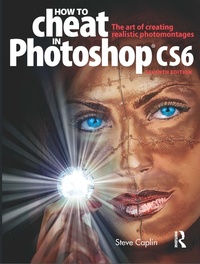
How to Cheat in Photoshop CS6
The art of creating realistic photomontages
Published on 25. June 2012
Book
Paperback/Softback
464 pages
978-0-240-52592-1 (ISBN)
Description
With enough charm and wit to make learning Photoshop anything but taxing, Steve Caplin delivers the next instalment of the How to Cheat series, containing all the techniques you need to create and master the art of photomontage. Delivered in easy to follow step-by-step tutorials, How to Cheat in Photoshop CS6 covers all the basics of selections and layers before moving on to top tricks and techniques for creating realistic works of art for business, pleasure, or something in between. Accompanying downloadable resources are packed full of practice images and tutorial movies for you to work along with, plus bonus chapters to push your skills even further. Using a tweaked design that is clearer and fresher than previous editions, this is the most fun way to master Photomontage.
This complete How to Cheat in Photoshop CS6 package includes a fully updated book, downloadable resources containing all of the images used in the helpful tutorials, plus over 5 hours of video tutorials, and a website featuring a reader forum where your questions will be answered by other readers as well as the author himself.
This complete How to Cheat in Photoshop CS6 package includes a fully updated book, downloadable resources containing all of the images used in the helpful tutorials, plus over 5 hours of video tutorials, and a website featuring a reader forum where your questions will be answered by other readers as well as the author himself.
Reviews / Votes
"Photomontage master Steve Caplin shows readers how to utilize the new features in CS6 efficient, as well as how to make an image look like something else entirely. This resource is for all kinds of creative inside and out of the industry such as retouchers, designers, illustrators and graphic artists. The book is now in its eighth edition and comes fully updated to cover the new features found in CS6. A packed DVD and supplemental website complete the package."--Advanced Photoshop, page 40More details
Edition
Revised edition
Language
English
Place of publication
Oxford
United Kingdom
Publishing group
Taylor & Francis Ltd
Target group
Professional and scholarly
General and Professional Practice & Development
Product notice
Paperback (trade)
Unsewn / adhesive bound
Dimensions
Height: 246 mm
Width: 189 mm
Thickness: 30 mm
Weight
1198 gr
ISBN-13
978-0-240-52592-1 (9780240525921)
Copyright in bibliographic data and cover images is held by Nielsen Book Services Limited or by the publishers or by their respective licensors: all rights reserved.
Schweitzer Classification
Other editions
Additional editions
E-Book
06/2013
1st Edition
Routledge
€69.99
Available for download
E-Book
06/2013
Routledge
€69.99
Available for download
Person
Steve Caplin is a freelance artist and author working in London, England. His satirical photomontage work is commissioned by newspapers and magazine around the world, including The Guardian, The Independent, The Sunday Telegraph, The Sunday Times Magazine, Radio Times, Readers Digest and L'Internazionale.
Steve has worked for advertising agencies including Saatchi & Saatchi, Bartle Bogle Hegarty and Lowe, Howard Spink, and his work has won two Campaign Poster Awards and a D&AD Pencil award. He has lectured widely in England, Norway, France and Holland, and has taught digital design at the University of Westminster and the University of the Arts, London.
Steve has worked for advertising agencies including Saatchi & Saatchi, Bartle Bogle Hegarty and Lowe, Howard Spink, and his work has won two Campaign Poster Awards and a D&AD Pencil award. He has lectured widely in England, Norway, France and Holland, and has taught digital design at the University of Westminster and the University of the Arts, London.
Content
How to cheat, and why, Acknowledgments, How to use this book, What's new in Photoshop CS6, 1. Natural selection, 2. Transformation and distortion, 3. Hiding and showing, 4. Image adjustment, 5. Composing the scene, 6. Getting into perspective, 7 Light and shade, 8. Heads and bodies, 9. Shiny surfaces, 10. Metal, wood and stone, 11. Paper and fabric, 12. The third dimension, 13. Hyper realism, 14. Advanced techniques, 15. Print and the internet