

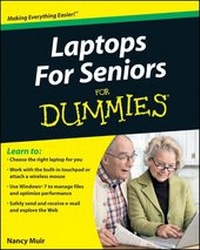
Laptops For Seniors For Dummies
1st Edition
Published on 12. March 2010
Book
Paperback/Softback
456 pages
978-0-470-57830-8 (ISBN)
Description
Now's the time! Learn to pick a laptop, use Windows, and take advantage of the Internet
Tired of wondering what all the fuss is about? This book is written for people like you, who may not know much about computers but are ready to learn. In plain English, it tells you how to use a computer, the Windows operating system, and basic software; what to look for in a laptop; and how to get online to shop, e-mail, and chat - safely.
* Compare - understand the differences between standard "notebook" laptops, netbooks, mids or minis, and tablet PCs
* Choose wisely - consider weight, monitor size, price, how you'll connect to the Internet, processor speed, and memory
* All the details - charge the battery, set up user accounts, adjust settings, and manage power
* Learn what you can do - manage your finances, watch movies, research topics of interest, organize your photos, and create family newsletters
* Do Windows - log on and off, manage files and folders, and use accessibility features
* Communicate - set up an e-mail account and join a social networking site
* Be careful - learn about online risks, how to protect yourself, and how to recognize fraud and scams
* Simplify your life - shop, bank, and pay bills online
Open the book and find:
* How to keep your laptop running smoothly
* What you can do with built-in applications
* Advice on searching the Web
* Tips for protecting your privacy
* How to access the Internet when you travel
* How to use accessibility features for vision or hearing challenges
* Where to find help
* How to connect printers and other devices
Learn to:
* ? Choose the right laptop for you
* ? Work with the built-in touchpad or attach a wireless mouse
* ? Use Windows(r) 7 to manage files and optimize performance
* ? Safely send and receive e-mail and explore the Web
Tired of wondering what all the fuss is about? This book is written for people like you, who may not know much about computers but are ready to learn. In plain English, it tells you how to use a computer, the Windows operating system, and basic software; what to look for in a laptop; and how to get online to shop, e-mail, and chat - safely.
* Compare - understand the differences between standard "notebook" laptops, netbooks, mids or minis, and tablet PCs
* Choose wisely - consider weight, monitor size, price, how you'll connect to the Internet, processor speed, and memory
* All the details - charge the battery, set up user accounts, adjust settings, and manage power
* Learn what you can do - manage your finances, watch movies, research topics of interest, organize your photos, and create family newsletters
* Do Windows - log on and off, manage files and folders, and use accessibility features
* Communicate - set up an e-mail account and join a social networking site
* Be careful - learn about online risks, how to protect yourself, and how to recognize fraud and scams
* Simplify your life - shop, bank, and pay bills online
Open the book and find:
* How to keep your laptop running smoothly
* What you can do with built-in applications
* Advice on searching the Web
* Tips for protecting your privacy
* How to access the Internet when you travel
* How to use accessibility features for vision or hearing challenges
* Where to find help
* How to connect printers and other devices
Learn to:
* ? Choose the right laptop for you
* ? Work with the built-in touchpad or attach a wireless mouse
* ? Use Windows(r) 7 to manage files and optimize performance
* ? Safely send and receive e-mail and explore the Web
More details
Other editions
New editions
Nancy C. Muir
Laptops and Tablets For Seniors For Dummies
Book
10/2011
2nd Edition
Wiley
€23.90
Article exhausted; check for reprint
Person
Nancy Muir is a writer and consultant and the author of more than 40 books, including Computers For Seniors For Dummies and Using the Internet Safely For Seniors For Dummies. She writes a column on computers for Retirenet.com and provides technology advice on her Web site, SeniorTechSmarts.com.
Content
Introduction.
Part I: First Steps with Your Laptop.
Chapter 1: Discovering the Laptop Advantage.
Chapter 2: Buying a Laptop.
Chapter 3: Setting Up Your Laptop.
Chapter 4: Managing Power.
Part II: Exploring Windows.
Chapter 5: Getting Around the Windows 7 Desktop.
Chapter 6: Setting Up Your Display.
Chapter 7: Customizing Windows and Accessibility.
Chapter 8: Setting Up Printers and Scanners.
Chapter 9: Getting Help.
Part III: Having Fun and Getting Things Done with Software.
Chapter 10: Working with Software Programs.
Chapter 11: Working with Files and Folders.
Chapter 12: Using the Desktop Gadget Gallery and Gadgets.
Chapter 13: Creating Documents with Works Word Processor.
Chapter 14: Working with Numbers and Finances.
Chapter 15: Getting the Most from Movies and Digital Photos.
Chapter 16: Playing Music in Windows 7.
Chapter 17: Playing Games in Windows 7.
Part IV: Exploring the Internet.
Chapter 18: Understanding Internet Basics.
Chapter 19: Browsing the Web with Internet Explorer.
Chapter 20: Staying Safe While Online.
Chapter 21: Keeping In Touch with E-Mail.
Chapter 22: Connecting with People Online.
Part V: Taking Care of Your Laptop.
Chapter 23: Laptop Security and Safety.
Chapter 24: Maintaining Windows.
Index.
Part I: First Steps with Your Laptop.
Chapter 1: Discovering the Laptop Advantage.
Chapter 2: Buying a Laptop.
Chapter 3: Setting Up Your Laptop.
Chapter 4: Managing Power.
Part II: Exploring Windows.
Chapter 5: Getting Around the Windows 7 Desktop.
Chapter 6: Setting Up Your Display.
Chapter 7: Customizing Windows and Accessibility.
Chapter 8: Setting Up Printers and Scanners.
Chapter 9: Getting Help.
Part III: Having Fun and Getting Things Done with Software.
Chapter 10: Working with Software Programs.
Chapter 11: Working with Files and Folders.
Chapter 12: Using the Desktop Gadget Gallery and Gadgets.
Chapter 13: Creating Documents with Works Word Processor.
Chapter 14: Working with Numbers and Finances.
Chapter 15: Getting the Most from Movies and Digital Photos.
Chapter 16: Playing Music in Windows 7.
Chapter 17: Playing Games in Windows 7.
Part IV: Exploring the Internet.
Chapter 18: Understanding Internet Basics.
Chapter 19: Browsing the Web with Internet Explorer.
Chapter 20: Staying Safe While Online.
Chapter 21: Keeping In Touch with E-Mail.
Chapter 22: Connecting with People Online.
Part V: Taking Care of Your Laptop.
Chapter 23: Laptop Security and Safety.
Chapter 24: Maintaining Windows.
Index.