

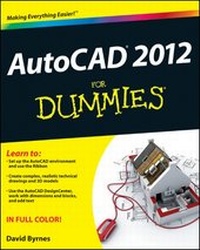
AutoCAD 2012 For Dummies
Published on 10. May 2011
Book
Paperback/Softback
560 pages
978-1-118-02440-9 (ISBN)
Unfortunately, price unknown
Article exhausted; check different version
Description
A full-color guide to the #1 architectural drafting program--AutoCAD 2012!
AutoCAD is the leading software used to create 2D and 3D technical drawings. Used by engineers, architects, and drafting professionals, it can be complex and is a perfect subject for the tried-and-true For Dummies format. Full-color illustrations make the instructions even easier to follow, because examples in the book appear exactly as they will on the screen.
* Explains AutoCAD and gets readers quickly up to speed on the latest version
* Features full-color illustrations that look the same as the AutoCAD 2012 screens, making the interface and the all-important Model view easier to understand
* Covers all the new features, creating a basic layout, using AutoCAD DesignCenter, drawing and editing, working with dimensions, adding text, and more
Newcomers to AutoCAD will easily master the software with help from this full-color edition of AutoCAD 2012 For Dummies.
More details
Other editions
Additional editions
Person
David Byrnes (Vancouver, BC) teaches CAD and 3-D modeling at Emily Carr Institute of Art & Design and British Columbia Institute of Technology. He has been using AutoCAD since 1985 and provides AutoCAD training and customization to clients in the architecture and civil and structural engineering fields. He is the author of AutoCAD 2011 For Dummies and AutoCAD 2010 For Dummies.
Content
Foreword.
Introduction.
Part I: AutoCAD 101.
Chapter 1: Introducing AutoCAD and AutoCAD LT.
Chapter 2: Le Tour de AutoCAD 2012.
Chapter 3: A Lap around the CAD Track.
Chapter 4: Setup for Success.
Chapter 5: Planning for Paper.
Part II: Let There Be Lines.
Chapter 6: Manage Your Properties
Chapter 7: Preciseliness Is Next to CADliness.
Chapter 8: Down the Straightaway.
Chapter 9: Dangerous Curves Ahead.
Chapter 10: Get a Grip on Object Selection.
Chapter 11: Edit for Credit.
Chapter 12: A Zoom with a View.
Part III: If Drawings Could Talk.
Chapter 13: Text with Character.
Chapter 14: Entering New Dimensions.
Chapter 15: Down the Hatch.
Chapter 16: The Plot Thickens.
Part IV: Advancing with AutoCAD.
Chapter 17: The ABCs of Blocks.
Chapter 18: Going Dynamic and External.
Chapter 19: Call the Parametrics!
Chapter 20: Drawing on the Internet.
Part V: On a 3D Spree.
Chapter 21: It's a 3D World After All.
Chapter 22: From Drawings . . . to Models.
Chapter 23: On a Render Bender.
Part VI: The Part of Tens.
Chapter 24: Ten Great AutoCAD Resources.
Chapter 25: Ten Differences between AutoCAD and AutoCAD LT.
Chapter 26: Ten System Variables to Make Your Life Easier.
Index.