


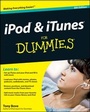
iPod and iTunes For Dummies
7th Edition
Published on 27. October 2009
Book
Paperback/Softback
408 pages
978-0-470-52567-8 (ISBN)
Description
The fun and easy way to make the most of your iPod and the iTunes store
iPods have totally revolutionized the way we play music, videos, and TV shows. This handy guide is written by veteran For Dummies author Tony Bove and will have you off and running with your iPod in no time. You'll get set-up advice and help loading your iPod with tunes, podcasts, movies, and more. Got an iPod touch or iPhone? Learn to use the multitouch interface, add photos, surf the Web, manage your e-mail and calendar, and even play games.
* Introduces the different iPod models, including iPod touch, iPod classic, iPod nano, and iPod shuffle
* Explains how to set up iTunes, shop at the iTunes store, and import music, videos, and podcasts
* Shows how to manage photos, videos, synchronize devices with iTunes, burn CDs from iTunes, play iPod content, and play music on your home stereo, TV, or car stereo
* Includes tips on working with Genius to create playlists, resetting and restoring your iPod, troubleshooting, and organizing and sharing content
Don't wait another minute to start enjoying your new iPod! Start enjoying everything your iPod can offer with the latest edition of iPod & iTunes For Dummies today.
iPods have totally revolutionized the way we play music, videos, and TV shows. This handy guide is written by veteran For Dummies author Tony Bove and will have you off and running with your iPod in no time. You'll get set-up advice and help loading your iPod with tunes, podcasts, movies, and more. Got an iPod touch or iPhone? Learn to use the multitouch interface, add photos, surf the Web, manage your e-mail and calendar, and even play games.
* Introduces the different iPod models, including iPod touch, iPod classic, iPod nano, and iPod shuffle
* Explains how to set up iTunes, shop at the iTunes store, and import music, videos, and podcasts
* Shows how to manage photos, videos, synchronize devices with iTunes, burn CDs from iTunes, play iPod content, and play music on your home stereo, TV, or car stereo
* Includes tips on working with Genius to create playlists, resetting and restoring your iPod, troubleshooting, and organizing and sharing content
Don't wait another minute to start enjoying your new iPod! Start enjoying everything your iPod can offer with the latest edition of iPod & iTunes For Dummies today.
More details
Edition
7., Auflage
Language
English
Place of publication
Chichester
United Kingdom
Publishing group
John Wiley and Sons Ltd
Edition type
Revised edition
Illustrations
ill
Dimensions
Height: 23.3 cm
Width: 19 cm
Thickness: 22 mm
Weight
589 gr
ISBN-13
978-0-470-52567-8 (9780470525678)
Schweitzer Classification
Other editions
New editions
Tony Bove
iPod and iTunes For Dummies
Book
12/2010
8th Edition
Wiley
€21.90
Article exhausted; check for reprint
Previous edition

Tony Bove
iPod & iTunes For Dummies
Book
09/2008
6th Edition
Wiley
€17.90
Article exhausted; check for reprint
Person
Tony Bove has written more than two dozen computer books, including all editions of iPod & iTunes For Dummies. Tony is also a professional musician. He blogs and offers tips about iPods, iPhones, iTunes, and the iLife applications at www.tonybove.com.
Content
Introduction.
Part I: Touching All the Basics.
Chapter 1: Firing Up Your iPod and iPhone.
Chapter 2: Setting Up iTunes and Your iPod and iPhone.
Chapter 3: Putting Your Finger on It.
Chapter 4: Choosing Essential Settings For Daily Operation.
Chapter 5: Going Mobile.
Part II: Filling Up Your Empty Cup.
Chapter 6: Getting Started with iTunes.
Chapter 7: Shopping at the iTunes Store.
Chapter 8: Bringing Content into iTunes.
Chapter 9: Into the Sync with iTunes.
Chapter 10: Syncing Mail, Calendars, Contacts, and Bookmarks.
Part III: Managing Your Library.
Chapter 11: Searching, Browsing, and Sorting in iTunes.
Chapter 12: Adding and Editing Information in iTunes.
Chapter 13: Playing Content in iTunes.
Chapter 14: Organizing iTunes Content with Playlists.
Chapter 15: Gimme Shelter for My Media.
Part IV: Playing It Back on Your iPod or iPhone.
Chapter 16: The Songs Remain the Same.
Chapter 17: Bring Videos, Books, and Podcasts.
Chapter 18: Your Pocket Picture Player.
Part V: Touching the Online World.
Chapter 19: Surfi n' Safari.
Chapter 20: The Postman Always Beeps Once.
Chapter 21: Using Applications on Your iPod or iPhone.
Part VI: The Part of Tens.
Chapter 22: Ten Steps to Recovery.
Chapter 23: Ten Tangible Tips.
Index.
Part I: Touching All the Basics.
Chapter 1: Firing Up Your iPod and iPhone.
Chapter 2: Setting Up iTunes and Your iPod and iPhone.
Chapter 3: Putting Your Finger on It.
Chapter 4: Choosing Essential Settings For Daily Operation.
Chapter 5: Going Mobile.
Part II: Filling Up Your Empty Cup.
Chapter 6: Getting Started with iTunes.
Chapter 7: Shopping at the iTunes Store.
Chapter 8: Bringing Content into iTunes.
Chapter 9: Into the Sync with iTunes.
Chapter 10: Syncing Mail, Calendars, Contacts, and Bookmarks.
Part III: Managing Your Library.
Chapter 11: Searching, Browsing, and Sorting in iTunes.
Chapter 12: Adding and Editing Information in iTunes.
Chapter 13: Playing Content in iTunes.
Chapter 14: Organizing iTunes Content with Playlists.
Chapter 15: Gimme Shelter for My Media.
Part IV: Playing It Back on Your iPod or iPhone.
Chapter 16: The Songs Remain the Same.
Chapter 17: Bring Videos, Books, and Podcasts.
Chapter 18: Your Pocket Picture Player.
Part V: Touching the Online World.
Chapter 19: Surfi n' Safari.
Chapter 20: The Postman Always Beeps Once.
Chapter 21: Using Applications on Your iPod or iPhone.
Part VI: The Part of Tens.
Chapter 22: Ten Steps to Recovery.
Chapter 23: Ten Tangible Tips.
Index.