

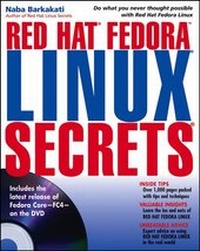
Red Hat Fedora Linux Secrets
1st Edition
Published on 1. September 2005
Book
Paperback/Softback
1064 pages
978-0-471-74757-4 (ISBN)
Description
* Featuring the latest changes in Fedora Core, this book offers valuable new secrets for Fedora users, including yum, mail filtering with SpamAssassin, mandatory access control with Security Enhanced Linux (SELinux), and improved device handling with udev
* Demonstrates how to use Linux for real-world tasks, from learning UNIX commands to setting up a secure Java-capable Web server for a business
* Because Fedora Core updates occur frequently, the book contains a helpful appendix with instructions on how to download and install the latest release of Fedora Core
* The DVD contains the Fedora distribution as well as all binary code packages and source code
* Demonstrates how to use Linux for real-world tasks, from learning UNIX commands to setting up a secure Java-capable Web server for a business
* Because Fedora Core updates occur frequently, the book contains a helpful appendix with instructions on how to download and install the latest release of Fedora Core
* The DVD contains the Fedora distribution as well as all binary code packages and source code
More details
Series
Edition
1., Auflage
Language
English
Place of publication
New York
United States
Publishing group
John Wiley and Sons Ltd
Target group
Adult education
Professional and scholarly
Illustrations
Illustrations
Dimensions
Height: 23.3 cm
Width: 18.7 cm
Weight
1446 gr
ISBN-13
978-0-471-74757-4 (9780471747574)
Schweitzer Classification
Other editions
Additional editions
Person
Naba Barkakati, an electrical engineer and a successful computer-book author, has experience in a wide variety of systems, ranging from MS-DOS and Windows to UNIX and Linux. He bought his first personal computer-an IBM PC-AT-in 1984 after graduating with a Ph.D. in electrical engineering from the University of Maryland at College Park. While pursuing a full-time career in engineering, Naba dreamed of writing software for the emerging PC software market. As luck would have it, instead of building a software empire like Microsoft, he ended up writing successful computer books. Currently, Naba is a Senior Level Technologist at the Center for Technology and Engineering in the U.S. Government Accountability Office (GAO). Over the past 17 years, Naba has written more than 25 computer books on a number of topics, ranging from object-oriented programming with C++ to Linux. He has written several best-selling titles, such as The Waite Group's Turbo C++ Bible, Object-Oriented Programming in C++, X Window System Programming, Visual C++ Developer's Guide, Borland C++ 4 Developer's Guide, and Linux Secrets. His books have been translated into many languages, including Spanish, French, Polish, Greek, Italian, Chinese, Japanese, and Korean. Naba's most recent books are SUSE Linux 9.3 For Dummies and Linux All-in- One Desk Reference For Dummies, both published by Wiley.
Content
PART I: SETTING UP LINUX.
1. An Overview of Linux.
2. Linux Installation.
3. X Window System Setup.
4. Printer Setup.
5. Sound Setup.
6. Network Setup.
PART II: EXPLORING LINUX.
7. Linux Basics.
8. GNU Utilities.
9. GUI Desktops.
10. Linux Applications and Utilities.
11. Text Processing.
12. Basic System Administration.
PART III: INTERNETWORKING LINUX.
13. Internet Connection Setup.
14. Web Server.
15. Mail Server.
16. News Server.
17. FTP Server.
18. DNS and NIS.
19. Samba and NFS.
PART IV: MANAGING LINUX.
20. Advanced System Administration.
21. Software Installation and Update.
22. System and Network Security.
PART V: PROGRAMMING LINUX.
23. Software Development in Linux.
24. Shell and Perl Scripting.
25. Tcl/Tk Scripting.
26. Java Programming
PART VI: APPENDIXES.
Appendix A: Linux Commands.
Appendix B: Disk Drives.
Appendix C: CD-ROM Drives.
Appendix D: Ethernet Cards.
Appendix E: Modems and Terminals.
Appendix F: PC Cards.
Appendix G: Linux Resources.
Appendix H: Fedora Upgrade Procedure.
Appendix I: About the DVD-ROM.
Index.
License Agreement(S).
CD Installation Instructions.
1. An Overview of Linux.
2. Linux Installation.
3. X Window System Setup.
4. Printer Setup.
5. Sound Setup.
6. Network Setup.
PART II: EXPLORING LINUX.
7. Linux Basics.
8. GNU Utilities.
9. GUI Desktops.
10. Linux Applications and Utilities.
11. Text Processing.
12. Basic System Administration.
PART III: INTERNETWORKING LINUX.
13. Internet Connection Setup.
14. Web Server.
15. Mail Server.
16. News Server.
17. FTP Server.
18. DNS and NIS.
19. Samba and NFS.
PART IV: MANAGING LINUX.
20. Advanced System Administration.
21. Software Installation and Update.
22. System and Network Security.
PART V: PROGRAMMING LINUX.
23. Software Development in Linux.
24. Shell and Perl Scripting.
25. Tcl/Tk Scripting.
26. Java Programming
PART VI: APPENDIXES.
Appendix A: Linux Commands.
Appendix B: Disk Drives.
Appendix C: CD-ROM Drives.
Appendix D: Ethernet Cards.
Appendix E: Modems and Terminals.
Appendix F: PC Cards.
Appendix G: Linux Resources.
Appendix H: Fedora Upgrade Procedure.
Appendix I: About the DVD-ROM.
Index.
License Agreement(S).
CD Installation Instructions.