

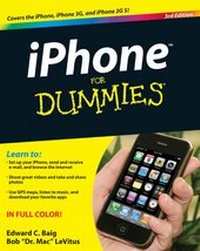
iPhone For Dummies
3rd Edition
Published on 28. July 2009
Book
Paperback/Softback
304 pages
978-0-470-53698-8 (ISBN)
Description
A full-color guide to the iPhone, including the new iPhone 3G S
With its new 3G S model, the iPhone is definitely the must-have mobile device. This fully updated guide covers all the cool features of the fastest iPhone ever, including the Spotlight search feature, voice control, and video camera capability.
iPhone For Dummies, 3rd Edition also covers the basics of using the multitouch interface, setting up iTunes, browsing the Internet, sending and receiving e-mail, and more.
* The iPhone 3G S is the fastest and most powerful iPhone yet, with a host of new features
* Learn to use landscape mode for e-mail, texting, and shooting widescreen video
* See how to copy or cut and paste text, video, photos, and Web content from one app to another
* Find out how to make calls, play music, or create new playlists using voice control
* Locate anything on your iPhone with Spotlight, whether in your calendar, contacts, e-mail, iPod, apps, or even saved Web clips
* Discover how to create and send messages that include text, video, voice memos, map locations, and more
Covering all the features of the much-anticipated iPhone 3G S, iPhone For Dummies, 3rd Edition helps you get every bit of functionality your iPhone offers.
With its new 3G S model, the iPhone is definitely the must-have mobile device. This fully updated guide covers all the cool features of the fastest iPhone ever, including the Spotlight search feature, voice control, and video camera capability.
iPhone For Dummies, 3rd Edition also covers the basics of using the multitouch interface, setting up iTunes, browsing the Internet, sending and receiving e-mail, and more.
* The iPhone 3G S is the fastest and most powerful iPhone yet, with a host of new features
* Learn to use landscape mode for e-mail, texting, and shooting widescreen video
* See how to copy or cut and paste text, video, photos, and Web content from one app to another
* Find out how to make calls, play music, or create new playlists using voice control
* Locate anything on your iPhone with Spotlight, whether in your calendar, contacts, e-mail, iPod, apps, or even saved Web clips
* Discover how to create and send messages that include text, video, voice memos, map locations, and more
Covering all the features of the much-anticipated iPhone 3G S, iPhone For Dummies, 3rd Edition helps you get every bit of functionality your iPhone offers.
More details
Edition
3., Auflage
Language
English
Place of publication
Chichester
United Kingdom
Publishing group
John Wiley and Sons Ltd
Edition type
Revised edition
Illustrations
col. ill
Dimensions
Height: 23.4 cm
Width: 18.7 cm
Thickness: 17 mm
Weight
716 gr
ISBN-13
978-0-470-53698-8 (9780470536988)
Schweitzer Classification
Other editions
New editions
Edward C. Baig | Bob LeVitus
iPhone For Dummies
Book
10/2010
4th Edition
Wiley
€23.90
Article exhausted; check for reprint
Previous edition

Edward C. Baig | Bob LeVitus
iPhone For Dummies
Book
10/2008
2nd Edition
Wiley
€18.59
Article exhausted; check for reprint
Persons
Edward C. Baig is the Personal Technology columnist for USA TODAY and the author of Macs For Dummies, 10th Edition. Bob "Dr. Mac" LeVitus pens the popular Dr. Mac column for the Houston Chronicle and is the author of Mac OS X(r) Snow Leopard For Dummies.
Content
Introduction.
Part I: Getting to Know Your iPhone.
Chapter 1: Unveiling the iPhone.
Chapter 2: iPhone Basic Training.
Chapter 3: The Kitchen Sync: Getting Stuff to and from Your iPhone.
Part II: The Mobile iPhone.
Chapter 4: Understanding thePhone-damentals.
Chapter 5: Texting 1, 2, 3: Messages and Notes.
Chapter 6: Calendars and Calculators and Clocks (Voice, Too) -- Oh, My.
Part III: The Multimedia iPhone.
Chapter 7: Get in Tune(s): Audio on Your iPhone.
Chapter 8: iPhone Video: Seeing Is Believing.
Chapter 9: You Oughta Be in Pictures.
Part IV: The Internet iPhone.
Chapter 10: Going on a Mobile Safari.
Chapter 11: The E-Mail Must Get Through.
Chapter 12: Monitoring Maps, Contemplating Compass, Scrutinizing Stocks, and Watching Weather.
Part V: The Undiscovered iPhone.
Chapter 13: Setting You Straight on Settings.
Chapter 14: Apply Here (to Find Out about iPhone Apps).
Chapter 15: When Good iPhones Go Bad.
Part VI: The Part of Tens.
Chapter 16: Ten Appetizing Apps.
Chapter 17: Ten Apps Worth Paying For.
Chapter 18: Ten Helpful Hints, Tips, and Shortcuts.
Index.
Part I: Getting to Know Your iPhone.
Chapter 1: Unveiling the iPhone.
Chapter 2: iPhone Basic Training.
Chapter 3: The Kitchen Sync: Getting Stuff to and from Your iPhone.
Part II: The Mobile iPhone.
Chapter 4: Understanding thePhone-damentals.
Chapter 5: Texting 1, 2, 3: Messages and Notes.
Chapter 6: Calendars and Calculators and Clocks (Voice, Too) -- Oh, My.
Part III: The Multimedia iPhone.
Chapter 7: Get in Tune(s): Audio on Your iPhone.
Chapter 8: iPhone Video: Seeing Is Believing.
Chapter 9: You Oughta Be in Pictures.
Part IV: The Internet iPhone.
Chapter 10: Going on a Mobile Safari.
Chapter 11: The E-Mail Must Get Through.
Chapter 12: Monitoring Maps, Contemplating Compass, Scrutinizing Stocks, and Watching Weather.
Part V: The Undiscovered iPhone.
Chapter 13: Setting You Straight on Settings.
Chapter 14: Apply Here (to Find Out about iPhone Apps).
Chapter 15: When Good iPhones Go Bad.
Part VI: The Part of Tens.
Chapter 16: Ten Appetizing Apps.
Chapter 17: Ten Apps Worth Paying For.
Chapter 18: Ten Helpful Hints, Tips, and Shortcuts.
Index.