


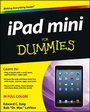
iPad mini For Dummies
2nd Edition
Published on 10. February 2014
Book
Paperback/Softback
416 pages
978-1-118-72315-9 (ISBN)
Description
Big info about using the iPad mini!
This fun-and-friendly full-color book gets you started with your iPad mini, walking you through using the multitouch interface, getting connected, going online, and packing your iPad mini with apps, games, e-books, photos, music, movies, and more. Expert authors and Mac gurus Edward C. Baig and Bob "Dr. Mac" LeVitus guide you through everything from powering up all the way to syncing your stuff with iCloud. You'll learn how to manage your calendar, make video calls with FaceTime, work with Siri, and enjoy your iPad mini wherever you go.
* Updated for iOS 7, iPad mini with Retina Display, and original iPad mini
* Walks you through getting connected, syncing your contacts and calendars, setting up e-mail, browsing the web, and working with Notification Center
* Shows you how to turn your iPad mini into an entertainment hub and shoot and share photos and HD video, create your own slideshow, listen to your favorites tunes, read the latest e-book bestsellers, play interactive games, and more
* Explains how to find your destination,get directions with Maps, check the weather, read movie reviews, and more
* Offers troubleshooting and maintance help, tips for keeping your personal information secure, and ways to customize your iPad mini for your own needs
Your iPad mini may be small, but it's one mighty mini! Find out everything it's capable of with this full-color, For Dummies guide.
This fun-and-friendly full-color book gets you started with your iPad mini, walking you through using the multitouch interface, getting connected, going online, and packing your iPad mini with apps, games, e-books, photos, music, movies, and more. Expert authors and Mac gurus Edward C. Baig and Bob "Dr. Mac" LeVitus guide you through everything from powering up all the way to syncing your stuff with iCloud. You'll learn how to manage your calendar, make video calls with FaceTime, work with Siri, and enjoy your iPad mini wherever you go.
* Updated for iOS 7, iPad mini with Retina Display, and original iPad mini
* Walks you through getting connected, syncing your contacts and calendars, setting up e-mail, browsing the web, and working with Notification Center
* Shows you how to turn your iPad mini into an entertainment hub and shoot and share photos and HD video, create your own slideshow, listen to your favorites tunes, read the latest e-book bestsellers, play interactive games, and more
* Explains how to find your destination,get directions with Maps, check the weather, read movie reviews, and more
* Offers troubleshooting and maintance help, tips for keeping your personal information secure, and ways to customize your iPad mini for your own needs
Your iPad mini may be small, but it's one mighty mini! Find out everything it's capable of with this full-color, For Dummies guide.
More details
Other editions
New editions

Edward C. Baig | Bob LeVitus
iPad mini For Dummies
Book
01/2015
3rd Edition
Wiley
Unfortunately, price unknown
Article exhausted; check different version
Previous edition
Edward C. Baig | Bob LeVitus
iPad mini For Dummies
Book
12/2012
1st Edition
Wiley
€23.90
Article exhausted; check for reprint
Persons
Edward C. Baig is the Personal Tech columnist for USA TODAY and his weekly column runs on Thursdays in the Money section.
Bob LeVitus, often referred to as "Dr. Mac," is one of the world's leading authorities on all things Apple and one of the Mac community's most trusted gurus.
Bob LeVitus, often referred to as "Dr. Mac," is one of the world's leading authorities on all things Apple and one of the Mac community's most trusted gurus.
Content
Introduction 1
Part I: Getting to Know Your iPad mini 5
Chapter 1: Unveiling the iPad mini 7
Chapter 2: iPad mini Basic Training 23
Chapter 3: The Kitchen Sync: Getting Stuff to and from Your iPad mini 45
Part II: The Internet iPad mini 71
Chapter 4: Going on a Mobile Safari 73
Chapter 5: The E-Mail Must Get Through 93
Chapter 6: Maps Are Where It Is 125
Part III: The Multimedia iPad mini 139
Chapter 7: Get in Tune(s): Audio on Your iPad mini 141
Chapter 8: iPad mini Video: Seeing Is Believing 161
Chapter 9: You Oughta Be in Pictures 181
Chapter 10: Curling Up with a Good iBook 213
Part IV: Putting the iPad mini to Work 233
Chapter 11: Apply Here (To Find Out about iPad mini Apps) 235
Chapter 12: People, Places, and Appointments 253
Chapter 13: Indispensible iPad mini Utilities 271
Chapter 14: Taking the iPad mini Siri-ously 289
Part V: The Undiscovered iPad mini 299
Chapter 15: Setting You Straight on Settings 301
Chapter 16: When Good iPad minis Go Bad 331
Chapter 17: Accessorizing Your iPad mini 345
Part VI: The Part of Tens 359
Chapter 18: Ten Appetizing (And Free) Apps 361
Chapter 19: Ten Apps Worth Paying For 365
Chapter 20: Ten Hints, Tips, and Shortcuts 373
Index 385
Part I: Getting to Know Your iPad mini 5
Chapter 1: Unveiling the iPad mini 7
Chapter 2: iPad mini Basic Training 23
Chapter 3: The Kitchen Sync: Getting Stuff to and from Your iPad mini 45
Part II: The Internet iPad mini 71
Chapter 4: Going on a Mobile Safari 73
Chapter 5: The E-Mail Must Get Through 93
Chapter 6: Maps Are Where It Is 125
Part III: The Multimedia iPad mini 139
Chapter 7: Get in Tune(s): Audio on Your iPad mini 141
Chapter 8: iPad mini Video: Seeing Is Believing 161
Chapter 9: You Oughta Be in Pictures 181
Chapter 10: Curling Up with a Good iBook 213
Part IV: Putting the iPad mini to Work 233
Chapter 11: Apply Here (To Find Out about iPad mini Apps) 235
Chapter 12: People, Places, and Appointments 253
Chapter 13: Indispensible iPad mini Utilities 271
Chapter 14: Taking the iPad mini Siri-ously 289
Part V: The Undiscovered iPad mini 299
Chapter 15: Setting You Straight on Settings 301
Chapter 16: When Good iPad minis Go Bad 331
Chapter 17: Accessorizing Your iPad mini 345
Part VI: The Part of Tens 359
Chapter 18: Ten Appetizing (And Free) Apps 361
Chapter 19: Ten Apps Worth Paying For 365
Chapter 20: Ten Hints, Tips, and Shortcuts 373
Index 385