

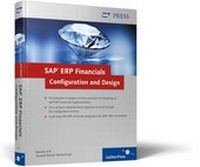
SAP ERP Financials: Configuration and Design
Description
This comprehensive reference provides you with a real-world understanding of the SAP ERP Financials module. You'll learn how to configure a basic SAP ERP Financials solution to satisfy your business requirements, including the more complex areas of configuration, and you'll explore key topics such as managing data migration, configuring and activating the SAP General Ledger, and integrating SAP ERP Financials with other SAP components.
Beginning with an overview of the SAP Enterprise Structure and the Financial Accounting global settings, this book will quickly walk you through the major SAP ERP Financials components and subcomponents, including the Controlling component, Accounts Payable and Receivable, and Asset Accounting. When you've mastered the design and configuration of these areas, you'll move on to more complex topics such as the closing process and reporting, where a wealth of practical and hands-on advice will help you develop the knowledge you need to maximize your SAP ERP Financials implementation.
This bestselling book is a must-have tool for all implementation teams, project managers, finance professionals, and consultants working on an SAP ERP Financials upgrade or implementation project.
More details
Other editions
New editions
Persons
Content
1 Overview ... 17
... 1.1 Introduction ... 17
... 1.2 Brief history of SAP ... 20
... 1.3 SAP Implementation Overview ... 21
... 1.4 SAP Navigation Basics ... 25
... 1.5 Summary ... 31
2 SAP Enterprise Structure ... 33
... 2.1 Building an Enterprise Structure ... 34
... 2.2 Building a Straw Man ... 35
... 2.3 Straw Man Design ... 39
... 2.4 Configuration of Enterprise Structure ... 41
... 2.5 Summary ... 65
3 Financial Accounting Component (FI) Global Settings ... 67
... 3.1 What Is a Document in SAP? ... 68
... 3.2 Configuration of Global Settings ... 71
... 3.3 Sales and Purchase Tax ... 109
... 3.4 Summary ... 119
4 New General Ledger ... 121
... 4.1 Overview of the GL ... 122
... 4.2 Building Your New GL Blueprint ... 127
... 4.3 Configuration Steps to Activate the New GL ... 129
... 4.4 Summary ... 162
5 Accounts Payable ... 163
... 5.1 Overview of the P2P cycle ... 164
... 5.2 Building an AP Business Model ... 167
... 5.3 Master Data ... 168
... 5.4 Vendor Account Groups ... 171
... 5.5 Vendor Number Ranges ... 180
... 5.6 Accounting Clerks ... 185
... 5.7 Define Sensitive Fields for Dual Control ... 186
... 5.8 House Banks ... 188
... 5.9 Invoice Processing ... 193
... 5.10 Document Parking ... 197
... 5.11 Outgoing Payments Processing ... 198
... 5.12 Summary ... 213
6 Accounts Receivable ... 215
... 6.1 Overview of the Order-to-Cash Process ... 215
... 6.2 Building an Accounts Receivable Business Model ... 218
... 6.3 Master Data ... 219
... 6.4 Customer Master Records ... 219
... 6.5 Finance Documents Global Settings ... 236
... 6.6 Customer Invoice Processing ... 237
... 6.7 Customer Payments ... 239
... 6.8 Debtor Management ... 246
... 6.9 Summary ... 264
7 Asset Accounting ... 265
... 7.1 Overview of Asset Accounting ... 266
... 7.2 Building Blocks of Asset Accounting ... 267
... 7.3 Building an Asset Accounting Business Model ... 272
... 7.4 Asset Accounting Configuration ... 273
... 7.5 Asset transaction processing ... 304
... 7.6 Summary ... 320
8 Controlling Component (CO) in SAP ERP ... 323
... 8.1 Overview and Diagram ... 324
... 8.2 Subcomponents of the Controlling Component (CO) ... 325
... 8.3 Building a Controlling Model ... 327
... 8.4 Configuration Settings in the Controlling Component (CO) ... 330
... 8.5 Summary ... 361
9 ERP Financials Integration ... 363
... 9.1 Automatic Account Determination ... 365
... 9.2 Master Data ... 382
... 9.3 Interfaces ... 390
... 9.4 The Value of Integration Testing ... 396
... 9.5 Summary ... 396
10 Data Migration ... 397
... 10.1 Key Principles of Data Migration ... 398
... 10.2 The Six-Step Migration Model ... 399
... 10.3 Inventory Transfer ... 404
... 10.4 Open Items Transfer ... 405
... 10.5 Upgrade to SAP ERP ECC 6.0 ... 406
... 10.6 Asset Accounting Legacy Data Transfer ... 407
... 10.7 Summary ... 413
11 Period-End Closing ... 415
... 11.1 Fast Close with the New GL ... 416
... 11.2 Key Elements of a Period End Timetable ... 417
... 11.3 Dependent Activities Already Completed ... 417
... 11.4 Analysis of Period-End Activities ... 417
... 11.5 Summary ... 424
12 SAP ERP Financials Reporting ... 425
... 12.1 Building Your Reporting Suite ... 425
... 12.2 Reporting Tools ... 427
... 12.3 Common Reporting Requirements ... 429
... 12.4 Creating Basic Management Accounting Reports with Report Painter ... 435
... 12.5 Summary ... 455